social_GazelleB82A
Known Participant
July 10, 2026
Question

Articles created in InDesign not appearing in Acrobat's "Articles" window

  • July 10, 2026
  • 2 replies
  • 23 views

I’m working on making my PDF exports more robust and accessible, and therefore including Articles. In a recent project, I fumbled through InDesign’s Articles panel (not a great experience) and managed to see the <Art> tags appropriately names and exported across into the resulting PDF. But in Acrobat, there’s also an Articles panel that shows nothing. What gives?

Is there a separate, different thing in Acrobat for articles outside of Accessibility Tags? Or did I miss something to have InDesign automatically build these, too? 

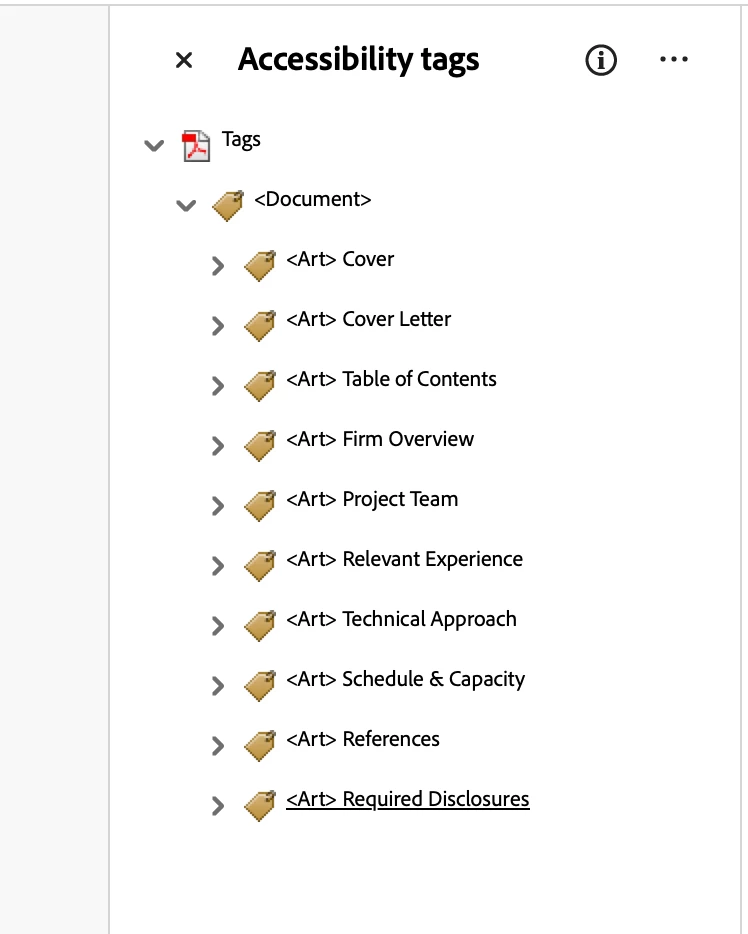
Any insight is helpful. Images below show the successfully-populated Tags, but an empty Articles area.

Tags in Acrobat, showing successful list of <art> from InDesign-made Articles.


Empty Articles panel in Acrobat. What’s supposed to be here and how do I build it properly?


    2 replies

    Mike Witherell
    Community Expert
    Community Expert
    July 11, 2026

    My big question: Did you click into the InDesign Articles panel menu button and turn on “Use for Tagging Order in Tagged PDF”?

    The word Article gets used in various ways in Adobe software.

    https://helpx.adobe.com/in/acrobat/using/pdf-articles.html

    In Adobe Acrobat Pro, the Articles panel is used to define, navigate, and manage paths of continuous text that span across multiple columns or pages. It allows sighted readers to follow a specific story or article sequentially without getting visually lost in complex newsletter, newspaper, or magazine-style layouts.  The Articles panel is for guided reading for people who can see. When reading a document, clicking on a defined article lets you view the text sequentially. The software automatically zooms and pans from one text box (article box) to the next in the order you set.

    This is not the same as accessibility for speech readers for persons who cannot see.

    The Articles panel in InDesign is very different. It helps you decide what will go into an exported PDF or EPUB. Objects not in the InDesign Articles panel will not be in the Accessibility tags structure of the exported PDF and so will not be read out loud by an accessibility software.

    An <Art> tag in the Acrobat Accessibility Tags panel stands for Article. It acts as a structural container for a self-contained, independent body of text, like a magazine article, newspaper story, or blog post. Screen readers and assistive technologies use it to understand and navigate logical document boundaries. There are 38 tags to get to know in Acrobat PDF Accessibility.

    https://www.section508.gov/create/pdfs/common-tags-and-usage/

    I hope this helps.

     

    Mike Witherell
    Dave Creamer of IDEAS
    Community Expert
    Community Expert
    July 10, 2026

    The Acrobat articles just defines the reading order, particularly for multi-column layouts that jump around the publication (magazine, newsletters, etc.).

    David Creamer: Community Expert (ACI and ACE 1995-2023)
    Joel Cherney
    Community Expert
    Community Expert
    July 10, 2026

    In case it’s not obvious from Dave’s post - using the Articles panel in InDesign can affect the tag tree, which affects reading order in screenreaders like JAWS or NVDA. That’s the Articles tool you’d actually want to use, if you’re trying to make your document accessible to people using screenreader tools. The Articles tool in Acrobat, however, does not affect the tag tree.


    If your motivations are either “I want blind people to be able to access this content” or “I don’t want my client in a Title III ADA lawsuit,” then you can safely ignore the Acrobat Articles panel.