
Known Participant
June 29, 2022
Answered

Automate a repetitive task when importing word document into indesign

  • June 29, 2022
  • 2 replies
  • 667 views

Guys, good afternoon, how are you? I'm working on a complex exercise book with several modules and questions that teachers send in Word


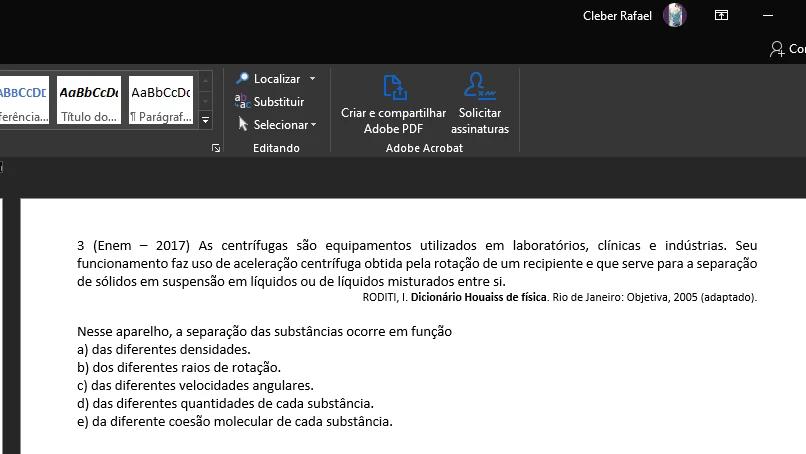
Question example:

In this apparatus, the separation of substances occurs as a function of
a) of the different densities.
b) the different radii of rotation.
c) the different angular velocities.
d) the different amounts of each substance.
e) the different molecular cohesion of each substance.

Let's say there are 100 questions that have alternatives and these a) b) c) d) e)
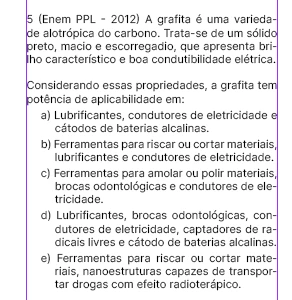
I need it to have a different paragraph style.

Today I have to select each one of the alternatives and click on a paragraph that I created, my question is if there is a faster way, thanks!

Example of how it comes in Word:


Example as I need - InDesign
This topic has been closed for replies.
Correct answer m1b

Hi @CleberRafael,

Here's a quick script to do what you want. It will search the whole document for paragraphs that begin with a letter with ). Let me know if it works for you. See attached document for example paragraph style with numbering.

- Mark


/**
 * Find answer paragraphs and apply paragraph style.
 * For Adobe Indesign 2022
 * 
 * by m1b
 * here: https://community.adobe.com/t5/indesign-discussions/automate-a-repetitive-task-when-importing-word-document-into-indesign/m-p/13038974#M482557
 * 
 * Assumes that paragraph style has
 * correct numbering set up, so it
 * removes the text.
 */

function main() {

    var doc = app.activeDocument,

        // the regex to find answer paragraphs
        // paragraphs that start with a) b) c) etc.
        myFindWhat = '^\\s*[a-z]\s?\\)\\s+',

        // change the found text to this
        myChangeTo = '\t',

        // put your paragraph style name here
        changeToStyleName = "Respostas",

        // get the paragraph style
        changeToStyle = doc.paragraphStyles.itemByName(changeToStyleName);

    if (!changeToStyle.isValid) {
        alert('There is no paragraph style named "' + changeToStyleName + '".');
        return;
    }

    // reset grep prefs
    app.findGrepPreferences = NothingEnum.NOTHING;
    app.changeGrepPreferences = NothingEnum.NOTHING;
    app.findGrepPreferences.findWhat = myFindWhat;
    // comment out the next line if you don't want to change the found text
    app.changeGrepPreferences.changeTo = String(myChangeTo);
    app.changeGrepPreferences.appliedParagraphStyle = changeToStyle;
    // do the change
    doc.stories.everyItem().paragraphs.everyItem().changeGrep();

}

app.doScript(
    main,
    ScriptLanguage.JAVASCRIPT,
    undefined,
    UndoModes.ENTIRE_SCRIPT,
    "Format Answers"
);


2 replies

m1b
Community Expert
m1bCommunity ExpertCorrect answer
Community Expert
June 29, 2022

Hi @CleberRafael,

Here's a quick script to do what you want. It will search the whole document for paragraphs that begin with a letter with ). Let me know if it works for you. See attached document for example paragraph style with numbering.

- Mark


/**
 * Find answer paragraphs and apply paragraph style.
 * For Adobe Indesign 2022
 * 
 * by m1b
 * here: https://community.adobe.com/t5/indesign-discussions/automate-a-repetitive-task-when-importing-word-document-into-indesign/m-p/13038974#M482557
 * 
 * Assumes that paragraph style has
 * correct numbering set up, so it
 * removes the text.
 */

function main() {

    var doc = app.activeDocument,

        // the regex to find answer paragraphs
        // paragraphs that start with a) b) c) etc.
        myFindWhat = '^\\s*[a-z]\s?\\)\\s+',

        // change the found text to this
        myChangeTo = '\t',

        // put your paragraph style name here
        changeToStyleName = "Respostas",

        // get the paragraph style
        changeToStyle = doc.paragraphStyles.itemByName(changeToStyleName);

    if (!changeToStyle.isValid) {
        alert('There is no paragraph style named "' + changeToStyleName + '".');
        return;
    }

    // reset grep prefs
    app.findGrepPreferences = NothingEnum.NOTHING;
    app.changeGrepPreferences = NothingEnum.NOTHING;
    app.findGrepPreferences.findWhat = myFindWhat;
    // comment out the next line if you don't want to change the found text
    app.changeGrepPreferences.changeTo = String(myChangeTo);
    app.changeGrepPreferences.appliedParagraphStyle = changeToStyle;
    // do the change
    doc.stories.everyItem().paragraphs.everyItem().changeGrep();

}

app.doScript(
    main,
    ScriptLanguage.JAVASCRIPT,
    undefined,
    UndoModes.ENTIRE_SCRIPT,
    "Format Answers"
);


Known Participant
June 30, 2022

Man you are never AWESOME thank you so much, I thought it would be possible hahaha

One last question when I apply the script in my document it is sequential example:


a)
b)
c)
d)
e)
f)
g)

How do I automatically reset in e)?

Here's a video of a way I found on how to reset the numeric listing:

m1b
Community Expert
Community Expert
June 30, 2022

Oh! Yes, that's a matter of adjusting the paragraph styles. You will have a style for your questions, and a style for your answers. Set the numbering of the questions style to level 1, start at 1, with no text (don't show number) and then set the numbering of the answers style to level 2 of same list, continuing from last, with the a), b), c) numbering text. See my attached indesign file.

- Mark


James Gifford—NitroPress
Legend
June 29, 2022

It sounds as if no styles were used in Word. Not unusual; even experienced Word users are style-averse. 🙂


There isn't any simple solution except to apply styles to each paragraph, whether it's done in Word and then imported, or done after import in InDesign. You will need two styles, one for the question and one for each answer selection. You could use a list style with auto-numbering to simplify the answer listing and numbering.


If you really want to do this in a few clicks, scripting can be used to automate the process. But someone would have to write the script for you (I am guessing it's not something you're familiar with). There are some adept script wizards here, though.


Known Participant
June 29, 2022

Thank you very much for the answer, here's how I'm doing it: if I do it with numerical list it would duplicate and do a. a).... correct?


James Gifford—NitroPress
Legend
June 29, 2022

Yes, it will duplicate the hard-typed numbering, but you can use a few find-and-change operations to remove those. Using a list style will keep any answer list from being misnumbered (through a typing or editing mistake), and you can use some sophisticated paragraph spacing tricks (above, below and between) to get a clean layout without multiple styles or a lot of fiddling around.