Participant
October 5, 2020
Answered

Automated editing of repeating elements

  • October 5, 2020
  • 1 reply
  • 312 views

Do you know the best solution to edith repeating elements on a layout? One solution could be to include a PSD-file and duplicate it wherever I need it and if I need a little change to go to Photoshop. But is there a InDesign based solution, maybe a script?


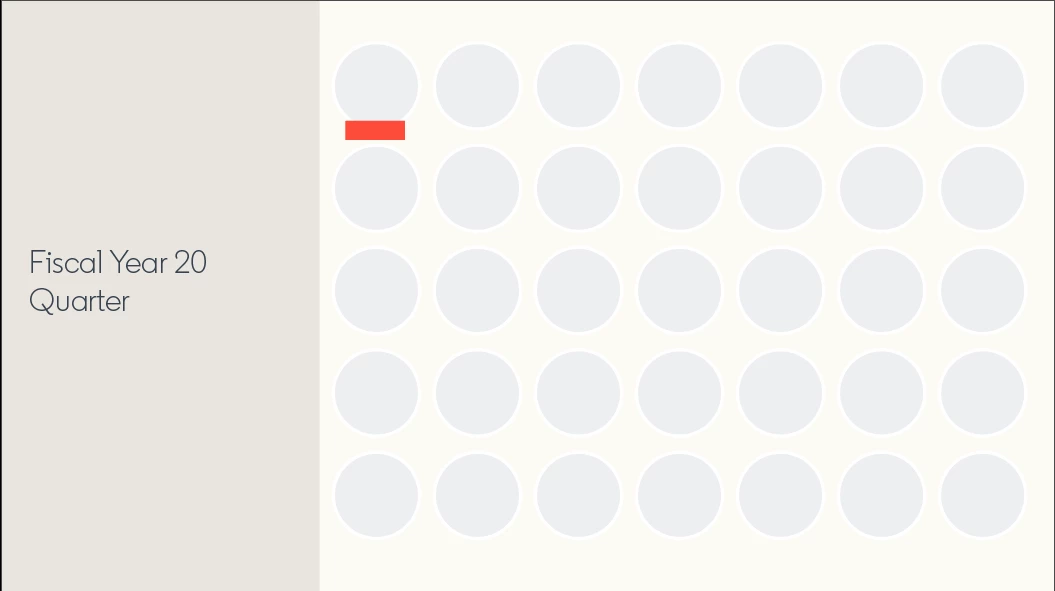
In the image you can see a reapeating circle – I would like to add this red square to it and have it perfectly aligned with all circles. I also need the option to quickly have a change and compare different options. It would be great to not have to replace each element after every change.
 

This topic has been closed for replies.
Correct answer brian_p_dts

So could the red line be a different color depending on the text inside? Is that the idea? If so, you could have a Character Style with underline options that mimic the color stroke and weight you want, and use Nested Grey Style to match the content to apply that Character Style. You could set that as a library shape, or leverage object styles to handle the alignment to the image circle. 

1 reply

brian_p_dts
Community Expert
Community Expert
October 5, 2020

Definitely scriptable. You could also save the shape(s) as grouped objects and store them in your library, and leverage Object Styles for different versions of the bar. Are the circles text content? If so, you could also look at using Nested Grep Styles and potentially paragraph shading or border options to get the effect you desitre. 

Participant
October 6, 2020

Thank you for your quick answer! These are just plane circles, with the purpose to be filled with images at some point. The red bar is a placeholder for a different kind of information with type. I would like to quickly compare different kinds of type inside the red box.


I tried to work with my library – the problem is that the object in the layout doesn’t seem to update when I change the object in the library, which would be the most important point of my issue.

brian_p_dts
Community Expert
brian_p_dtsCommunity ExpertCorrect answer
Community Expert
October 6, 2020

So could the red line be a different color depending on the text inside? Is that the idea? If so, you could have a Character Style with underline options that mimic the color stroke and weight you want, and use Nested Grey Style to match the content to apply that Character Style. You could set that as a library shape, or leverage object styles to handle the alignment to the image circle.