Participant
July 15, 2020
Answered

Automated Table of Contents: Paragraph Styles

  • July 15, 2020
  • 3 replies
  • 344 views

Hi,

Does anyone know of a way to make a section appear in a TOC without having that name on the section? For example, I want "Introduction.......page 3" to appear on the TOC but in the Introduction section it does not say Introduction in the header so I can't use a paragraph style with that. I have nothing to go off of.


Thanks
This topic has been closed for replies.
Correct answer Barb Binder

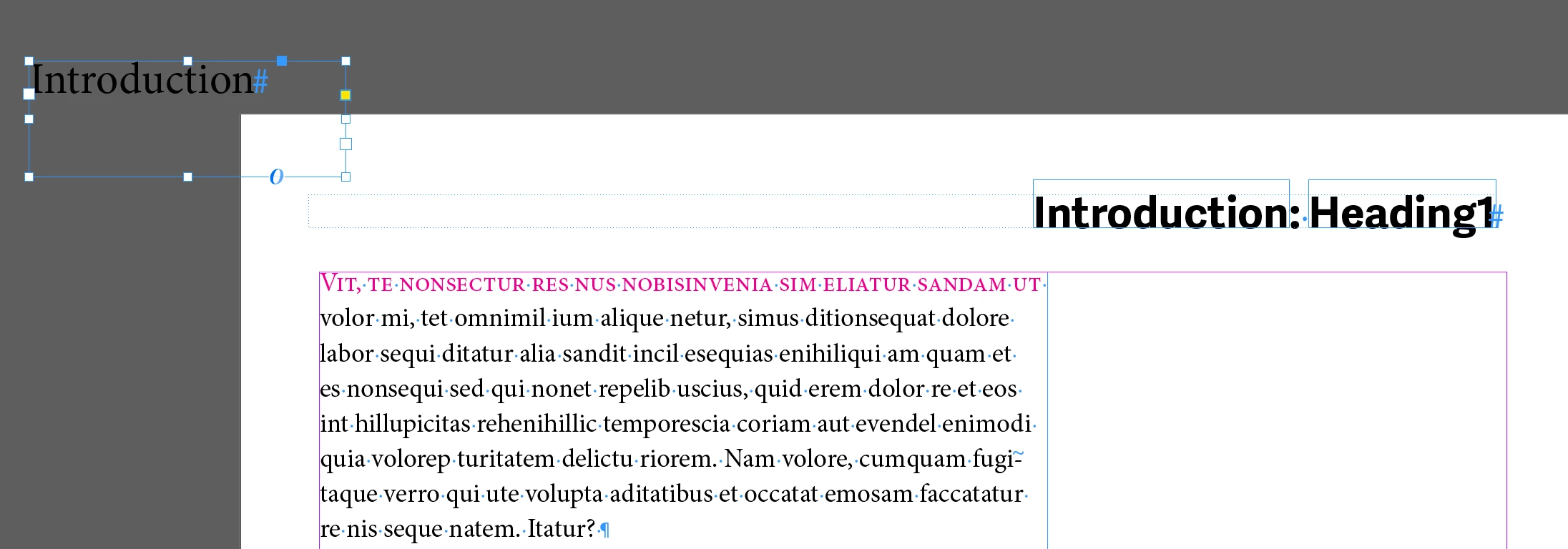
The other alternative is to add the word introduction in its own text frame, assign a paragraph style, and then drag the frame so that it is touching the page, but the word itself is beyond the printable area. InDesign will still see it and collect it for the TOC.


~Barb


3 replies

Ashutosh_Mishra
Inspiring
July 25, 2020

Hi there,


Thanks for reaching out. I hope your issue is resolved now. We'd appreciate if you can mark the appropriate answer correct.

If you used any other method, please share it here. It'll help other users having similar concern.

If you still have issues, let us know. We'll be happy to help.


Regards,

Ashutosh

Barb Binder
Community Expert
Barb BinderCommunity ExpertCorrect answer
Community Expert
July 16, 2020

The other alternative is to add the word introduction in its own text frame, assign a paragraph style, and then drag the frame so that it is touching the page, but the word itself is beyond the printable area. InDesign will still see it and collect it for the TOC.


~Barb


~Barb at Rocky Mountain Training
Mike Witherell
Community Expert
Community Expert
July 16, 2020

It only generates text based on text that exists on the page and is styled. You could make the word Introduction (in the correct paragraph style) on the page and set the text to the color Paper. The ToC generator would then have something to gather and concatenate.

Mike Witherell