Participating Frequently
August 10, 2024
Answered

Automatic Chapter Numbering with master page

  • August 10, 2024
  • 5 replies
  • 953 views

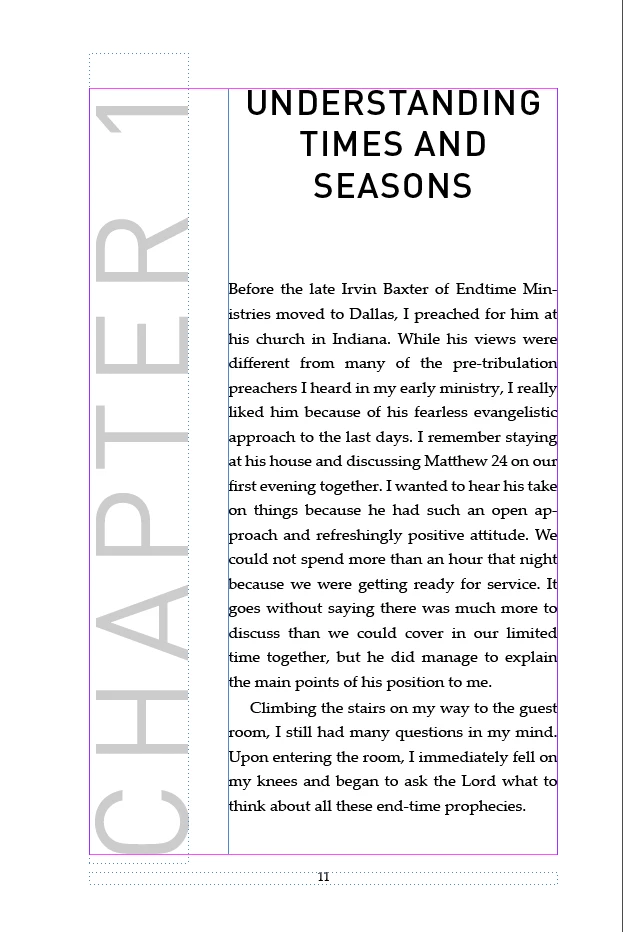
Is there a way to make my chapter numbers automatic when I apply the master page? For the chapter start page I have a separate master page and my Chapter number text box also inside that master page. Tried everything. But its not working. Someone please help.


This topic has been closed for replies.
Correct answer James Gifford—NitroPress

I don't believe it can be done, at least not with any simple combination of ID features. Parent pages are a peculiar mix of being tightly bound to their document pages AND completely disconnected entities, at the same time. Users would like many features and aspects such as having a Parent page follow a selected paragraph style, but their placement in the page array is fixed, not flexible. It can carry a page numbering marker, but autonumbering will not update — which you've probably already found.


Having the CHAPTER frame on a parent page and disconnecting it on the document page so you can type the current chapter number doesn't seem like an overly difficult process to manage, but no, it's not automatic.


You could flow a text file through those text frames, containing an manually-numbered or autonumbered series, similar to the non-standard page numbering schemes. (Put a text frame where you want it on the parent page. In the first use of the page, flow the numbering text file into that frame. Each iteration of the page will have hte next paragraph in the frame.)


5 replies

Dave Creamer of IDEAS
Community Expert
Community Expert
August 11, 2024

If you want to use the chapter number code (^H), then you need to use a book.


If you building a "book" as a single InDesign document, you just need to use straight level-based numbering. This would be done with a paragraph style, not the parent/master page. However, you could place a text frame with the style on a parent page--however, the numbering will only update once you override the parent page item (cntl-shift or cmd-shift click on it after you apply the parent page). I've attached a example for you to check out.


I've also attached a file with examples of various numbering techniques. (I called the single-document numbering "Legal numbering".

David Creamer: Community Expert (ACI and ACE 1995-2023)
Pradi1988Author
Participating Frequently
August 11, 2024

@James Gifford—NitroPress @Barb Binder @Robert at ID-Tasker  Thank you for all your answers and help. Really appreciate your time and effort and trying to help me. I think @James Gifford—NitroPress  is right. Its always nice if we can automate it. But its not worth for the effort. I have removed the chapter number text box from Master page and placed them on the chapter pages manually and changed the number. Thanks again for your help.

Barb Binder
Community Expert
Community Expert
August 10, 2024

You could do it if you use an InDesign book (each chapter is its own .indd file, mananged by the .indb book file) but use ^H in place of ^1 or ^# in auto-numbers. 


~Barb

~Barb at Rocky Mountain Training
Robert at ID-Tasker
Legend
August 10, 2024

@Pradi1988 


https://helpx.adobe.com/uk/indesign/using/numbering-pages-chapters-sections.html


2nd paragraph:


Each document can be assigned only one chapter number.  


So you need to switch to Sections. 


https://helpx.adobe.com/uk/indesign/using/numbering-pages-chapters-sections.html#define_section_numbering


James Gifford—NitroPress
Legend
August 10, 2024

I don't quite see how to use section numbering in this context, other than by manually defining the section tag in each section.


Seems a bit messy. Am I missing something?

Robert at ID-Tasker
Legend
August 10, 2024

If used only at the start of the Section - then you are right - but if will be used somewhere else in the text?


So either manual - as you've already suggested - or Sections or variables? 


James Gifford—NitroPress
Legend
August 10, 2024

I don't believe it can be done, at least not with any simple combination of ID features. Parent pages are a peculiar mix of being tightly bound to their document pages AND completely disconnected entities, at the same time. Users would like many features and aspects such as having a Parent page follow a selected paragraph style, but their placement in the page array is fixed, not flexible. It can carry a page numbering marker, but autonumbering will not update — which you've probably already found.


Having the CHAPTER frame on a parent page and disconnecting it on the document page so you can type the current chapter number doesn't seem like an overly difficult process to manage, but no, it's not automatic.


You could flow a text file through those text frames, containing an manually-numbered or autonumbered series, similar to the non-standard page numbering schemes. (Put a text frame where you want it on the parent page. In the first use of the page, flow the numbering text file into that frame. Each iteration of the page will have hte next paragraph in the frame.)