

Evalos
Participant
August 23, 2023
Answered

automatic figure numbering doesn´t work in InDesign book

  • August 23, 2023
  • 1 reply
  • 204 views

Hello community,
I created an InDesign book with several chapters and a lot of visualization/pictures. I want the pictures in the document to be nummbered continiously to put the nummbers into text for a better explanation. I created a paragraph style and set up following settings:
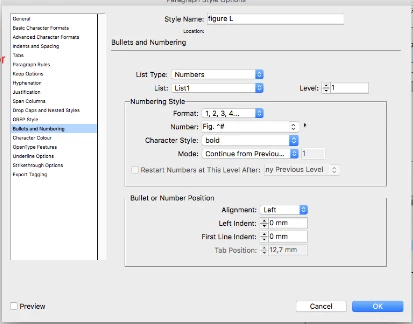
My first Figure - Figure 1 goes well. Then  I set another text box, for Figure 2, and using the same paragraph style it shows the same nummber - Figure 1. Also with the same settings and the same paragraph style the nummbering of the figures in the next chapter beginns from 1. Here is an example:
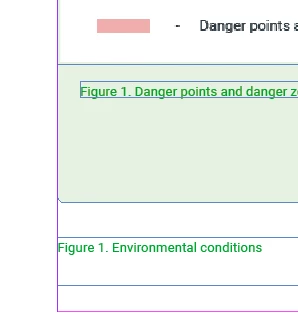
Does someone have any ideas how to fix this?

Thanks a lot!

This topic has been closed for replies.
Correct answer Peter Kahrel

For paragraph numbering to work the paragraphs must be in the same story. So thread the captions and they'll number correctly.

1 reply

Peter Kahrel
Community Expert
Peter KahrelCommunity ExpertCorrect answer
Community Expert
August 23, 2023

For paragraph numbering to work the paragraphs must be in the same story. So thread the captions and they'll number correctly.

Evalos
EvalosAuthor
Participant
August 23, 2023

Hello Peter,
I copied the figure description with the paragraph style in the second chapter and deleted the old one (paragraph style). It seems to work for this time 🙂
Gracias mucho!