Hi @Zaphod, those demo docs were perfect, thanks. I've written a script for this and it works pretty well in my simple testing. It might need some tweaks for your particular use though, but see how you go.
The script tries to apply an Object Style to each item to be anchored. I think this is wise (see attached demo.indd which has an example Object Style that only applies anchored object settings and nothing else). You can turn this off by changing `settings.applyObjectStyleToEachItem` to false.
The script also sorts the items (prefering left-right and then top-bottom order). If you don't want this, just comment out the `items.sort` line.
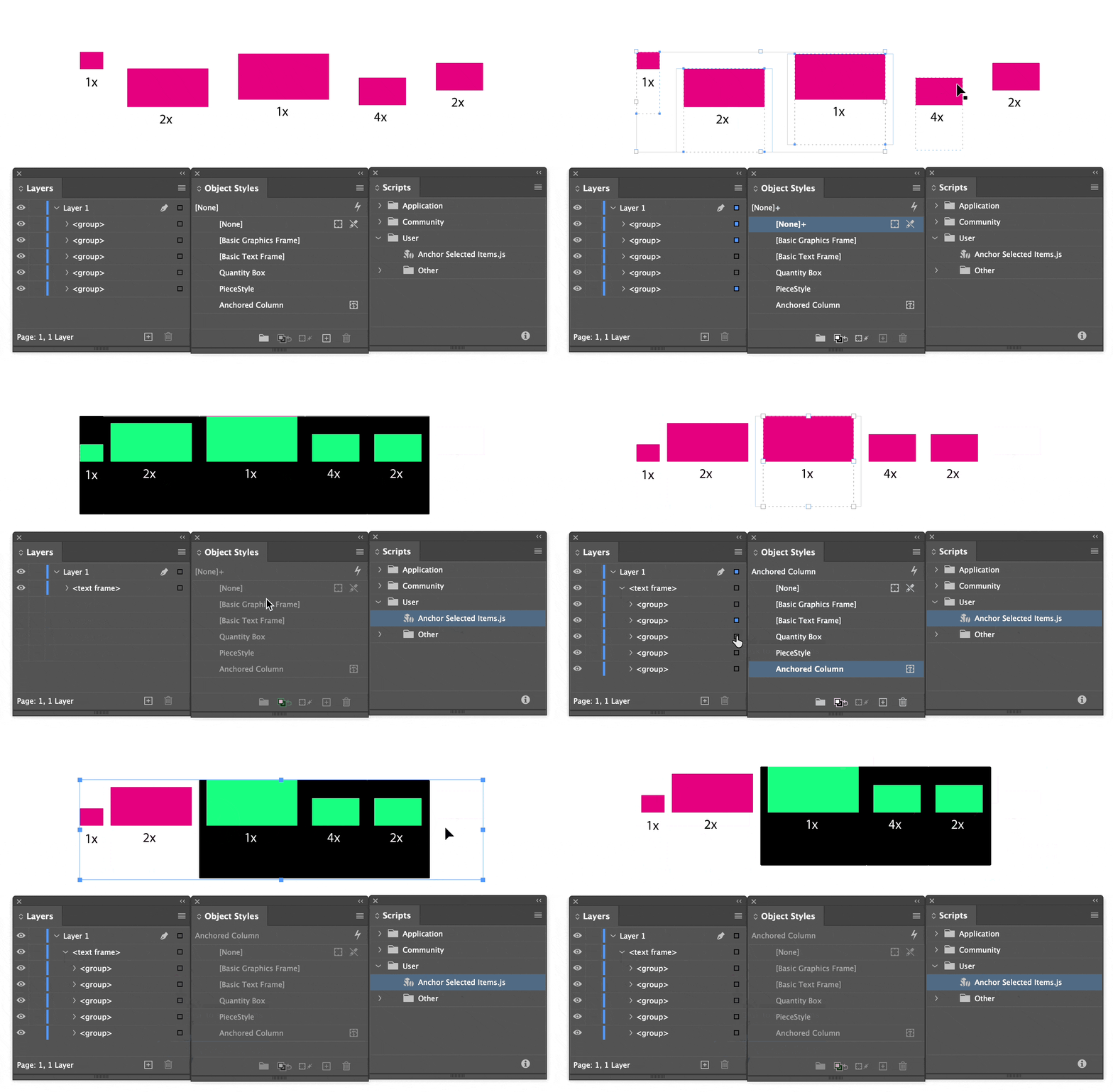
Here's how it looks in the demo file:
/**
 * Anchor selected items.
 * @author m1b
 * @discussion https://community.adobe.com/t5/indesign-discussions/automatically-placing-multiple-groups-into-a-text-frame-inline/m-p/14335102
 */
function main() {

    var settings = {
        applyObjectStyleToEachItem: true,
        anchoredObjectStyleName: 'Anchored Column'
    };

    app.scriptPreferences.measurementUnit = MeasurementUnits.POINTS;

    var doc = app.activeDocument,
        items = doc.selection;

    if (0 === items.length)
        return alert('Please select some page items and try again.');

    // sort so that objects are anchored in correct order
    items.sort(sortByLeftThenTop);

    var anchoredObjectStyle = doc.objectStyles.itemByName(settings.anchoredObjectStyleName);

    if (
        !anchoredObjectStyle.isValid
        && settings.applyObjectStyleToEachItem
    )
        return alert('Could not find "' + settings.anchoredObjectStyleName + '" object style.');

    // create a text frame to put the items in
    var exampleTextFrame = items[0].parent.textFrames.add({
        geometricBounds: boundingRectangle(items),
    });

    // add the items to the new text frame
    anchorSelectedPageItems(items, exampleTextFrame.insertionPoints[0], settings.applyObjectStyleToEachItem && anchoredObjectStyle);

    // for convenience(?) leave the selection as the anchored text
    exampleTextFrame.parentStory.texts[0].select();

};
app.doScript(main, ScriptLanguage.JAVASCRIPT, undefined, UndoModes.ENTIRE_SCRIPT, 'Anchor Selection');


/**
 * Anchors supplied `items`, one at a time,
 * to the supplied `insertionPoint`. Can apply
 * an optional Object Style to each item.
 * Note the insertionPoint will move along
 * so that each anchored item will be added
 * after the previous one.
 * @author m1b
 * @version 2024-01-05
 * @param {Array<PageItem>} items - indesign page items.
 * @param {InsertionPoint} insertionPoint - the place to add the items.
 * @param {ObjectStyle} [anchoredObjectStyle] - the object style to apply to each item (default: none).
 */
function anchorSelectedPageItems(items, insertionPoint, anchoredObjectStyle) {

    if (undefined == items)
        throw error('anchorSelectedPageItems failed: no `items` supplied.');

    if (undefined == insertionPoint)
        throw error('anchorSelectedPageItems failed: no `insertionPoint` supplied.');

    for (var i = 0; i < items.length; i++) {

        // do the insertion
        items[i].anchoredObjectSettings.insertAnchoredObject(insertionPoint);

        if (
            undefined != anchoredObjectStyle
            && anchoredObjectStyle.isValid
        )
            items[i].appliedObjectStyle = anchoredObjectStyle;

    }

};

/**
 * Sort Indesign page items by horizontal
 * position, then vertical position.
 * @author m1b
 * @version 2024-01-05
 * @param {PageItem} a
 * @param {PageItem} b
 * @returns {Number} - the sort direction.
 */
function sortByLeftThenTop(a, b) {
    if (a.geometricBounds[1] < b.geometricBounds[1]) return -1;
    if (a.geometricBounds[1] > b.geometricBounds[1]) return 1;
    if (a.geometricBounds[0] < b.geometricBounds[0]) return -1;
    if (a.geometricBounds[0] > b.geometricBounds[0]) return 1;
    return 0;
}

/**
 * Returns a bounding rectangle that
 * encompasses the geometric bounds
 * of all items supplied, with optional
 * padding added all around.
 * @author m1b
 * @version 2024-01-05
 * @param {Array<PageItem>} items - the items to bound.
 * @param {Number} [padding] - the padding all around, in points (default: 0)
 * @returns {Array<Number>} - the bounding rectangle.
 */
function boundingRectangle(items, padding) {

    padding = padding || 0;

    var b = [Infinity, Infinity, -Infinity, -Infinity];

    for (var i = 0; i < items.length; i++) {
        if (b[0] > items[i].geometricBounds[0])
            b[0] = items[i].geometricBounds[0];
        if (b[1] > items[i].geometricBounds[1])
            b[1] = items[i].geometricBounds[1];
        if (b[2] < items[i].geometricBounds[2])
            b[2] = items[i].geometricBounds[2];
        if (b[3] < items[i].geometricBounds[3])
            b[3] = items[i].geometricBounds[3];
    }

    return [b[0] - padding, b[1] - padding, b[2] + padding, b[3] + padding];

};
Edit 2024-01-05: added some missing documentation.
Let me know how it works for you.
- Mark



 AdChoices