Object Styles would solve this, but if your text frames don't have an object style applied, it's pretty easy to set all your text frames to auto-size using the Object tab of Find/Change.
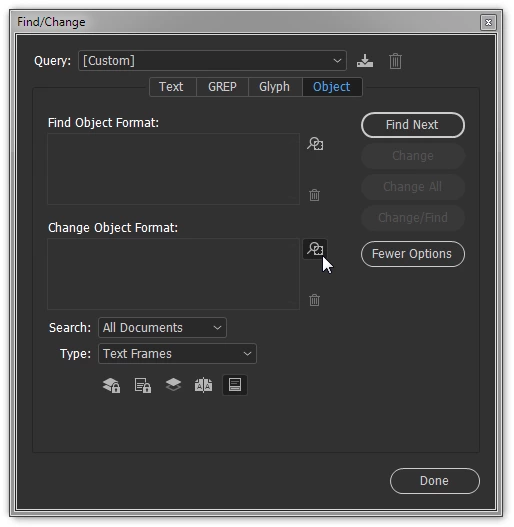
Working on a copy of your file, Choose Edit > Find/Change... and click the Object tab.
Set the Type: menu to Text Frames and click the icon next to the Change Object Format field:
Set the desired Text Frame Auto Size Options. While you could go with Height and Width, I'd recommend Height Only and the top-down anchor option:
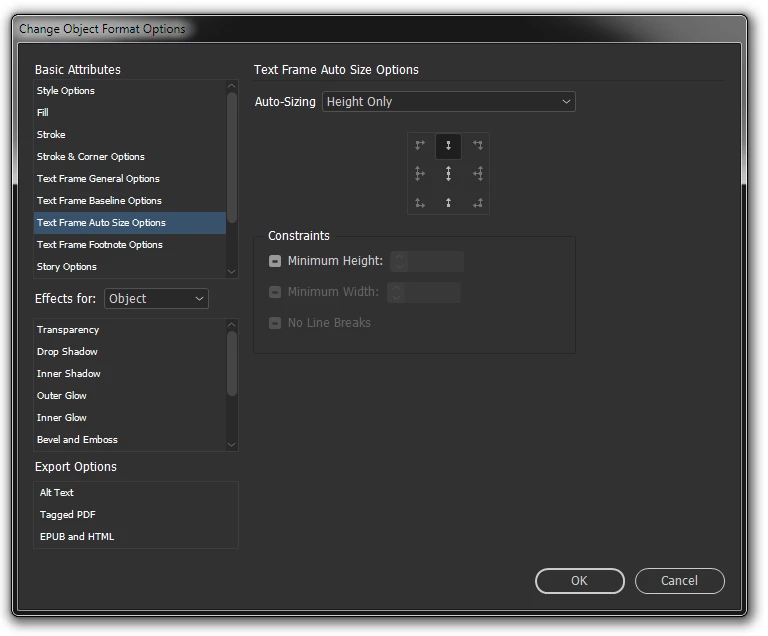
Click OK and then Change All (or Find Next to step through find-by-find).
There are a number of conditions in which this won't remedy all oversets, or produce a result that won't need additional adjustment, including documents with many frame-threaded stories, documents in which all the text is a single frame-threaded story, frames containing a single word, and others. However, there are other conditions in which it can help, and of course the shorter the document, the lower the risk. Your mileage will vary; proceed with caution.



 AdChoices