Answered
Avoid hyphenation at the end of a line.
Avoid hyphenation at the end of a line. And I tried disabling the no hyphenation option, but it doesn't look nice. Can you help me please?

Avoid hyphenation at the end of a line. And I tried disabling the no hyphenation option, but it doesn't look nice. Can you help me please?
If you are doing Justfied text, and you have a narrow column, you are limited to how good you CAN make it look.
What I expect you are seeing is large word spacings you don't like. You can minimize this by chnaging your Justification Settings to add space between letters to balance them out. Your default is probably something like this:
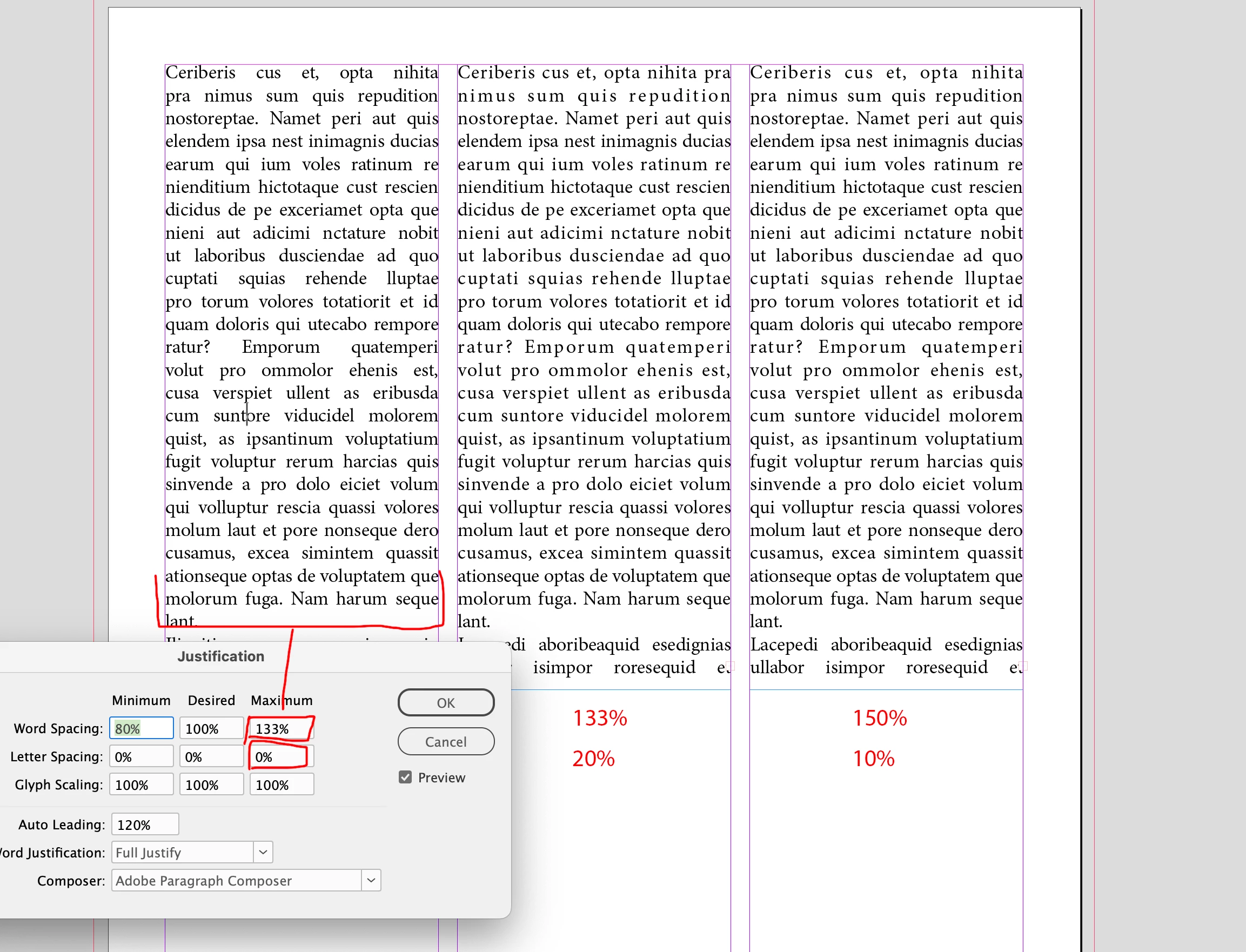
Here, there is no spacing between letters added (Max: 0)
Increase this to, say 10% or even 20%. You can even play with the word space.
I've changed this to (in the middle column) Word Spacing Max 133% with Letter Space Max 20%;
and the right column is Word Spacing Max 150% with Letter Spacing Max 10%
Play with the settings until you get a result that's pleasing to you.
Already have an account? Login
Enter your E-mail address. We'll send you an e-mail with instructions to reset your password.


 AdChoices