


Inspiring
October 16, 2024
Answered

Ayuda con InDesign / Actualización

  • October 16, 2024
  • 1 reply
  • 518 views

Hola, buenos dias me salio una nueva actualizacion en los programas y me sale el letrero que dice lo de la imagen. 
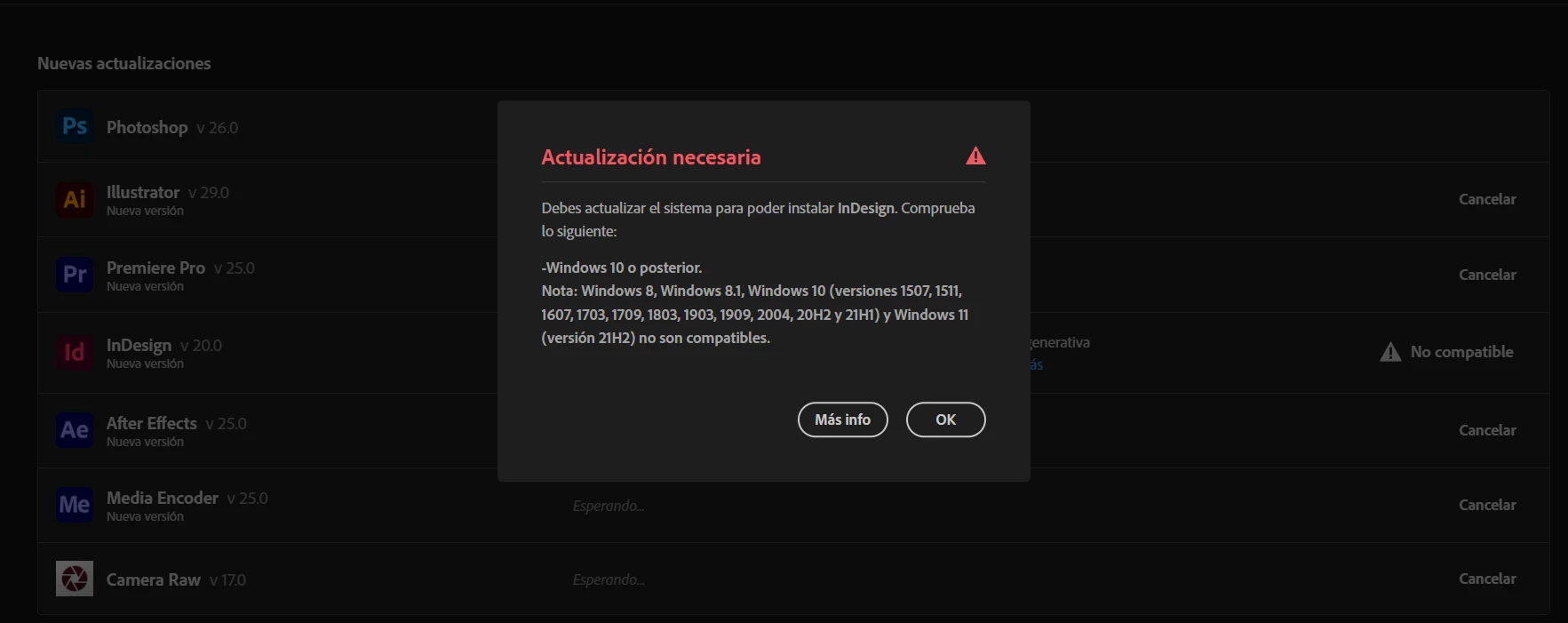
Y no entiendo cual es el problema, dado que me actualiza photshop sin problema illustrator sin problema, y voy a mas informacion y las caracteristicas que pide del sistema mi computador las supera, es un intel de i7 de 8rh gen tiene una tarjeta grafica nvidia geforce, 32 de ram y el sistema operativo es windows 11... que tengo que hacer?

This topic has been closed for replies.
Correct answer Abhishek Rao

Hola, pero ya se reviso lo de windows y me dice que esta actualizado a la ultima version... entonces no entiendo, y mas si se puede actualizar photshop e illustrator y todos los demas programas es solo ese el que esta molestando..


Hi @hernanjavier19,


Thank you for the clarification! I understand that your Windows is showing as updated. 


Could you please take a look at the InDesign requirement link? It specifies compatibility with Windows 10 versions 21H2 and 22H2, as well as Windows 11 versions 22H2 and 23H2. Since you're on 21H2, it may cause compatibility issues with InDesign.

If you're certain that your system indicates it's updated, I recommend checking if there are optional updates available that might help you upgrade to at least 22H2.


Feel free to share your findings, and we'll continue troubleshooting together!


Thanks,  
Abhishek Rao


1 reply

Abhishek Rao
Community Manager
Community Manager
October 16, 2024

Hi @hernanjavier19,


Thank you for reaching out! To assist you better, could you please share the exact Windows version and build number of your system? This will help us troubleshoot the issue more effectively.


Looking forward to your response!


Best,
Abhishek Rao

Inspiring
October 16, 2024

Sistema operativo de 64 bits, procesador x64

edision: Windows 11 Home

version: 21H2

Compilacion del SO: 22000.2538

Creo que esta es la informacion que me solicitan.

Abhishek Rao
Community Manager
Community Manager
October 16, 2024

Hi @hernanjavier19,


Thank you for providing those details! To further assist you, could you please open the Command Prompt on your computer? You can do this by typing "cmd" in the Windows search bar and hitting Enter. Once the Command Prompt is open, run the command 'winver' and take a screenshot of the window that appears. This will give us more information about your system.


Looking forward to your response!


Best,  
Abhishek Rao