
Participant
May 18, 2010
Answered

Background missing when exporting from indesign to pdf

  • May 18, 2010
  • 14 replies
  • 53752 views

Sometimes when I export a file  from indesign to pdf, my background doesn't show up. The background is  just a block of solid colour, or gradient. The background block of  colour is usually the full size of the page. I've tried to play around  to see what is causing this to happen and sometimes if I reduce the size  of the block to say, 1/3 of the page then the block of colour shows up,  but then when I make it the full size of the page as I actually need it  to be, the colour block doesn't show up when I export it to pdf (i've  tried all the different pdf presets and it doesn't make a difference)???  Does anyone know why and how to fix it?

thanks!
    This topic has been closed for replies.
    Correct answer BCNisly86

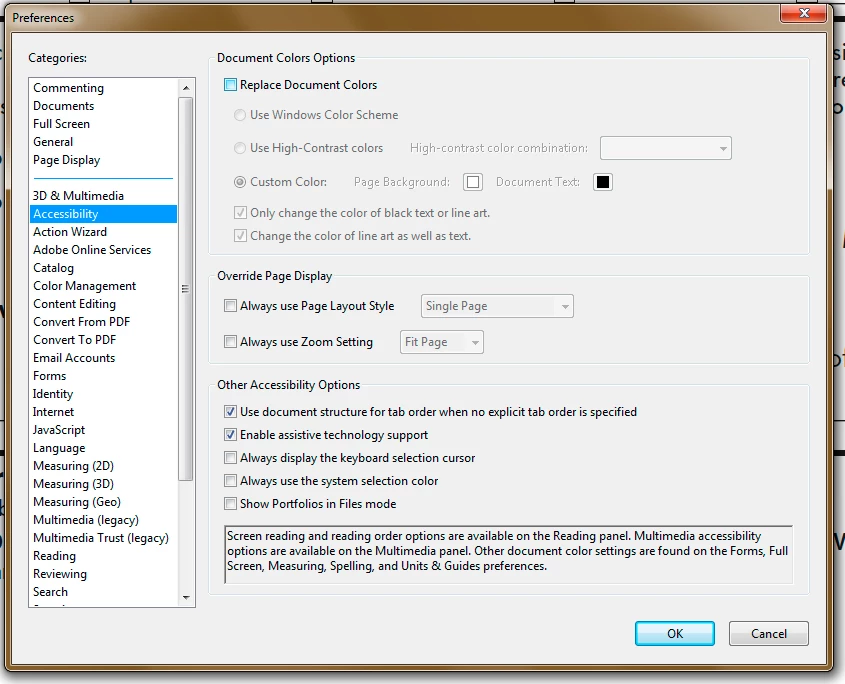
    Check your Acrobat preferences: Edit>Preferences, then click Accessibility and make sure "Replace Document Colors" is NOT checked.

    14 replies

    Participant
    June 14, 2023

    I'm a little late to the party, but I was having the same issue and the acrobat setting didn't fix it.

    For me, the problem was with my export.

    Make sure you have export layers set to All.


    I'm very new to InDesign so im not sure why this works, but im guessing I messed something up when making my project.

    laAdobe
    Participant
    January 15, 2018

    This worked. THANK YOU!

    But, how would it get changed? Never happened before?

    melodyl85299632
    Participant
    October 16, 2017

    YES!! So helpful thank you.

    Participant
    March 18, 2016

    Same problem... Unchecking "Replace Document Colors" in Accessibility worked.

    Known Participant
    August 18, 2015

    This was driving me nuts because the new Acrobat interface was driving me nuts ...

    I thought it was a print spreads vs. print pages issue (spreads worked).

    It turns out I clicked on "Acrobat>preferences>Categories>Accessibility> Replace document colors" earlier in the month because I was desperately trying to alter the interface contrast so I could differentiate the scroll bars from the tool sliders.

    Uncheck this preference and it's all back to normal ... a crappy new normal.

    Participant
    June 10, 2015

    Same problem, this worked for me

    If background color disappears try Acrobat>preferences>Categories>Accessibility> (uncheck) Replace document colors 

    Participating Frequently
    February 5, 2015

    This is still an issue with CS6 and Adobe hasn't figured it out. In fact, they don't provide support for CS6 anymore; nor, for any version of Reader at all. It is a random thing that happens on my computer and not Adobe's. It even is random on my computer. Sometimes it happens on certain files. Sometimes it doesn't. It happens in Acrobat and Reader, but the same file will look slightly different in the two programs. BCNisly86's solution is the only correct solution to fix this bug that Adobe ignores. The problem is that you have to hope or make sure that every single recipient of your PDF file doesn't change his/her background color settings in Reader or Acrobat because Acrobat and Reader have no clue how to differentiate the PDF page background from the object's background or a simple Illustrator color fill on the page. Note to Adobe: 1. Listen to your customers; 2. Test your product.

    BCNisly86Correct answer
    Inspiring
    July 23, 2014

    Check your Acrobat preferences: Edit>Preferences, then click Accessibility and make sure "Replace Document Colors" is NOT checked.

    Participant
    August 31, 2015

    Changing this setting worked for me. I'm using Acrobat CC and it was still a problem. What's strange is that we have 4 licenses and for some reason, the settings were different.

    Thanks!!

    Participant
    July 10, 2013

    Hi,

    I am having this same problem right now (2013) and trying to find a way to solve it. I have never had this issue in the past. The example file i am working on is a document that prior to now had no issue exporting the black box in the background. Its not just black as I have tried normal black, rich black, red etc.

    I am working in CS5.5 with all software up to date.

    I have tried saving the file as an IDML and reopening to see if it will 'debug' the file. I have exported the PDF as every kind of option. I have restarted the computer and the program several times.

    Similar to the above replies, reducing the size of the box to something small fixes the issue. But obviously doesnt solve the problem as when you go back to a large box it disappears again. On a few tests, putting a different black box underneath the large one has made it show up, however this is not consistent as testing it a second time produced a different result.

    I have also just tested this issue in a new file sent to me by a client. They sent me an Indesign file and a PDF (exported at their end) and my Acrobat does not show up the black background or a photo sitting on top of this. The whole page is just blank when viewing in Acrobat.

    Peter Spier
    Community Expert
    Community Expert
    July 10, 2013

    Let's confine the answers to your other thread... http://forums.adobe.com/message/5491551

    April 7, 2012

    I have CS5 and I am having the same problem. Except even when I try to print directly from the PSD I still get no background color

    Peter Spier
    Community Expert
    Community Expert
    April 7, 2012

    Seamisti wrote:

    ...when I try to print directly from the PSD I still get no background color

    Are you working in Photoshop or InDesign? This is the InDesign forum...