

Supreme_Chancellor
Inspiring
July 17, 2019
Answered

Beginner question: folder location in parameter.

  • July 17, 2019
  • 2 replies
  • 900 views

Hello,

I'm trying to point to a folder to relink an image into and cant seem to get the syntax right.

I wrote a function. And when I call it I get an error that talks about Google Docs. Which is really weird because I'm selecting a folder on my desktop, and I don't have the google docs app installed - I access it through a web browser.

var firstLink = app.activeDocument.links[0];

relink (firstLink);

function relink (link){

    var myTargetFolder = Folder.selectDialog("Select a folder.");

    link.relink (to = File(myTargetFolder));

    };
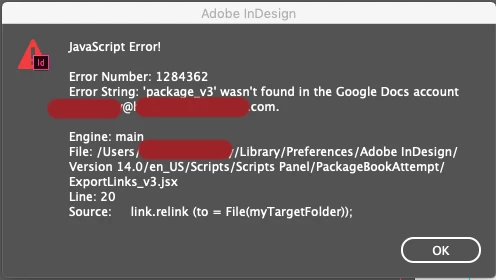
I also tried to just plug in the file path, and that throws another different error.

function relink (link){

   link.relink (to = File("/Users/username/Desktop/package_v3"));

};

So my main questions are:

What is the correct syntax?

Does the syntax change if the argument is a variable vs a path?

why am I getting alerts about googledocs? how does it know my email? WTF?

Im new to JS, and this forum so let me know if I've done something else wrong.

Any help is appreciated! Thanks.

This topic has been closed for replies.
Correct answer Marc Autret

Hi,

The method Link.relink(…) expects a File (or a uri string pointing to a file.) But what your code actually passes in is a Folder. Indeed, the syntax File(myTargetFolder) still refers to a Folder, provided that myTargetFolder is a folder. Using the wrapper File(…) won't change a folder into a file. You need to select a file inside the relink folder [/Users/username/Desktop/package_v3], or maybe do you want to append the name of the original file to find the proper match:

// ...

var ff = File( myTargetFolder + '/' + File(link.filePath).name );

if( ff.exists ) link.relink(ff);

// ...

Regarding the weird Google Docs account message, this may be related to a remote asset (?) There are “experimental” features exposed in the Link API that seem to open such option. See e.g. the method Link.reinitLink(linkResourceURI), the property Link.assetURL, etc.

@+

Marc

2 replies

Community Expert
July 17, 2019

The relink api needs as an argument the full path of the file that you are relinking to and not just the folder path. So something like the following will work

undefined relink (to:Varies File String)

Points the link to a new source file.

Parameter

Type

Description

to

File

String

The full path name of the new source file. Can accept: File or String.

var firstLink = app.activeDocument.links[0];

relink (firstLink);

function relink (link){

    var myTargetFolder = File.openDialog("Select a file");

    link.relink (myTargetFolder);

}

Regarding the Google doc error i am not sure why is it happening to you. My guess is you may have some plugin installed that has something to do with it.

-Manan

-Manan
Marc Autret
Marc AutretCorrect answer
Legend
July 17, 2019

Hi,

The method Link.relink(…) expects a File (or a uri string pointing to a file.) But what your code actually passes in is a Folder. Indeed, the syntax File(myTargetFolder) still refers to a Folder, provided that myTargetFolder is a folder. Using the wrapper File(…) won't change a folder into a file. You need to select a file inside the relink folder [/Users/username/Desktop/package_v3], or maybe do you want to append the name of the original file to find the proper match:

// ...

var ff = File( myTargetFolder + '/' + File(link.filePath).name );

if( ff.exists ) link.relink(ff);

// ...

Regarding the weird Google Docs account message, this may be related to a remote asset (?) There are “experimental” features exposed in the Link API that seem to open such option. See e.g. the method Link.reinitLink(linkResourceURI), the property Link.assetURL, etc.

@+

Marc

Supreme_Chancellor
Inspiring
July 17, 2019

Thank you!

This is very helpful. I was trying to pass a folder's path as an argument, where the parameter was expecting a file's path. I've fixed it now and it works like I expected.