
Participant
May 12, 2022
Answered

Beige color highlights behinds my text when printing in InDesign

  • May 12, 2022
  • 4 replies
  • 1134 views

Hi all,

I have text over a colored box that is printing with a beige background/highlight. None of the other text in the document prints that way. This does not show up on screen at all, only in printing. Any ideas of what might be the problem?

This topic has been closed for replies.
Correct answer rob day

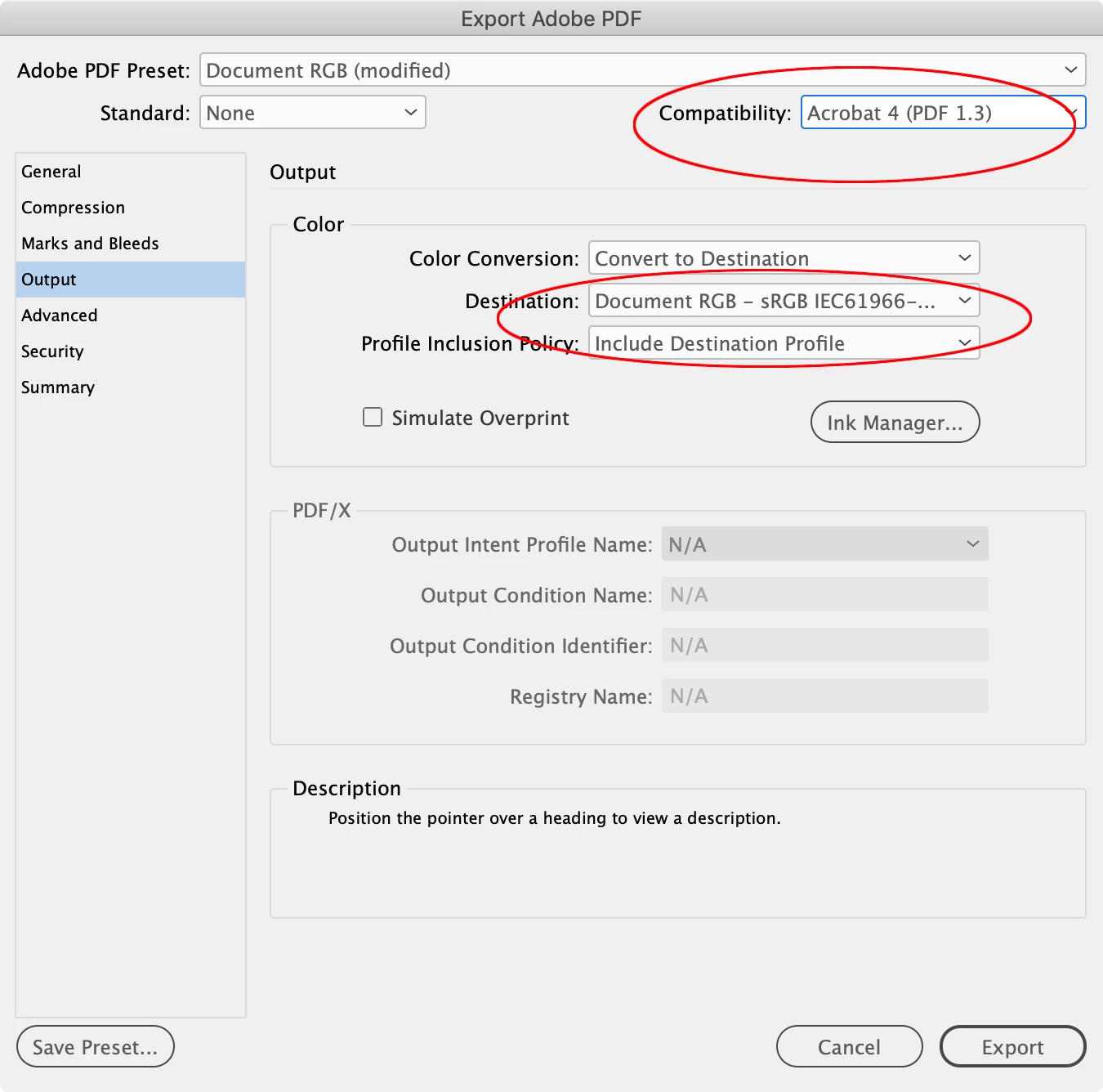
Hi @Regan24158619x8ni , sounds like your print driver is not handling transparency flattening and color managment correctly. Printing to PDF forces the page to flatten, so that’s probably why it worked. For composite printing, you can also force transparency flattening via a PDF Export, which might be easier. Try the Export>Output tab set like this:


4 replies

Participant
May 23, 2022

Thanks for your help, and I apologize for not following up. I was in a crunch of multiple deadlines! 

What ended up working was that I printed to .pdf, and then printed a hard copy, and that printed clean with no unexpected background or highlight. 

Thanks for your responses!

RP

rob day
Community Expert
rob dayCommunity ExpertCorrect answer
Community Expert
May 23, 2022

Hi @Regan24158619x8ni , sounds like your print driver is not handling transparency flattening and color managment correctly. Printing to PDF forces the page to flatten, so that’s probably why it worked. For composite printing, you can also force transparency flattening via a PDF Export, which might be easier. Try the Export>Output tab set like this:


Participant
May 23, 2022

That's a great explanation. I figured it had something to do with the printer. Thanks!

Willi Adelberger
Community Expert
Community Expert
May 13, 2022

Is any character style applied on this text? If so, select the text and apply none character style. 

Is a plus + beside the paragraph style name if the curser is in the text? Reapply this paragraph style while holding the alt key.

Jumpenjax
Community Expert
Community Expert
May 13, 2022

Have you checked to see if you can remove the formatting. Then copy paste again and see if that gets rid of the problem. You may have to change the type font to what you are using. But sometimes it keeps the correct font. 
Hope this helps

Lee- Graphic Designer, Print Specialist, Photographer
HARSHIKA_VERMA
Community Manager
Community Manager
May 12, 2022

Hi Regan24158619x8ni,


Thank you for reaching out. If I heard you correctly, this is happening with a specific text on a particular page. If so,  could you please duplicate any page that prints correctly and paste the text on that duplicate page text box and share the results with us?


We will try our best to help.


Thanks,

Harshika