

dublove
Legend
May 1, 2025
Answered

Besides entering coordinate values, does InDesign have a function to align two path points?

  • May 1, 2025
  • 3 replies
  • 580 views

For aligning one or two points, the best way is probably to enter coordinate values, but can it be a bit slow sometimes.


Wouldn't it be cool to have this feature in the alignment panel.
Correct answer Flo_8580

Where does it fail?


ID 20.3: This only works with singular unconnected points. It stops working when they are part of the same shape.


And when they are part of different shapes, the shapes themselves get aligned, as if selected with the regular selection tool.

3 replies

Community Expert
May 2, 2025

Hi @dublove ,

it's simple as that:

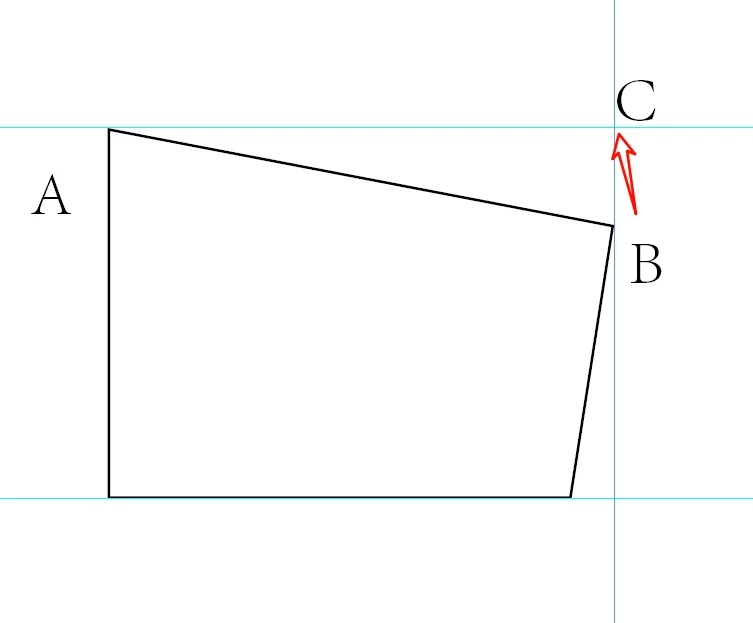
Select path point A with the Direct Selection tool. Copy the value for the vertical height from the Control panel's y field.

Select path point C with the Direct Selection tool. Paste in the copied value in the y field of the Control panel.

Hit return to apply the value.


And yes, it could be a bit tedious if you have to do that very often.


Regards,
Uwe Laubender
( Adobe Community Expert )

Willi Adelberger
Community Expert
Community Expert
May 1, 2025

Select the anchor point you want to align with the direct selection tool (shift or comd klick to select several) and use the align tools.

dublove
dubloveAuthor
Legend
May 2, 2025

ID 2025?
Why can't my ID?

Willi Adelberger
Community Expert
Community Expert
May 2, 2025

Where does it fail?

Anubhav M
Community Manager
Community Manager
May 1, 2025

Hello @dublove,

That's a great idea. Would you mind creating a UserVoice for this feature request (https://adobe.ly/4lXfSBA) and adding your comments there? Doing this will help us prioritize this request, and you will be notified of any updates.


Feel free to reach out if you have more questions or need assistance. We'd be happy to help.


Anubhav

Willi Adelberger
Community Expert
Community Expert
May 1, 2025

No need to make a request as this function is inbuild since many versions.