
dublove
Legend
April 7, 2024
Answered

Besser curve:Under the premise of not changing the shape of the right area, how do you show the cont

  • April 7, 2024
  • 3 replies
  • 675 views

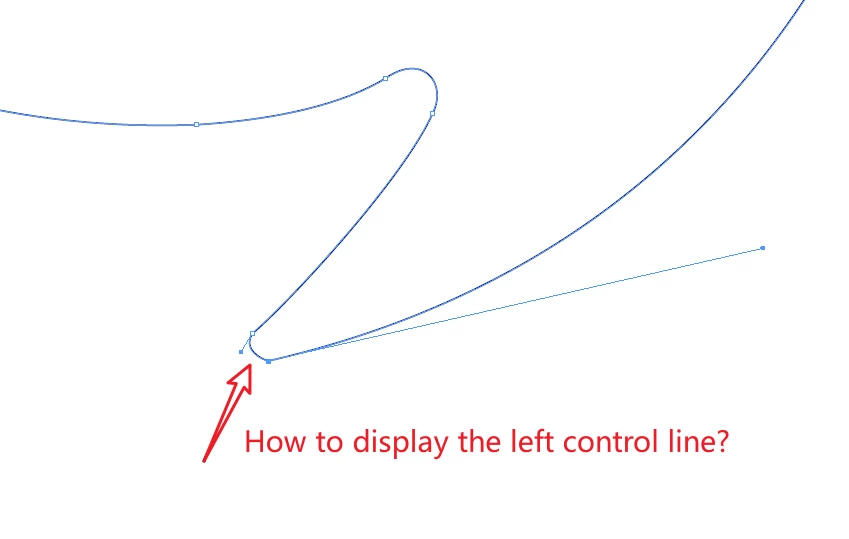
Under the premise of not changing the shape of the right area, how do you show the control line that you can't see on the left?

This topic has been closed for replies.
Correct answer Jeffrey_Smith

You can convert the point to a corner point. Then select and adjust the curve, this will show the missing handle.

3 replies

Jeffrey_SmithCommunity ExpertCorrect answer
Community Expert
April 8, 2024

You can convert the point to a corner point. Then select and adjust the curve, this will show the missing handle.

Peter Kahrel
Community Expert
Community Expert
April 8, 2024

Time to blow the dust off my ancient point editor.

@dublove -- run the script discussed on the page:

https://creativepro.com/files/kahrel/indesign/path-point-editor.html

and check the point and handle values of the point you're interested in.

m1b
Community Expert
Community Expert
April 7, 2024

Hi @dublove, it is already showing.


But the left control point has the same coordinates as the anchor point; in other words the length of the control handle is zero.


This also means that there is no way to extend the control handle without changing the bezier curve (because that is what moving points does).

- Mark


dublove
dubloveAuthor
Legend
April 8, 2024

I think the software is unscientific.
Or your answer is not scientific enough.
Come on to  better.
Thank you so much.

m1b
Community Expert
Community Expert
April 8, 2024

Perhaps I wasn't clear: the "missing" control handle has the same [x,y] coordinates as the anchor point.

This is normal Indesign drawing behaviour for a corner point.


Remember: a PathPoint in Indesign does not represent a Bezier curve. A Bezier curve is represented by a minimum of two PathPoints, eg. the anchor and rightDirection of point1 and the leftDirection and anchor of point2.


PathPoints constituting a line-only path (no curves) still have leftDirection and rightDirection coordinates, but they are equal to the anchor. It is nothing unusual in Indesign.

- Mark


Edit 2024-04-09: Sorry, I kept saying "Illustrator" instead of "Indesign". Fixed. Illustrator and Indesign PathPoints are basically the same, so it doesn't make any difference.