
Bizarre page offset in spread view
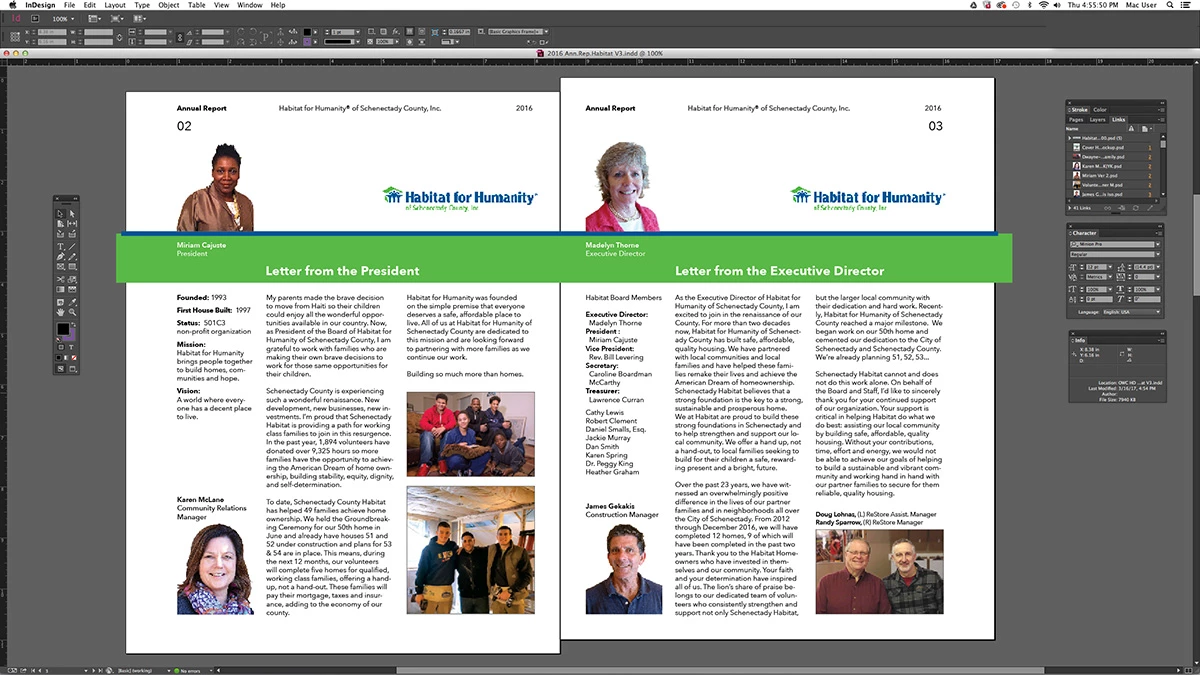
I have created a simple 8-page document in ID. In setup, it is described as facing pages. Pages 1 and 8 sit on their own at the top and bottom, and the spreads for 2-3, 4-5 and 6-7 sit in between. Bizarrely, at some pint in the editing process (over three weeks or so)) page 2 started displaying offset from page 3 – the entire page sits down about 1/4" from page 3. This can be seen clearly on screen (I will try to attach a screen shot). If I output to a PDF in "Spreads" mode, it looks fine. But if I output as "Pages", sure enough, the content of page 2 sits about 1/4" lower than the content on page 3 (also true when output to hard copy). This is critical and blatantly obvious, since I have a graphic element that spans the entire spread. Can anyone help?
Thanks in advance, M. Davis, Atlanta GA
 AdChoices