michal_PL
Inspiring
January 15, 2025
Answered

Black background instead of transparency while printing PDF from InDesign (RGB)

  • January 15, 2025
  • 7 replies
  • 3866 views

Hey, I have a problem I have difficulties solving on my own.

I prepare file in Indesign, keeping everything in sRGB IEC6...

1. Export PNG files with transparent backgrounds from Procreate
2. Place them in InDesign (linking)
3. Indesign is set up for sRGB IEC6...
4 Then I Export to pdf using sRGB IEC... as an ouput (embeding profile)

I wanted to try using Adobe 5 format compatibility, to avoid downsides of Adobe 4- lines and dividing pictures to triangles, as I observed at least one printing result where printer lost parts of the images. For most of them, these lines resulting from flattening are only visible on screens (something I still would like to avoid if possible). Also, clickable table of contents would be great.

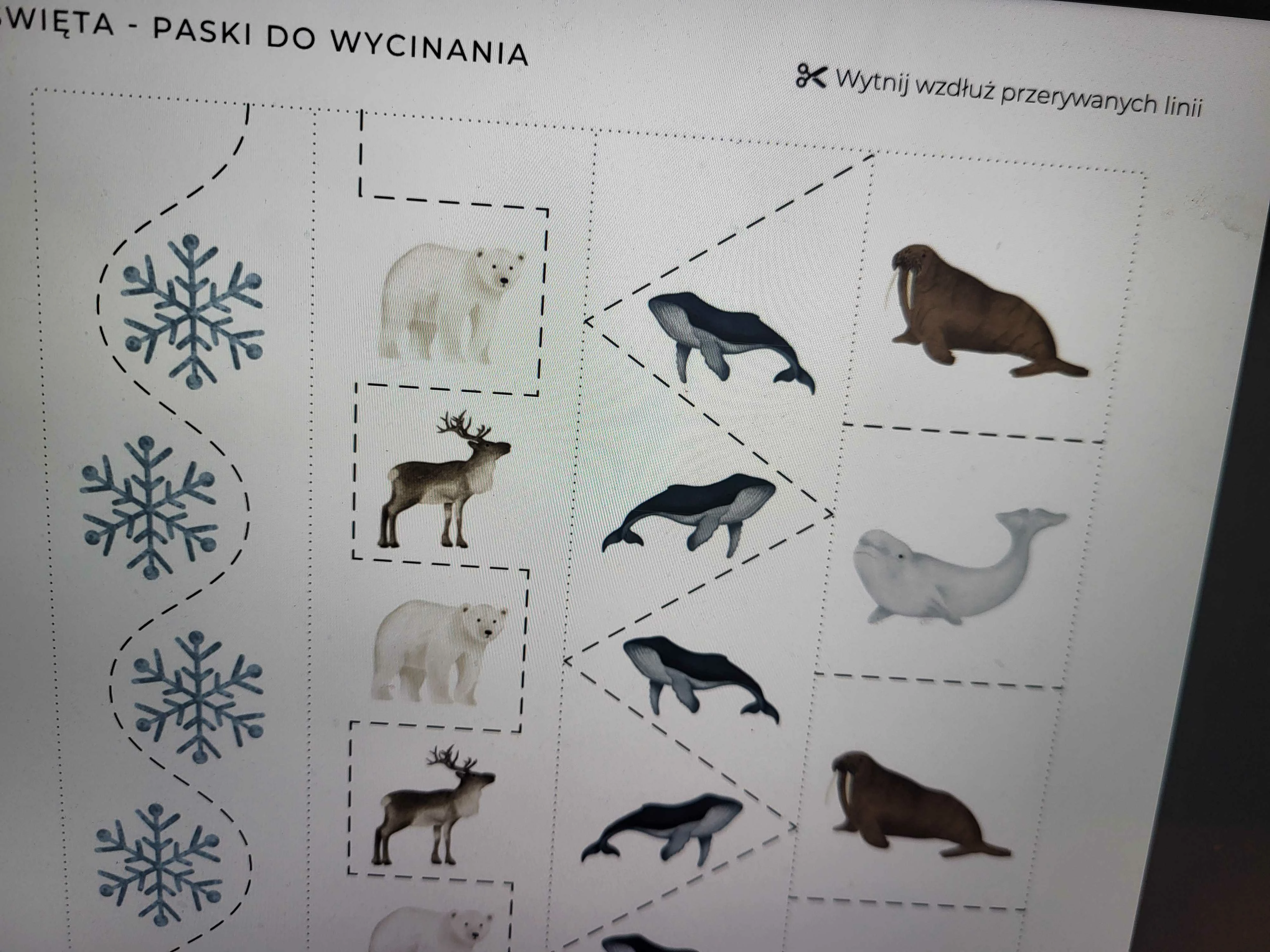
So I exported PDF file with Adobe 5 compatibility and received such result on two different printers.
What can I do to avoid lines, fractals, and have clicable ToC and not end up with black PNG backgrounds?

Have I done anything wrong?

All help appreciated!
Correct answer Robert at ID-Tasker

@michal_PL


It's possible, that Procreate is saving those PNGs a bit differently than the standard - and InDesign can't read properly this non-standard format.


7 replies

Mike Witherell
Community Expert
Community Expert
January 17, 2025

Circling back to this, I would process the PNGs thru PS to PSD and relink. Then, making sure the whole document was Transparency Blend Mode > RGB, I would export to PDF interactive, which will be RGB and will print on desktop RGB-drivered printer machines.

Mike Witherell
Robert at ID-Tasker
Legend
January 17, 2025

@Mike Witherell


There is sonerhingbwrong with those PNGs as they do not convert to TIFF correctly - there is no transparency.


michal_PL
michal_PLAuthor
Inspiring
January 16, 2025

So after extensive testing to check many of your tips, i found out, that this problem occurs only on one computer on Google Chrome. Printing from Firefox or both browsers on different MacBook works just fine.


I migrated files as a package between these two MacBooks back and forth and no discoveries here.


Since my goal is to make sure the file will print properly on all devices, I have to continue troubleshooting.

Unfrotunately simple conversion from png go png didn't help, and I didn't manage to test conversion to Tiff files yet, but will continue trying tomorrow. Thank you for your help so far!

Willi Adelberger
Community Expert
Community Expert
January 16, 2025

How did  hrome here? Does it mean, that you exported to PDF and viewed it in Chrome?

Are you aware that there is only one valid PDF viewer and that is Adobe A robat? All others are failing in one or the other aspects. 

michal_PL
michal_PLAuthor
Inspiring
January 16, 2025

That's correct. Phis PDF is digital product I'm preparing and I have zero control over end-user habits. They are non-knowledgeble about printing, and I can't make them use Acrobat. I know they sometimes use only mobile device for printing. I need to ensure this file is failsafe for this exact reason.


Robert at ID-Tasker
Legend
January 15, 2025

@michal_PL


Do druku - najlepiej najwyższy PDF - PDF/X-4.


PNG możesz hurtem przekonwertowac do TIF / PSD w Photoshop'ie - a później w InDesign hurtem przelinkowac do nowego rozszerzenia. 


michal_PL
michal_PLAuthor
Inspiring
January 15, 2025

Hej, dzięki za podpowiedź!

To z której strony radziłbyś to ruszyć? Wybrać PDF/X-4 czy konwertować grafiki?


Zaznaczam, że druk tego pliku będzie odbywał się na domowych drukarkach RGB - rozmaitych urządzeniach, będzie też drukowany z urządzeń moblnych, desktopóów, przeglądarek, aplikacji, klientów poczty. Cel jest taki żeby drukował się wszędzie poprawnie bo będą go używały osoby bez wiedzy o druku.

Robert at ID-Tasker
Legend
January 15, 2025

@michal_PL 


Najlepiej najwyższy PDF. 


A konwersję PNG -> "coś" możesz I tak zrobić - just in case 😉 


Ew. po prostu "przepisz" te PNG na PNG - za pomocą Photoshop'a - żeby je "wyprostować". Oczywiście do nowego katalogu, żebyś nie nadpisywał oryginałów. 


Często ludzie mają np. problem z XLS wyexportowany z Google Sheet albo coś "niestandardowego" - przepisanie w Excel'u zawsze pomaga - tak samo DOC / RTF - przepisanie w WORD "naprawia" plik. 


Mike Witherell
Community Expert
Community Expert
January 15, 2025

Cześć Michał,
Lepiej jest umieścić pliki PSD w programie InDesign. Edycja > Przestrzeń mieszania przezroczystości powinna być ustawiona na RGB. PNG jest dobry w przypadku stron internetowych i programu PowerPoint, ale jest mniej niezawodny w przypadku układu strony w programie InDesign. Kiedy mówisz, że drukujesz plik PDF, jak dokładnie go drukujesz? Do drukarki stacjonarnej?

Mike Witherell
michal_PL
michal_PLAuthor
Inspiring
January 15, 2025

Hi Mike, thanks for your reply! These illustrations are created in the drawing application “Procreate” and never go through Photoshop. It never occurred to me to use PSD. I was considering TIFF, but it seemed like Overkill at the time, given the weight of the assets and my needs.


The goal of these PDFs is to be as versatile and easy to print as possible. People will print them from their phone, computer, browser, email client, etc. Rarely will anyone be more knowledgeable about printing. They will always be RGB desktop printers. That's why I decided to choose compatibility with an older standard (Acrobat 5 or 4).


I've solved color conversion problems before, but never heard that PNG might not be a good choice. This is an ongoing learning journey for me 🙂


I am wondering what to do now. I already have pretty much the whole setup prepared. I can't export and set all the assets from the ground up, it will probably take a few days. I can:

- Experiment with other Acrobat standards, e.g. Acrobat 7, as someone recommended in another comment, and if nothing works, I will eventually stay with Acrobat 4, which works for almost every user, just leaves those lanes (flattening artifacts)

- Convert in Photoshop all those PNGs to TIFF by running them through Photoshop automatically, and they should be able to be relinked in one go.


What would you advise?

Robert at ID-Tasker
Legend
January 15, 2025

@michal_PL 


PSD will be even bigger than TIFF. 


But you can convert all assets in bulk in Photoshop. 


leo.r
Community Expert
Community Expert
January 15, 2025
quote

So I exported PDF file with Adobe 5 compatibility and received such result on two different printers.


By @michal_PL


I assume you meant Acrobat 5. As a test, try to set Acrobat 7 (PDF 1.6) compatibility - will it make a difference?

michal_PL
michal_PLAuthor
Inspiring
January 15, 2025

Yes, sorry, "Acrobat 5". I wIll check later today, when will have an access to the printer.

My goal was to create PDF's to be maximally compatible with home devices and printers. THat's why I figured out using older compatybility will be the best, but perhaps I'm wrong, and Acrobat 7 can have better/wider compatybility?


Is there somethoing that I should know about , like this "Not using PNG with transparency" in Indesign? 😄

michal_PL
michal_PLAuthor
Inspiring
January 15, 2025

Tested it - switching to Acrobat 7 didn't fix the problem. 🙊

Willi Adelberger
Community Expert
Community Expert
January 15, 2025

Don't use PNG files, use PDF or PSD or TIFF files, if you use images with transparency.

michal_PL
michal_PLAuthor
Inspiring
January 15, 2025

OMG - I'm terified - I started over the whole process, including exporting all the images again in sRGB, and found no sign of such a tip/recommendation/requirement. Is this some general rule, or some issue with InDesign?
Won't PNG's work at all?
Every kind of Tiff should work correctly?

Willi Adelberger
Community Expert
Community Expert
January 15, 2025

PNGs have no colormanagement and support only alpha transparency and are always in RGB.

BobLevine
Community Expert
Community Expert
January 15, 2025

What did the printer say? Can you post one of the PNGs? What are you using PNGs?

michal_PL
michal_PLAuthor
Inspiring
January 15, 2025

No error messages. Just printed it with black backgrounds.

quote

What are you using PNGs?


By @BobLevinequote

 Sorry, can't understand this one 😬

BobLevine
Community Expert
Community Expert
January 15, 2025
Should have said WHY are you using PNGs.