
Known Participant
November 12, 2021
Answered

Black lines around shapes after exported as interactive PDF

  • November 12, 2021
  • 2 replies
  • 310 views

Hi,

After I export my indesign file into interactive pdf, some of the shapes/text boxes have thin black lines around them. Both of their fill and stroke are nothing. 
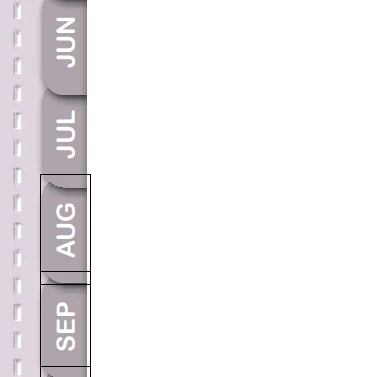
 

I combed through this community and saw several solutions such as uncheck the "smooth lineart" and "Smooth images" on Acrobat. I did uncheck both fields, but there is nothing changed.

I can't export to PDF/x-4 as other suggested as well, because it would eleminate all the interactive buttons in my file.

Please help! Thanks!


This topic has been closed for replies.
Correct answer Laubender

Hi Sophia,

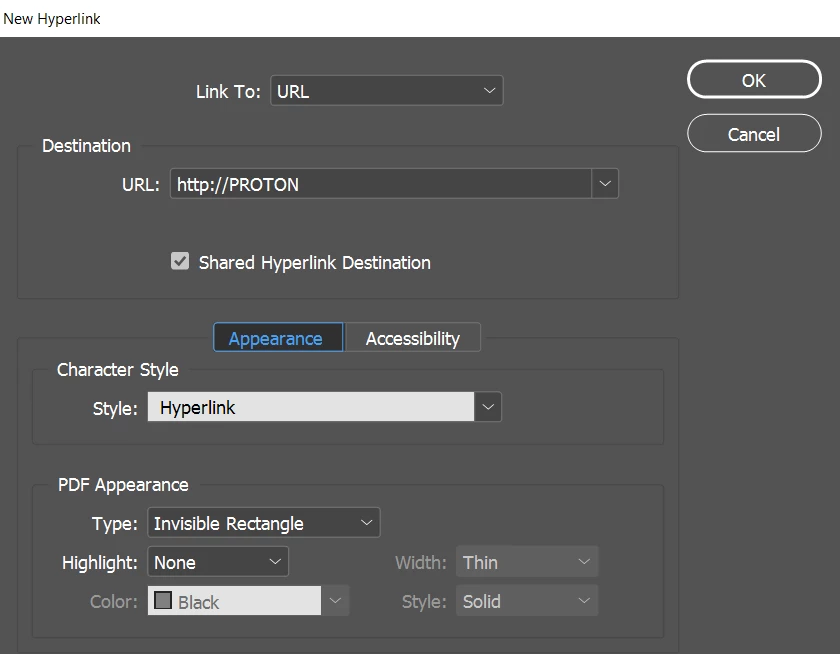
could be the PDF Appearance of a hyperlink.

You can set it to "Invisible Rectangle" like in the screenshot below:


Source:
https://helpx.adobe.com/indesign/using/hyperlinks.html


Regards,
Uwe Laubender

( ACP )

2 replies

Luke Jennings3
Community Expert
Community Expert
November 12, 2021

Acrobat may be automatically detecting form fields. Go to Tools> Prepare Forms in Acrobat, do the frames appear as form fields? You can select and delete them. In Acrobat, go to Preferences> Forms> Automatically detect form fields (uncheck).

BobLevine
Community Expert
Community Expert
November 12, 2021
I've never heard of Acrobat doing something like that. Only URLs are auto-detected.
LaubenderCommunity ExpertCorrect answer
Community Expert
November 12, 2021

Hi Sophia,

could be the PDF Appearance of a hyperlink.

You can set it to "Invisible Rectangle" like in the screenshot below:


Source:
https://helpx.adobe.com/indesign/using/hyperlinks.html


Regards,
Uwe Laubender

( ACP )

SophiaPPAuthor
Known Participant
November 12, 2021

Thank you very much, @Laubender! This is exactly what had happened!