Participant
June 28, 2017
Answered

Bleed issue with PNG graphic exporting to PDF

  • June 28, 2017
  • 9 replies
  • 2148 views

Hello all,

Hoping someone can provide a tip to solve the below:

    

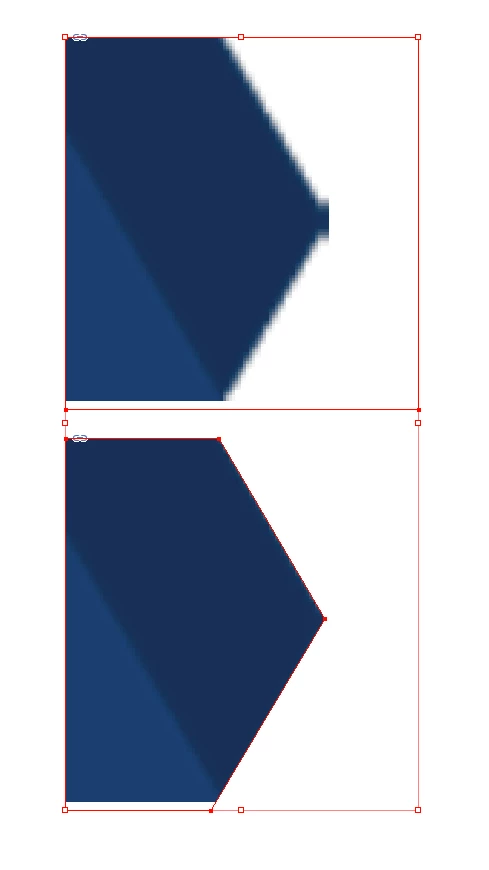
The above image is a PNG imported into an .indd document; whenever I export to PDF, that annoying bleed pops up, which makes me think it has something to do with my PDF export settings?

Any tips are much appreciated! Thank you
This topic has been closed for replies.
Correct answer Luke Jennings

I believe that little flat spot is caused by anti aliasing at the outside edge of the image. You can fix it several ways;

1. Increase the canvas size of the image in Photoshop, adding white.

2. Add a clipping mask in Photoshop and save as a .psd

3. Add and delete anchor points in InDesign to mask the image, as shown in this screen shot.

9 replies

JR Boulay
Community Expert
Community Expert
June 29, 2017

No, I was talking about PDF/X-1 and X-3 because they are presets with transparency flattening.
The PDF/X-4 is OK now, unlike its first version.

Acrobate du PDF, InDesigner et Photoshopographe
Legend
June 29, 2017

So JR you still say PDF/X-1a and PDF/X-3 are better than PDF/X-4? Why?

JR Boulay
Community Expert
Community Expert
June 29, 2017

Sorry.

I wanted to say that presets are not OK because transparency flattening is not optimal, but it is not the only issue.
I know that transparency flattening concerns only PDF 1.3 and earlier versions.

I don't think you mean to say these are the best presets right?

"The less bad" should be a better translation, according to Google Translate.

Acrobate du PDF, InDesigner et Photoshopographe
hollyh123Author
Participant
June 29, 2017

Thanks everyone for these tips; just to clarify, the little extra spot that pops up at the corner on the image, ONLY happens when I export to PDF. When I have the image open within the .indd doc, the image has crisp edges with no issues...

Luke Jennings
Luke JenningsCorrect answer
Inspiring
June 29, 2017

I believe that little flat spot is caused by anti aliasing at the outside edge of the image. You can fix it several ways;

1. Increase the canvas size of the image in Photoshop, adding white.

2. Add a clipping mask in Photoshop and save as a .psd

3. Add and delete anchor points in InDesign to mask the image, as shown in this screen shot.

Willi Adelberger
Community Expert
Community Expert
June 29, 2017

No, if you add a clipping mask in Photoshop you should save that file as PDP or PDF. When you place a PSD in InDesign the cliping mask would be rasterized which is not happening with PDF.

Luke Jennings
Inspiring
June 29, 2017

A .psd with a photoshop clipping mask placed into InDesign will not have a raster edge.

rob day
Community Expert
Community Expert
June 29, 2017

It's not clear what you mean by bleed. In the print world it generally refers to an extra amount added to the page size in order to allow for inaccurate trimming. Your screen captures seem to be showing some kind of scaling or resampling.

Derek Cross
Community Expert
Community Expert
June 29, 2017

Yeah Rob, I agree, it is unclear, maybe it's the aliasing of the edge the OP is asking about.

JR Boulay
Community Expert
Community Expert
June 29, 2017

See this article about PDF/X-4: https://translate.google.fr/translate?sl=fr&tl=en&js=y&prev=_t&hl=fr&ie=UTF-8&u=https%3A%2F%2Fwww.abracadabrapdf.net%2Ff…

"Cri cri" is Christian B., an active member of the Ghent Workgroup.

Acrobate du PDF, InDesigner et Photoshopographe
JR Boulay
Community Expert
Community Expert
June 29, 2017

All presets sucks, mostly because of transparency flattening but there are other reasons.

PDF/X-1 and PDF/X-3 are the least worst.

Those are OK (clic the red button to download): https://www.abracadabrapdf.net/utilitaires/utilitaires-pdf/parametres-predefinis-dexportation-en-pdf-pour-adobe-creative…

Or directly in English: https://translate.google.fr/translate?hl=fr&sl=fr&tl=en&u=https%3A%2F%2Fwww.abracadabrapdf.net%2Futilitaires%2Futilitair…

Acrobate du PDF, InDesigner et Photoshopographe
Derek Cross
Community Expert
Community Expert
June 29, 2017

I thought PDF/X-4 was the preset recommended for commercial litho printing (unless the printer had supplied a spec).

Derek Cross
Community Expert
Community Expert
June 28, 2017

Which version on InDesign and OS?

It's not clear what the issue is, can you explain a bit more.

Presumably you're Placing the image.

Which PDF preset are you using?

hollyh123Author
Participant
June 28, 2017

I am working with InDesign CC 2017, and OS X Yosemite 10.10.5

I am placing the PNG graphic into the .indd doc; when I am working within the .indd doc,  the PNG image looks perfect with no bleed or quality issues. However, when I export the document into PDF format that extra smudge is popping up at the corner.

As far as the PDF preset, it is set to "High Quality Print"and compatible with Adobe Reader 5.0..

Willi Adelberger
Community Expert
Community Expert
June 29, 2017

Do you have a better file type than PNG? Why do you use PNG? What is on the image?