


Participant
July 26, 2017
Answered

Bleed marks set in Document Setup but missing in InDesign and exported PDF

  • July 26, 2017
  • 2 replies
  • 14038 views

I set up my book with bleed marks, but misinterpreted the printer's requirements and deleted them. Now I've set them up again in Document Setup, but they don't show up inmy InDesign document. Previously, with the bleeds set, they didn't show up in the exported PDF.

This topic has been closed for replies.
Correct answer Steve Werner

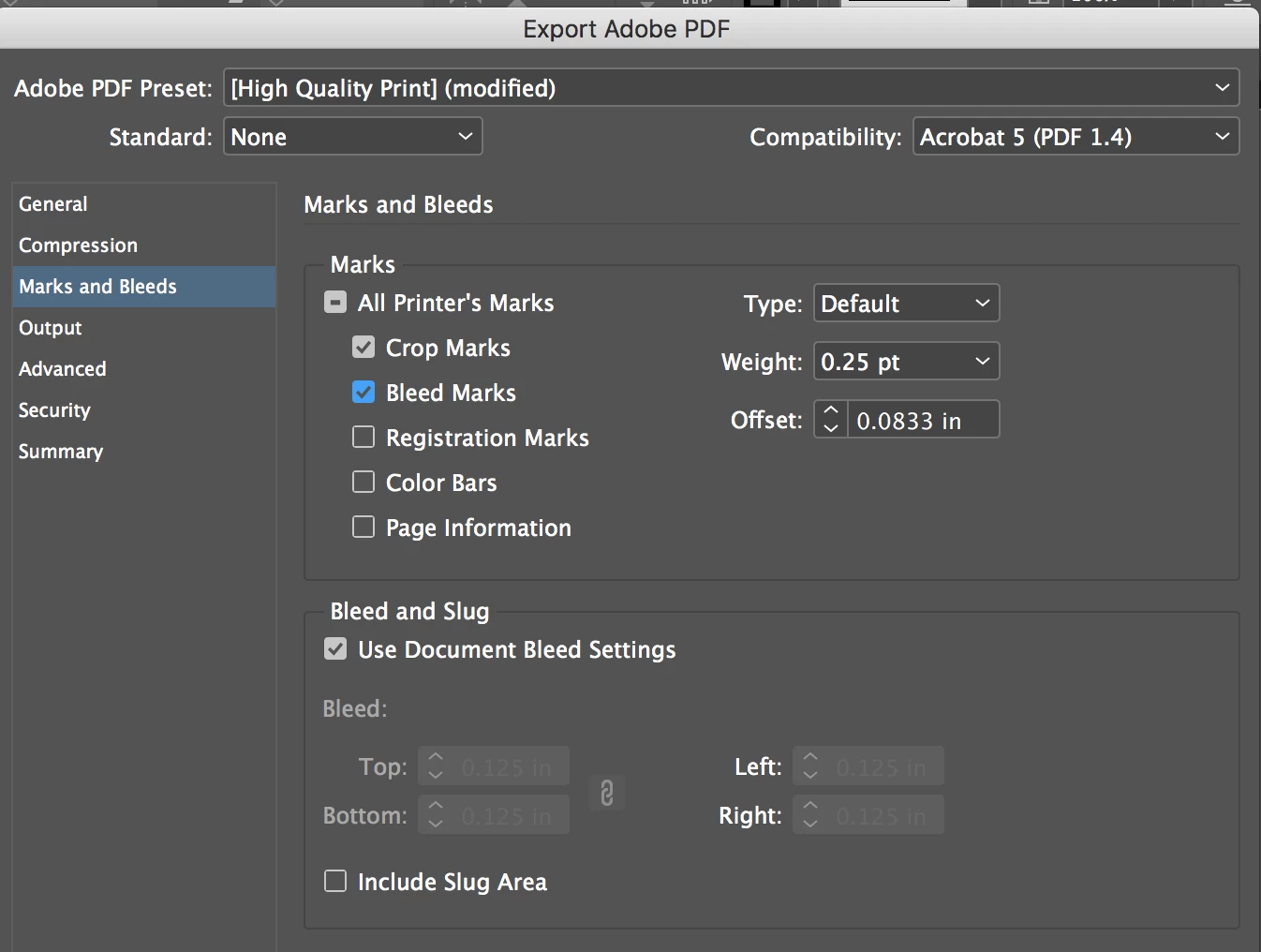
Bleed marks don't show up in the InDesign document (unless you manually created your own lines).

You would create them in the File > Export > Adobe PDF (Print) dialog box in the Marks and Bleeds section, like below. They would appear in your PDF file:

2 replies

Peter Spier
Community Expert
Community Expert
June 26, 2022

There seems to be some confusion in this thread between Bleed MARKS and Bleed GUIDES.

That red line shown in the screen capture of the page is a bleed GUIDE, which is added in the Document Setup dialog when you specify bleed values for the document. The are there to show you how far to extend the art beyond the page edge whre and when it should run to the edge of the page (bleed). Guides show in Normal view, but not in Preview Mode (my guess for what happened to the OP) or in exported or printed content.

Bleed MARKS, on the other hand, are added as Steve explained above, in the Export or Print dialog. Those show on the output.

Their purpose is to show the printer the edge of the bleed allowance, and in more than 20 years I've never had a printer request them. CROP marks, however, are standard additions to all output to be printed and trimmed (bleed, N-up prints on a larger sheet) and show the printer where the edge of the perintwed page is supposed to be trimmed. Since content in the bleed area is actually supposed to be cut off, knowing the outer limit of the bleed is not particularly useful. The only reason for extending art beyond the page edge is to prevent white borders whrte there should be color to the edge in cases where the paper cutter is not properly aligned to the page edge.

Participant
June 26, 2022
Thank you so much for the clarification. I will see my printer's tomorrow and I hope that I was able to export the bleed to their expectations.
Steve Werner
Community Expert
Steve WernerCommunity ExpertCorrect answer
Community Expert
July 26, 2017

Bleed marks don't show up in the InDesign document (unless you manually created your own lines).

You would create them in the File > Export > Adobe PDF (Print) dialog box in the Marks and Bleeds section, like below. They would appear in your PDF file:

Participant
July 26, 2017

But the bleed marks show in the InDesign file of the cover (as well as the PDF) but not in the InDesign file of the interior. The PDF is fine.

rob day
Community Expert
Community Expert
July 26, 2017

But the bleed marks show in the InDesign file of the cover (as well as the PDF) but not in the InDesign file of the interior. The PDF is fine.

Then they must have been manually drawn or included in a placed file. Check the masterpages.

As Steve points out when you set Printer Marks in the Export or Print dialogs they are never added to the pages, they only appear in the output.