Participant
July 23, 2021
Answered

Blurred, Pixelated Text - is there a fix?

  • July 23, 2021
  • 1 reply
  • 2671 views

For weeks now my InDesign text has been displaying as low resolution pixelated text (see screenshot below). 

In preferences my Display is all high quality and images are displaying fine, although now as High Quality as I would like, however this text, and any vectors / EPS files placed also look pixelated or un-rendered.


Any advice on how to fix this? Seems to be in every single document I use or open now and is very frustrating! Have tried uninstalling and re-installing InDesign but no luck. 


Thanks


USING: PC Windows 10, latest version of ID

This topic has been closed for replies.
Correct answer Barb Binder

cheers James, really appreciate your input and suggestions... ride on!!

ps your book Id to Kindle looks very interesting!!!


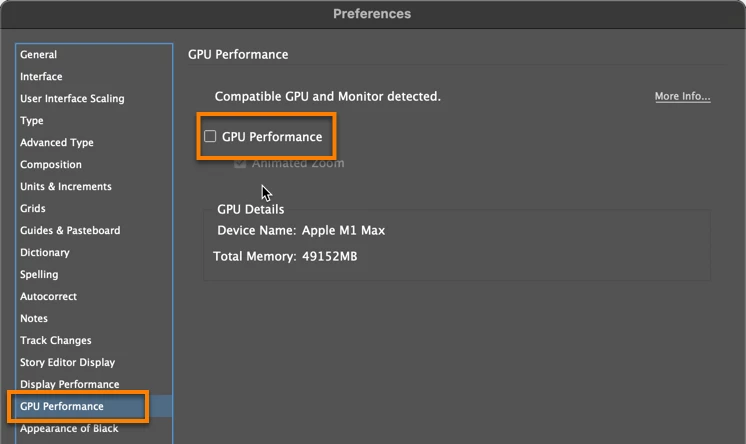
Tony, what happens if you disable GPU Performance?


~Barb


1 reply

Community Expert
July 23, 2021

Hi Jemima,


Preferences > Display Performance  >


Default View: [ High Quality ]

[  ] Preserve Object-Level Display Settings


Adjust View Settings [ High Quality ]

[ x ] Enable Anti-aliasing    Greek Type Below: 0 pt


Regards,
Uwe Laubender

( ACP )

Participating Frequently
October 4, 2024

Hi Uwe,

These issues (font pixelation... not sure about images at this stage) still persist after using suggested settings.

Staff at my school advised others are experiencing the same issue...


is Adobe resolving this issue??

James Gifford—NitroPress
Legend
October 4, 2024

Note that this is a three-year-old thread. Still, it's generally good to continue a topic rather than start yet another one. 🙂


This is not a common issue with InDesign and as far as I know and recollect, nearly all of the problems and solutions lie with user systems — OS, video system, drivers, display, settings etc.


Details about your system — platform, OS version, ID version, screen resolution — can help.


The first question, though, is does this happen with all fonts? For example, does it happen with the Adobe/ID standard fonts Minion Pro and Myriad Pro? Or is it only with select fonts, perhaps one your school distributes or uses for all projects? Because honestly, those screen caps look like poor font rendering (rather than screen resolution or other system issues). Checking with "known good" fonts is a start.