mcguiganj790988
Participant
April 20, 2017
Answered

Body Page View

  • April 20, 2017
  • 1 reply
  • 718 views

I am trying to figure out why my body page view is changing between files when I synchronize my book. I think I have narrowed it down to when I am updating my Page/Section numbers. All files have the same setting:
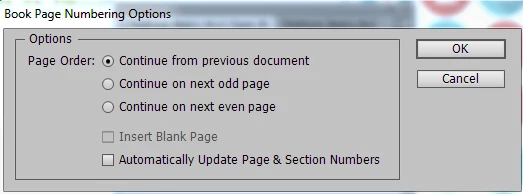
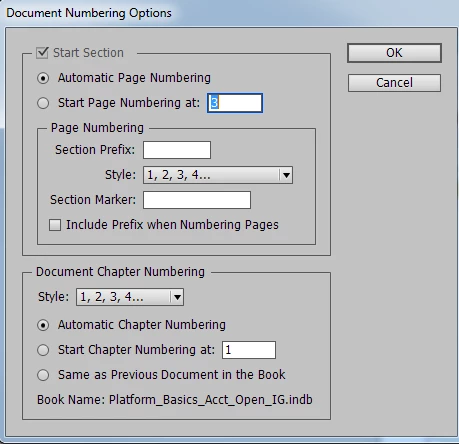
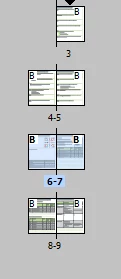
But starting on the fourth module my body page panel view changes from starting with the page on top to side by side:
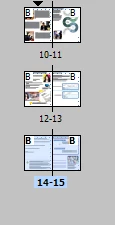
Does anyone no how I can switch my view back to the first one with the page on top?  It tried pasting the content into another blank template...but it keeps happening....the first three module are fine...but the second image starts in the fourth module and impacts any that come after. Thanks so much.

This topic has been closed for replies.
Correct answer rob day

If you want all of the book parts to start on a right page they will all have to have an even number of pages. In your example it would have to be pages 3-10 for part 1, and pages 11-14 or 11-16 for part 2. You would set the start page for part 2 to page 11.

1 reply

rob day
Community Expert
rob dayCommunity ExpertCorrect answer
Community Expert
April 20, 2017

If you want all of the book parts to start on a right page they will all have to have an even number of pages. In your example it would have to be pages 3-10 for part 1, and pages 11-14 or 11-16 for part 2. You would set the start page for part 2 to page 11.

Known Participant
April 20, 2017

Thanks Rob...it's really just a view issue....see how on the left image page 3 is up above starting on the right.....and page 10...(sorry bad examples with the page numbering...is down one the full spread...trying to figure out how to not have the pages start on the spread view and give me that staggered first page on top view. It prints fine...but it's more a workflow issue...we build Instructor information on the left and participant on the right so we know that it will print correctly. The top page format helps us with that. The other thing I should have mentioned...but didn't think it was relevant..is I am using threaded text frames to show/hide/collapse/expand content and the page numbering is set differently between books. The PG goes from one file to the next and the IG is set to start over at page 1....When I built the IG book...and updated the page/section numbering...that's when it did this funky page view layout change....not sure if that helps.

I want to get my page panel view to layout like the first three mods as follows:

not a side by side spread

Legend
April 20, 2017

What I see is expected behavior. Page 9 is on the right, so page 10 would have to be on the left. If you want your new section to begin with an odd-numbered (right-hand) page, then the section before it has to begin with an even-numbered (left-hand) page.