
Participant
April 17, 2025
Question

Bold text "sticking" for first word following GREP phrase

  • April 17, 2025
  • 3 replies
  • 597 views

Newbie GREP user here. Please forgive any bonehead assumptions on my part.


Hundreds of footnote citations in my document end with a unique file code that corresponds to a digital image. Example: [B1234]


About 25% of those footnotes cite multiple sources, requiring a "stacked" format. Most also end with their own unique file code.


I set up the footnotes paragraph style to include a tab for the beginning of the second and third citations. Works like a charm. Next, I added a GREP style to make the file codes bold (see image below).


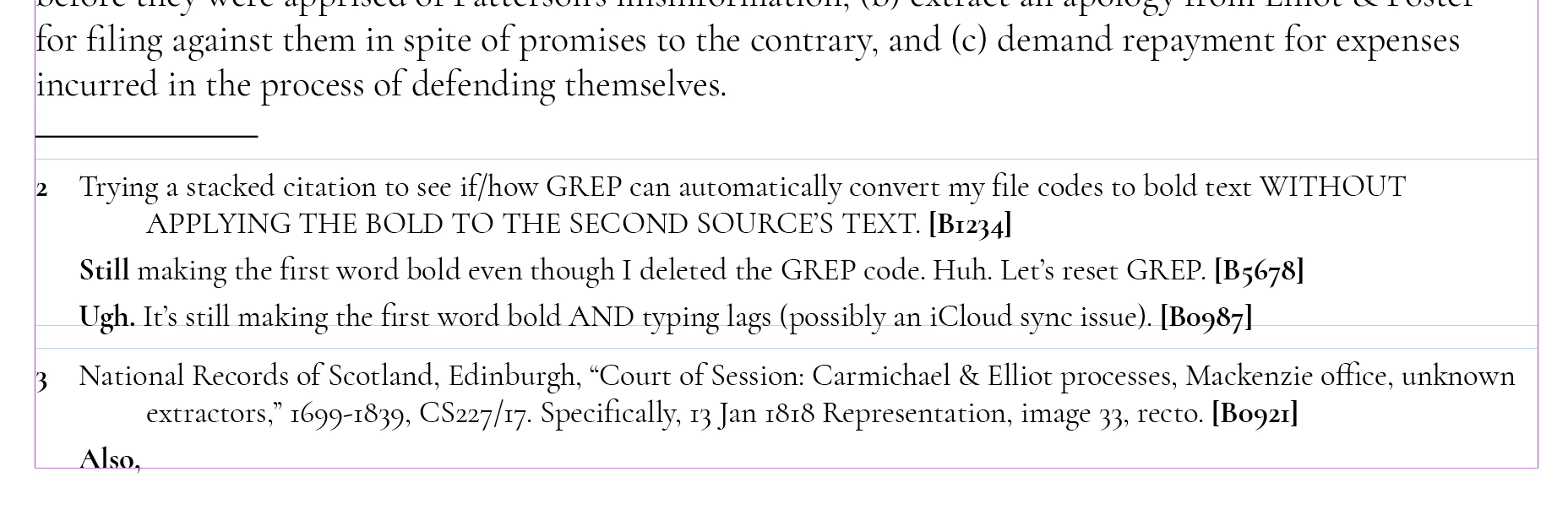
The tabs still work but.... Any idea why GREP is also converting the first word that follows a file code to bold text? This is driving me batty.

 

3 replies

Legend
April 18, 2025

Character style "Bold" may be explicitly applied to text, e.g. from manual edits before you had the grep style.


Use a different style for the grep style's "Apply Style", e.g. style "Red".

Then use the Find/Change Text dialog to search for applied cstyle "Bold".


Mike Witherell
Community Expert
Community Expert
April 18, 2025

What happens if you try:

\[.+\]+?

Mike Witherell
Participant
April 18, 2025

Oh, how I do appreciated each of you chiming in! To run through the questions posed above:


@Willi Adelberger 

  • I've attached a screenshot below that includes hidden code.
  • I created a "Bold" Character Style then selected it in "Apply Style" (just above the field where one types the GREP code).
  • Thanks for the suggestion to consider nested styles (something I haven't worked with...yet). 

@Robert at ID-Tasker 

  • This is the only GREP style in the entire document. 

@Mike Witherell 

  • That's soooooo much cleaner than my stringy creation. Oddly, I'm still seeing the first word of the next paragraph in bold, though. 


I went as far as to completely delete the "Bold" Character Style, then recreate it, thinking something buggy was happening there. No change.  Took out the tab in the footnotes Paragraph Style (used for the second and third citations), but no impact there either.


It's a relief to know I got my first GREP right, but sheeeeeeesh, whatever gremlin is hiding in here really has me stumped. 


FRIdNGE
April 18, 2025

What you don't tell us is how you make "bold" the footnote number!  😉


(^/)  The Jedi

Participant
April 17, 2025

Huh. No bold applied to text immediately following the code--only to the first word of the next paragraph (using the same paragraph style). 

Willi Adelberger
Community Expert
Community Expert
April 17, 2025

Can you show us the invisible vharacters?

How did you apply the bold to the code? I would do it via nested style from [ to ].