


Participating Frequently
July 18, 2022
Answered

Book Index page reference content help

  • July 18, 2022
  • 2 replies
  • 372 views

I have been using InDesign to create a series of magazines -- so far 16 issues, ~600 pages total. I have added my indd files to a book file, created an index doc and made an index. However:


The page numbers in each issue start at 1, so the index shows lots of low-numbered entries, but no indication of the issue number. How can I tell ID to include something more than the page-within-issue number?


A Text Variable "Issue Number" in each issue gives its issue number "187" and is used in other places. So ideally each page ref would appear as, e.g. 187:23 for Issue 187 page 23.


I don't want the printed page number in an issue to change (i.e. 1...N), not (187-1...187-N).
This topic has been closed for replies.
Correct answer Barb Binder

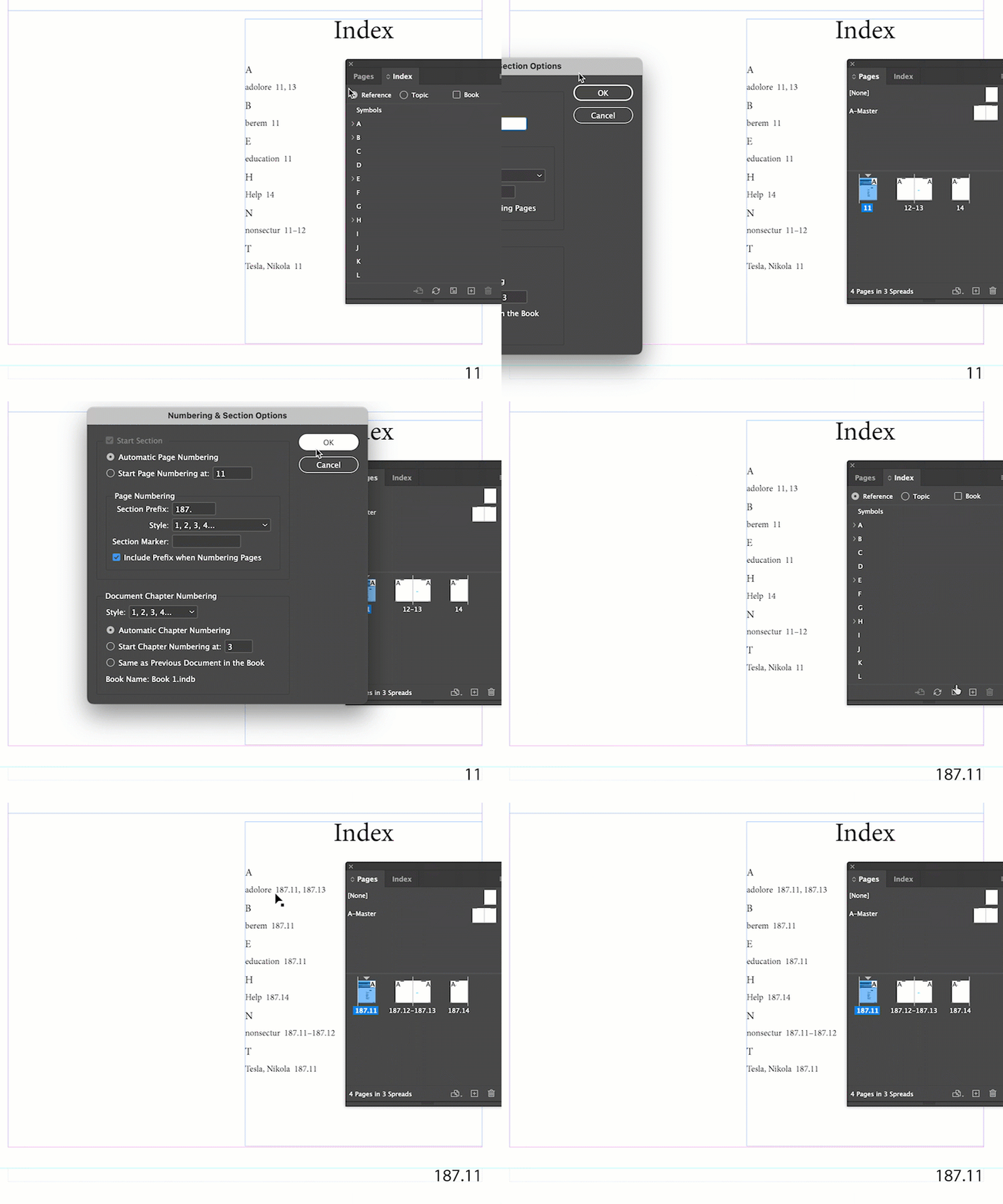
Well, yes. You can set up the section prefix for each file in the Pages panel (use Numbering and Section options), but the prefix will appear in the running head as well as in the index.


~Barb


2 replies

Barb Binder
Community Expert
Barb BinderCommunity ExpertCorrect answer
Community Expert
July 20, 2022

Well, yes. You can set up the section prefix for each file in the Pages panel (use Numbering and Section options), but the prefix will appear in the running head as well as in the index.


~Barb


~Barb at Rocky Mountain Training
Participating Frequently
July 26, 2022

Using the Section prefix is what I ended up doing, but as Barb noted it is imperfect because the files then include printed page numbers with that prefix too. This is acceptable only in that those files have been sent to print already.

Barb Binder
Community Expert
Community Expert
July 18, 2022

Hi Ruth:


Unfortunately that's not how InDesign works. When you generate a table of contents or an index, InDesign will pull the page numbers in along with any designated section prefix. That designated section prefix will appear in three places: in the Pages panel, in the running head and in the generated file. There is no way to automatically add a cross-reference in front of each page number in the generated file, and there is no way to hide the section prefix from the running head if you want it to appear in the generated file. 


You can file a feature request here: https://indesign.uservoice.com


~Barb

~Barb at Rocky Mountain Training
Participating Frequently
July 20, 2022

Barb, thanks for your reply. Is there any way I could use the section prefix somehow? I'm not very familiar with it (not really having the need so far). There being relatively few documents I could manually copy the issue number into some other config item.