Book pallet doesn't show actualised page numbers
InDesign version: 13.1 x64
Problem: Book pallet doesn't show actualised page numbers after forcing update of pagemubers
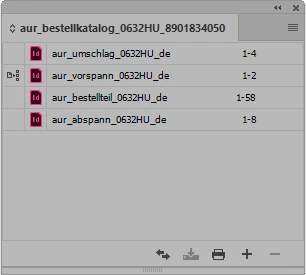
The page numbers are actualised in all documents, but the book pallet does not show the new numbers.
The numbering is executed correctly in all part documents, starting from 1 in the first document and
ending with 70 on the last page of the last document.
The page pallet (with the thumbnails of all pages) shows the same error:
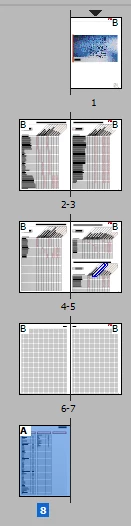
Page 8 is page 70, correctly shown on the page.
I already tried to make a new book file, I added the documents and when I start page numbering,
the same error occurs.
I already tried the same in CC 17 and there the book pallet shows correct page numbers after numbering.
So the part documents should be correct. Is there a bug in 13.1 version?
Has anybody an idea what's going wrong?
And maybe how to fix it?
 AdChoices