Participating Frequently
October 7, 2021
해결됨

Booklet printing in Indesign

  • October 7, 2021
  • 5 답변들
  • 1981 조회

Hi 

I am trying to print 4pp A4 on 7800 xerox phaser using Print booklet in indesign?

All I am getting is pages 1&2 printed on the A3 with blank for pages 3&4?

이 주제는 답변이 닫혔습니다.
최고의 답변: rob day

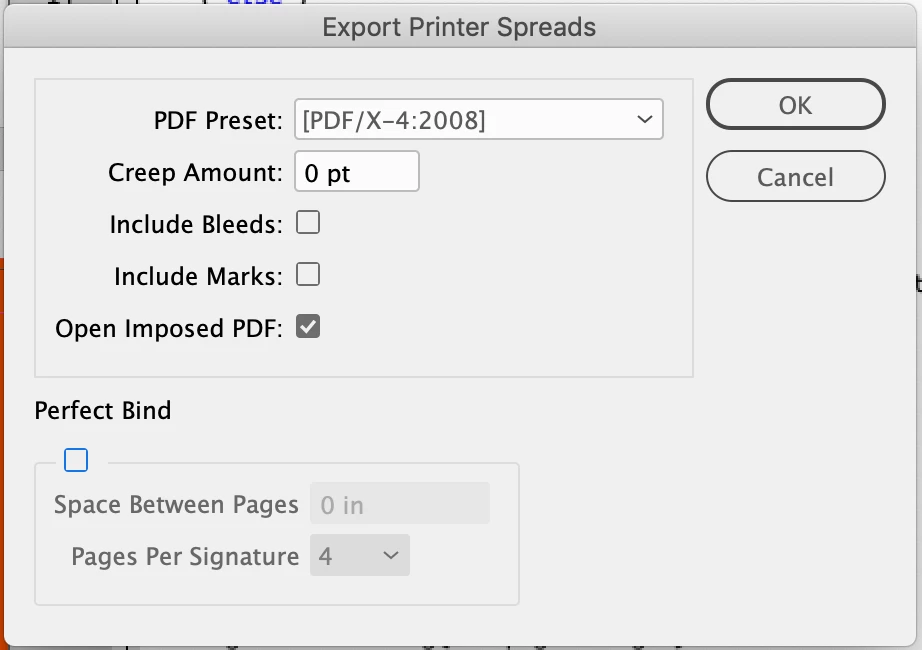
You are also welcome to try this imposition script, exports imposed 2-up printer spreads for saddle stitch or perfect binding:


https://shared-assets.adobe.com/link/3bfdb004-f188-4f3d-5904-d82dd8f8e2d1


Setup dialog:


5 답변

rob day
Community Expert
rob dayCommunity Expert답변
Community Expert
October 7, 2021

You are also welcome to try this imposition script, exports imposed 2-up printer spreads for saddle stitch or perfect binding:


https://shared-assets.adobe.com/link/3bfdb004-f188-4f3d-5904-d82dd8f8e2d1


Setup dialog:


petem52078592작성자
Participating Frequently
October 8, 2021

Thanks Rob

Much appreciated


Take Care!!

Peter Spier
Community Expert
Community Expert
October 7, 2021

I mentioned earlier that I use a script for imposing (then export the imposed file to PDF for printing). I have two scripts written by Dave Saunders years ago, one for files without bleeds, the other for files with. Both still work fine, and are very fast. Dave has taken down his downloads page, but I don't think he would mind if I share them with anyone who wants them.

Peter Spier
Community Expert
Community Expert
October 7, 2021

I mention this only because I find this gets a larger booklet off the printer much faster than using the booklet printing features of Acrobat or the various print drivers.

Jumpenjax
Community Expert
Community Expert
October 7, 2021

I have a canon printer and found that if I choose print instead of print booklet from InDesign. Then choose booklet on the canon printer output, it solve this issue. I have to use what I have, but it works.

Lee- Graphic Designer, Print Specialist, Photographer
Legend
October 7, 2021

I have found the same with our bizhub printer. It seems that there are no settings from the InDesign Print Booket that will work properly with this printer, but the Booklet printing built into the print driver works.

petem52078592작성자
Participating Frequently
October 8, 2021

Thanks 

Much appreciated


Take Care!!

Community Expert
October 7, 2021

Best bet is to export the document to PDF

Then use Acrobats built in booklet printing feature.

petem52078592작성자
Participating Frequently
October 7, 2021

Thank you 👍

Peter Spier
Community Expert
Community Expert
October 7, 2021

Sounds like you aren't sending all the pages to print.

I prefer to use a script to impose booklets (though with only four pages it's pretty easy to do it manually by placing your pages into a new document set up on A3), then export to PDF and print that. What version of ID are you using?

petem52078592작성자
Participating Frequently
October 7, 2021

Hi Peter

Thanks for this, I have now created a PDF and can print in booklet from the PDF and this works print all 4pp

But, the second side is up side down?

I tried all sorts of differnt ways in the PDF settings and the printer settings but cannot get the inside pages 2&3 to flip to match pages 1&4?

I am using the latest CC indesgn