Known Participant
October 27, 2022
Answered

Booklet printing in InDesign is not creating postscript in correct page size

  • October 27, 2022
  • 2 replies
  • 639 views

I can't get booklet printing in InDesign to print a postscript/PDF in the correct paper size. It has always worked correctly before. All the correct information is in the preset with the custom paper size but instead of the PDF being in the custom paper size, it's 8.5x11.
This topic has been closed for replies.
Correct answer Mike Bro

@ericar13 


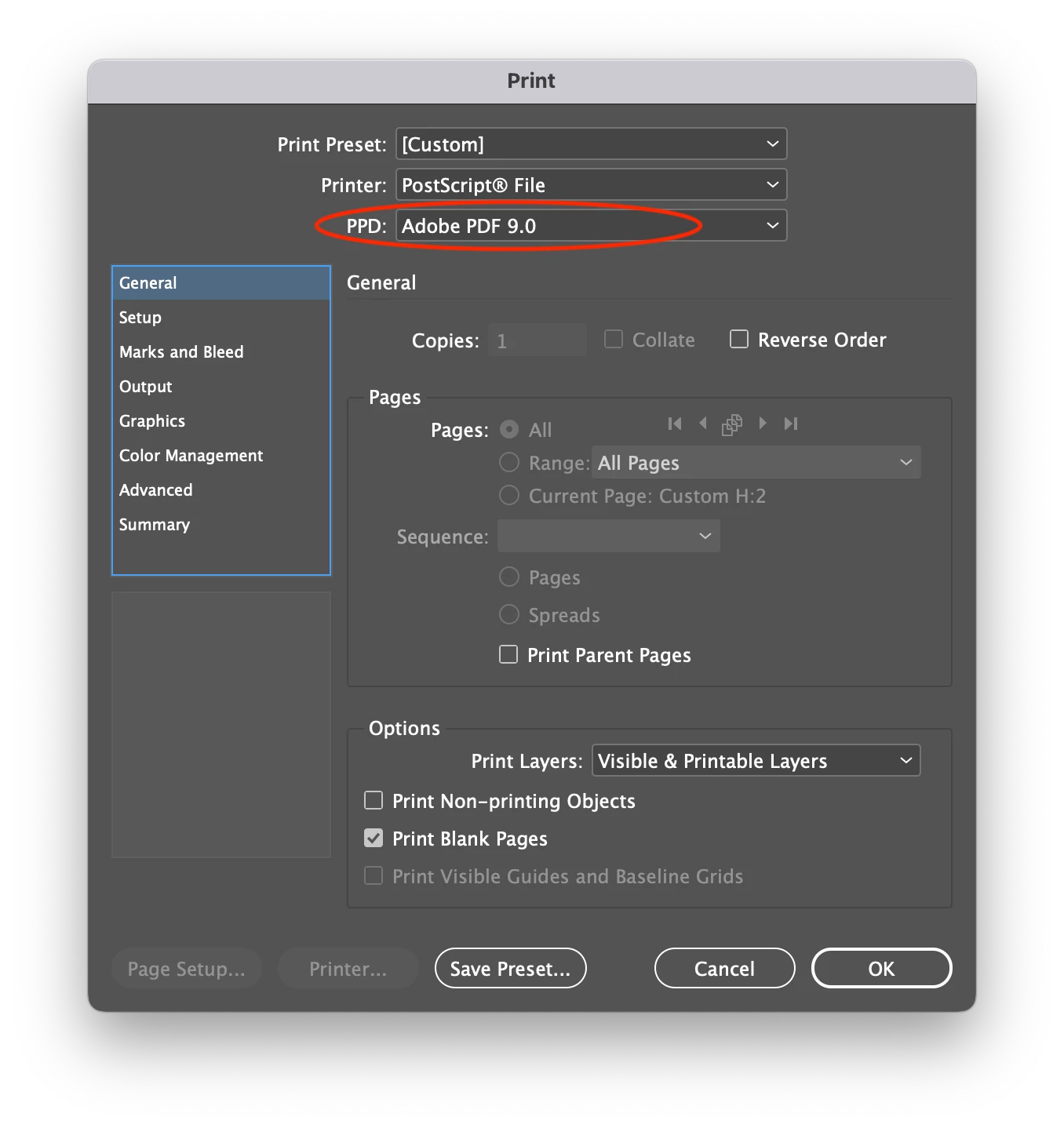
To go along with @Brad @ Roaring Mouse's question, you should be using the ADPDF9.PPD for printing PS files under the Print Booklet/ Printer Settings.

If you don't have the Adobe PDF 9.0 as an option under the Printer Settings, you can download the PPD from the link below and put it here: Applications/Adobe InDesign 2022/Presets/PPDs.

If the PPDs folder doesn't exist just creat it.

https://helpx.adobe.com/indesign/kb/add-acrobat-ppd.html


Regards,

Mike


2 replies

Mike BroCorrect answer
Legend
October 28, 2022

@ericar13 


To go along with @Brad @ Roaring Mouse's question, you should be using the ADPDF9.PPD for printing PS files under the Print Booklet/ Printer Settings.

If you don't have the Adobe PDF 9.0 as an option under the Printer Settings, you can download the PPD from the link below and put it here: Applications/Adobe InDesign 2022/Presets/PPDs.

If the PPDs folder doesn't exist just creat it.

https://helpx.adobe.com/indesign/kb/add-acrobat-ppd.html


Regards,

Mike


ericar13Author
Known Participant
November 4, 2022

Thanks, Mike

As I told Brad, it uses my printer as PPD, anything else and it won't allow custom paper sizes. We set this up a number of years ago when the comapny I was working for decided to do in-house printing for single foreign languages. If the set-up didn't link to a physical printer it wouldn't work. 

Legend
November 4, 2022

 So, did you try installing the recommended PPD? Or just assume it won't work?

Brad @ Roaring Mouse
Community Expert
Community Expert
October 28, 2022

What PPD are you using?

ericar13Author
Known Participant
November 4, 2022

It uses my printer as PPD, anything else and it won't allow custom paper sizes. We set this up a number of years ago when the comapny I was working for decided to do in-house printing for single foreign languages. If the set-up didn't link to a physical printer it wouldn't work. 

Brad @ Roaring Mouse
Community Expert
Community Expert
November 5, 2022

Actually, using the PPD for your actual printer is good if that's what you will be printng to. It knows the possible page sizes it can do. Otherwise, use the generic Adobe PDF 9.0 version suggested!