Participating Frequently
September 11, 2018
Answered

booklet with only 1 numbering on 2 pages

  • September 11, 2018
  • 2 replies
  • 968 views

please guys need help, i want to have the layout from left to right

i know i can manully set start number but this has 600 pages,,,,,,,,,,,

it has to be folded so resize wont do cause it's double sided.

    This topic has been closed for replies.
    Correct answer winterm

    Artboards?


    Artboards?

    Illustrator's terminology. We should read Artboards as Pages here, I think.

    @OP

    it lose the back. Not double sided anymore

    So you need your 'back' on a dedicated page? For imposition, most likely? And you want that page excluded from auto page numbering? As [Jongware] said, you are fighting InDesign's standard page model.

    Well, another option here - 'the best of two worlds':

    1. follow the 3rd option, compose your document page as a 300 wide landscapes 'one for two', make standard auto page numbering. Save file, optionally - export to pdf.

    2. Create brand new doc, but now set up it with Facing Pages in a spreads. 600 pages, 300 spreads.

    3. Place your indd/pdf file from pt.1. I'd recommend a free MultiPageImporter script for that. Google for it.

    4. Voilà, you have a doc with Facing Pages setup as you want, and with sequential page numbers on a left pages only.

    5. Export pdf for printer, ready for imposition.

    It's a big project, and your demands are not that standard. Don't expect it done 'in one click'.
    2 replies

    TyDGAuthor
    Participating Frequently
    September 11, 2018

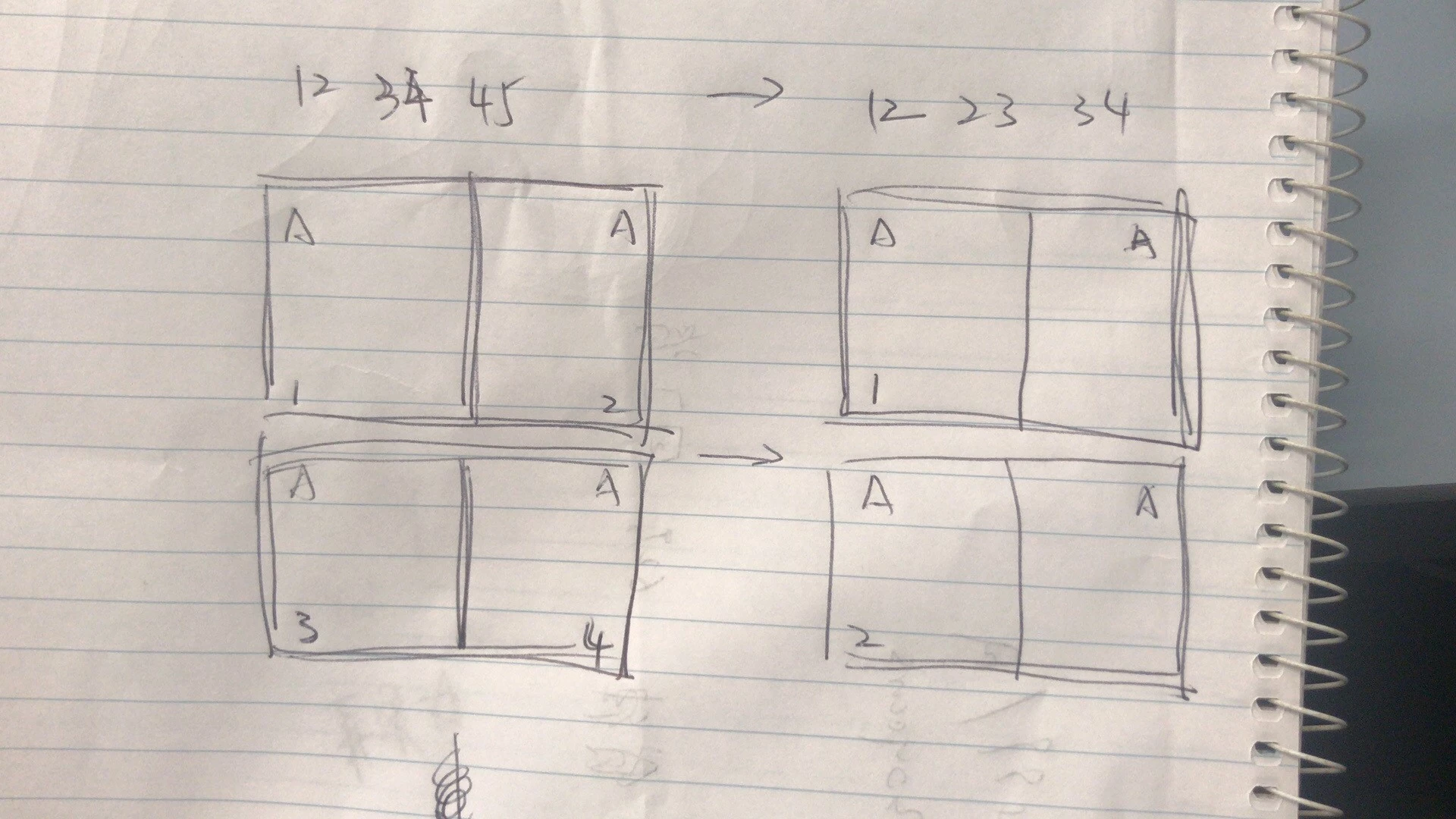
    hi there. Thanks for reply so i have this two sided document need numbering from 1-600  So I ticked fold when setting up the docu which gives me 2 artborad for left page and right page. Now when I put numbering system on master it gives me odd number on left and even on right by default.  

    my question was how to skip the 2 on the right but have 2 on the actual third page. That is what my graph is for.

    Jongware
    Community Expert
    Community Expert
    September 11, 2018

    InDesign does not do that by itself.

    Option 1: set each page number manually, as its starting page.

    Option 2: forget about automatic page numbering. Create a file with your list of numbers from 1 to 600, and place this on the left hand pages.

    Option 3: I may be missing something because your typing seems somewhat breathless and in a hurry, so maybe you explained it and maybe you did not. But why, if you need single pages (with a single page number on the left), did you set up your document as Facing Pages to begin with, if you are going to treat them as if these are one single large page? InDesign is not fighting your design ideas, you are fighting InDesign's standard page model.

    TyDGAuthor
    Participating Frequently
    September 11, 2018

    Yeah I did go with option 1 though. It was painful.

    And I actually did try option 2 but still I need to click 600 times to place On to each page

    option 3 though. If I’m getting this right. I tried to set up as one whole artboard the it lose the back. Not double sided anymore

    anyway thanks a lot

    Derek Cross
    Community Expert
    Community Expert
    September 11, 2018

    Sorry but I don't understand (maybe others do!) – can you rephrase the question.

    (Are you intending to print this yourself on your desk-top duplex printer, but if it's to be commercially printed the printer will do the imposition.)

    TyDGAuthor
    Participating Frequently
    September 11, 2018

    And I know I can right click on the third page and type start chapter from 2 but I have 600 pages. Hope this will help u understand.