Participating Frequently
August 29, 2017
Answered

Bookmarks in Publish Online not working

  • August 29, 2017
  • 3 replies
  • 2683 views

I have an auto-generated table of contents (Layout > Table of Contents... > Create PDF bookmarks is checked) but when I Publish Online and view in Safari none of these bookmarks are working. Does Publish Online not support this? I'm using InDesign CC 2017.1. Thanks for your help.
    This topic has been closed for replies.
    Correct answer Barb Binder

    Create PDF bookmarks is checked

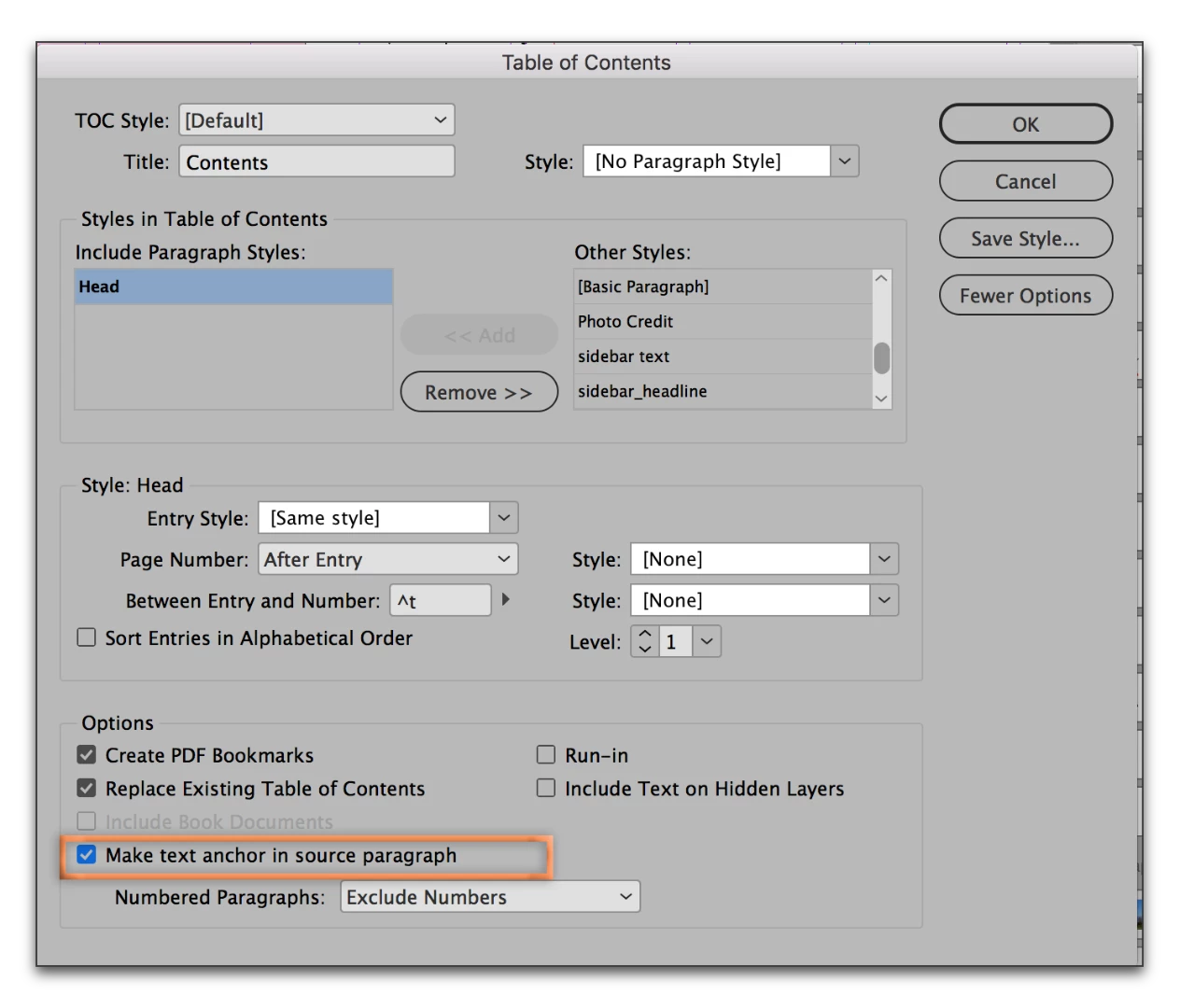
    Publish Online creates an HTML5 document and not a PDF. Go back and enable Make text anchor in source paragraph in the Table of Contents dialog box. If you don't see it, click More Options on the right side (where mine shows Fewer Options). Then publish again and replace the original.

    3 replies

    Jbarrigon
    Inspiring
    August 30, 2017

    The bookmarks created from a table of contents are for when exporting to PDF, not to publish online, i think you can try to use hyperlinks in the publish online version, you can activate the option for users to download a pdf version of the publish online document but there im not sure if the bookmarks you created will work with this pdf, you can do some test.

    Barb Binder
    Community Expert
    Barb BinderCommunity ExpertCorrect answer
    Community Expert
    August 30, 2017

    Create PDF bookmarks is checked

    Publish Online creates an HTML5 document and not a PDF. Go back and enable Make text anchor in source paragraph in the Table of Contents dialog box. If you don't see it, click More Options on the right side (where mine shows Fewer Options). Then publish again and replace the original.

    ~Barb at Rocky Mountain Training
    Participating Frequently
    August 30, 2017

    Hi Barb,

    Yes, I know PO turns into HTML but was hoping somehow there was a way to make the TOC bookmarks come over to it and your solution works perfectly. The TOC links in the downloaded PDF work great too.  Thanks so much!

    Barb Binder
    Community Expert
    Community Expert
    August 31, 2017

    Terrific! Glad we could help.

    ~Barb

    ~Barb at Rocky Mountain Training
    Om Nath Jha
    Legend
    August 29, 2017

    Hi there,

    Did you check your published document in a different browser like Chrome? If not, please do and share your findings.

    Regards,

    Om

    Participating Frequently
    August 29, 2017

    Tried it in both Firefox and Chrome, still isn't working.