Participating Frequently
September 22, 2021
Question

Bookmarks repeat in PDF exported from InDesign book

  • September 22, 2021
  • 2 replies
  • 352 views
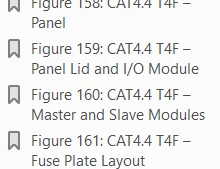
My InDesign book has 10 sections and 161 figures. In the exported PDF’s bookmark panel, after the bookmark titled Figure 161, the bookmarks (from Section 2: Control Panel through Section 7: Maintenance) get repeated, please see below: 
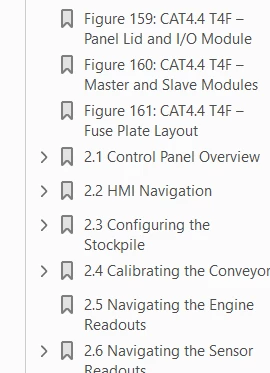
 
(continued...)
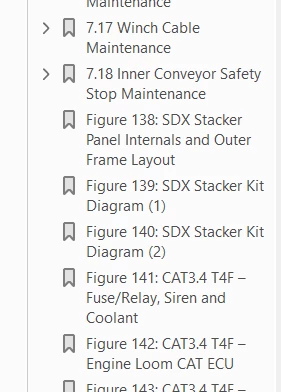
 

At the end of Section 7 bookmarks above, the bookmarks of Figure 138 until the last Figure 161, get repeated. 


How can I resolve the bookmarks that repeat in my PDF?


Thanks in advance for your help.


You need to ask program questions in the forum for the program you are using
To ask in the forum for your program please start at https://community.adobe.com/
Moving from Using the Community (which is about the forums) to the correct forum... Mod


2 replies

Community Expert
September 23, 2021

So do you have multiple TOCs in your book project? Do they show the figures statements that are repeated as bookmarks?

If yes, can you show the settings of the TOC Styles you are using for the two TOCs that share the same output?


If the cause are two overlapping TOCs you could try to turn off bookmarks at output in one of the TOCs.


Regards,
Uwe Laubender

( ACP )

Community Expert
September 23, 2021

Hi Ariz0101,

if you open the Bookmarks panel in each and every InDesign document of the book file, could you see entries that match others in the other documents? You could remove the double ones from the InDesign Bookmarks panel.


A possible cause could be a multitude of Table Of Contents (TOCs) that automatically create the double entries.


Regards,
Uwe Laubender

( ACP )

Ariz0101Author
Participating Frequently
September 23, 2021

Thanks, Laubender, for responding and providing your feedback. I notice one of the documents in my InDesign book does not show bookmarks. How can I get those to show up? FYI, each of the book's remaining documents show bookmarks without any duplicates. Regarding your point about  multitude of Tables Of Contents (TOCs) that automatically create the double entries, if so, am not sure how to work around that. Could you please let me know? Thanks.