Answered
Booths and Lists
I'm working on a floor layout for an event with squares representing booths. Is there a way to set it up so that if I change the number of the booth on figure 1 it is reflected in the list on figure 2?
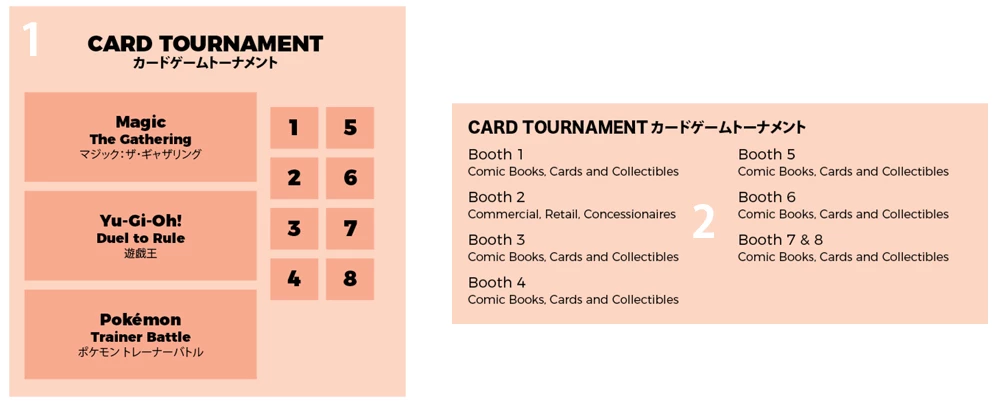

I'm working on a floor layout for an event with squares representing booths. Is there a way to set it up so that if I change the number of the booth on figure 1 it is reflected in the list on figure 2?
You can create Variables in Indesign to reflect the booth numbers.
Steps to create variable -
1. Select the current booth number and create a new paragraph style out of the booth number. (you will have to do this for each of the booth numbers).
2. Than go to Indesign Menu > Type > Text Variable > Define.
3. Than Select the option to create "New.." Variable from the option box of Define.
4. Name the variable and than change the type to "Running Header (Paragraph Style)" from drop down list. Than select the style name you have made in Step number 1 and click ok..leaving all the other setting default.
5. Insert the cursor inside the other text box where you want to show the booth number and than go to Menu > type > text variable > Insert Variable > Select the name of variable you have created.
Now if you will change the variable value in the previous text box than it will update the value of variable in the another text box.
Note - If indesign does not reflect the updated value of variable on the page than double click the page in Page panel or zoom in & out to refresh the page to reflect the updated value of variable.
You can also looked at the video (no audio) to follow the steps - Indesign Variable for Numbering - YouTube
Already have an account? Login
Enter your E-mail address. We'll send you an e-mail with instructions to reset your password.
 AdChoices