
Participant
January 21, 2022
Answered

Brackets and symbols on wrong side of text ( Arabic ) Equal fix found in Photoshop

  • January 21, 2022
  • 1 reply
  • 323 views

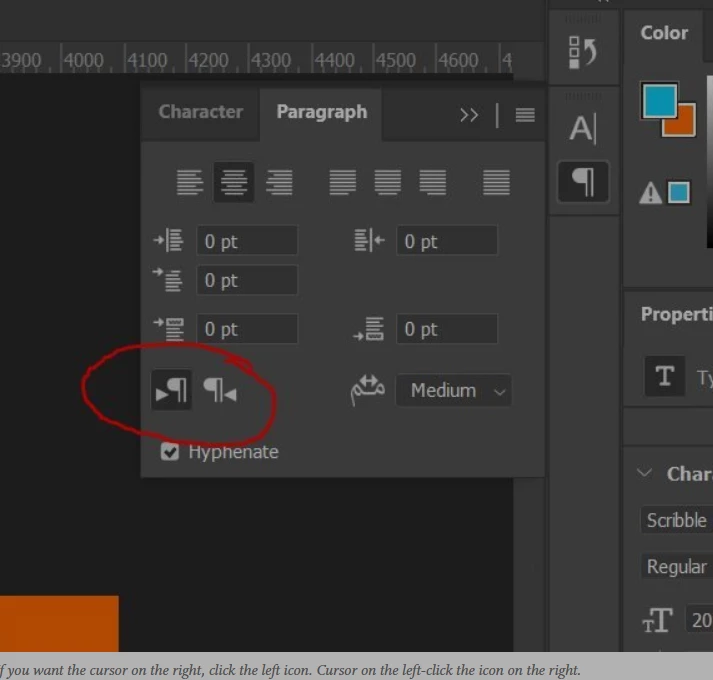
Where can I find the equal setting in photoshop for Indesign ?
I have arabic text that is justified correctly but the brackets and symbols are on the wrong side. Where can I find the attached image settings in Indesign 
 

This topic has been closed for replies.
Correct answer Anshul_Saini

Hi there,


Thanks for reaching out. To get these options, you will need to install the MENA (Middle East and North African languages) edition of InDesign. The steps are here - (https://helpx.adobe.com/indesign/kb/access-install-hebrew-arabic-indesign-illustrator-CC.html). Once you install the MENA edition, you will be able to change the text direction. The Steps are here - (https://helpx.adobe.com/indesign/using/arabic-hebrew.html#:~:text=and%20Hebrew%20names.-,Text%20direction,-To%20create%20content). I hope it helps!


Kindly update the discussion if you still need assistance with it. We'd be happy to help.


Thanks & Regards,

Anshul Saini

1 reply

Anshul_Saini
Community Manager
Anshul_SainiCommunity ManagerCorrect answer
Community Manager
January 30, 2022

Hi there,


Thanks for reaching out. To get these options, you will need to install the MENA (Middle East and North African languages) edition of InDesign. The steps are here - (https://helpx.adobe.com/indesign/kb/access-install-hebrew-arabic-indesign-illustrator-CC.html). Once you install the MENA edition, you will be able to change the text direction. The Steps are here - (https://helpx.adobe.com/indesign/using/arabic-hebrew.html#:~:text=and%20Hebrew%20names.-,Text%20direction,-To%20create%20content). I hope it helps!


Kindly update the discussion if you still need assistance with it. We'd be happy to help.


Thanks & Regards,

Anshul Saini