



dondotreid
Participant
August 19, 2026
Question

braille

  • August 19, 2026
  • 3 replies
  • 87 views

I’ve been using a competing vector program for creating braille signage and wondered if there was any plans on having this be something Illustrator or Indesign could incorporate natively so that I can stop using the other program entirely? 

The workflow currently with adobe products is:

  • go to some conversion web page like brailletranslator.org
  • paste text in for the conversion, copy results
  • go back into my Indesign doc using a braille font with a CA Standard paragraph style (that I’ve created)

This works for making 1-10 signs, but I’d prefer to have this be something I was able to merge from a CSV file as we typically need to create 100 individual signs at a time--which the competing program will also not do. It does however have a TEXT TO BRAILLE and BRAILLE TO TEXT option from the TEXT menu and a panel that looks a little like this:  
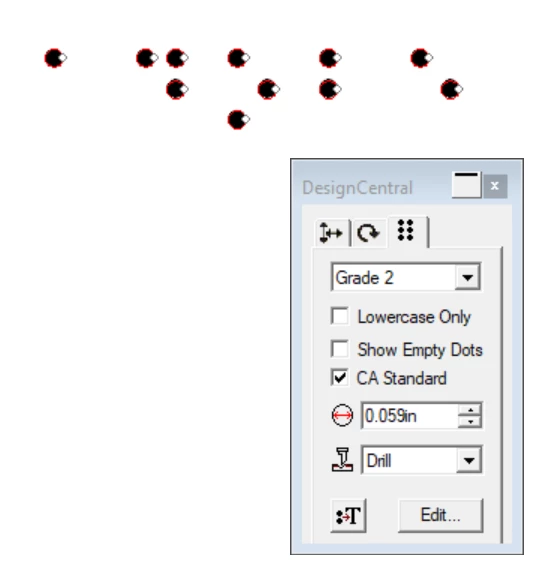
    3 replies

    Participant
    August 30, 2026

    Yeah, the CSV part is really the frustrating piece here. For a smaller number of signs, the text → Braille → InDesign workflow is manageable, but doing it 100 times gets tedious very quickly.

    For the conversion step, I’ve also been using browser-based Braille translators rather than relying on the font itself, since the font mainly handles how the Braille characters are displayed. The important part is making sure the correct Braille table/grade is being used before putting the result into InDesign.

    If you're mainly working with UEB, BrailleDot is another online translator worth trying for the conversion step: https://brailledot.com/ This is my recent find and make my workflow smooth. Hope it will help you too :)

    Community Expert
    August 20, 2026

    @Dave Creamer of IDEAS  Yes, use the standard braile fonts at size 10mm font size (28.346 pt) and 10mm leading as is pretty much standard anywhere I’ve seen or used it. 

    Most braille systems have a braille grid that you align to, so this works well. 

    Dave Creamer of IDEAS
    Community Expert
    Community Expert
    August 19, 2026

    Great subject! However, I have a dumb question based purely on my ignorance…

    Couldn’t a Braille font do what you want? 

    For example: https://www.pharmabraille.com/support/how-to-use-your-pharmabraille-braille-font-set/

    David Creamer: Community Expert (ACI and ACE 1995-2023)