

Robert at ID-Tasker
Legend
March 15, 2025
Question

Brain teaser - Whac-A-Mole Table??
  • March 15, 2025
  • 2 replies
  • 743 views

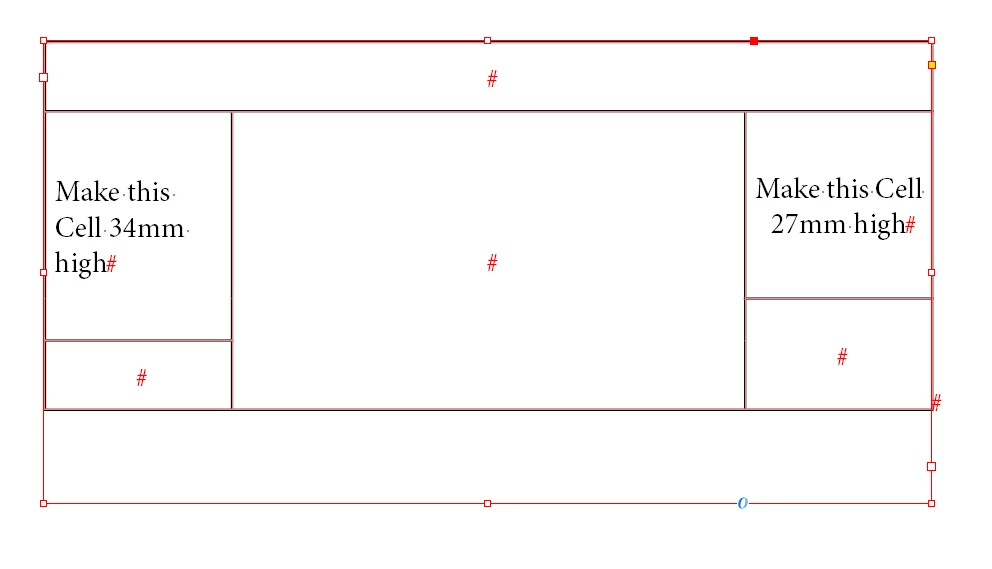
I've no idea how to do this...


I've tried to unmerge cells - and set different "At Least" / "Exactly" options - then merge again...


Logic would dictate, that the middle part - this "invisible" row - should be "flexible" and resize dynamically - keeping the rest "constant" - but it doesn't ?!?!


It's like this Whac-A-Mole game...


2 replies

Robert at ID-Tasker
Legend
March 15, 2025

Actually - it is possible - but you won't gonna believe how crazy it is to do it...


Robert at ID-Tasker
Legend
March 15, 2025

And the "crazy" solution - switching back and forth between left and right cells and setting 34 and 27 again and again 😉 after 40 or 50 times - the error margin goes down to 34.001 and 26.999 and then there is a perfect 34 and 27 😉


Dave Creamer of IDEAS
Community Expert
Community Expert
March 15, 2025

I'm not quite following what you are looking for. The last row expands based on content. Are you looking for the two body rows to expand proportionally?

David Creamer: Community Expert (ACI and ACE 1995-2023)
Robert at ID-Tasker
Legend
March 15, 2025

@Dave Creamer of IDEAS 


As per screenshot - can you make left cell - 34mm high and right cell - 27 mm high - AT THE SAME TIME?


The last row / cells - doesn't matter.


Dave Creamer of IDEAS
Community Expert
Community Expert
March 15, 2025

David Creamer: Community Expert (ACI and ACE 1995-2023)