

dublove
Legend
August 7, 2025
Answered

Brainstorming, With script, How to transform spread rows into HEADER_ROWS or to BODY_ROWS?
  • August 7, 2025
  • 3 replies
  • 1497 views


God of all gods, come up with an good idea together.


Hi m1b.

I am sorry, I still couldn't help myself. Confusion is torture.

When there is only one row in the header, it can be directly converted to a header.
like this:

var doc = app.activeDocument,
selectedRows = getRows(doc.selection[0]);
var headerRows = convertToRowType(selectedRows, RowTypes.HEADER_ROW);


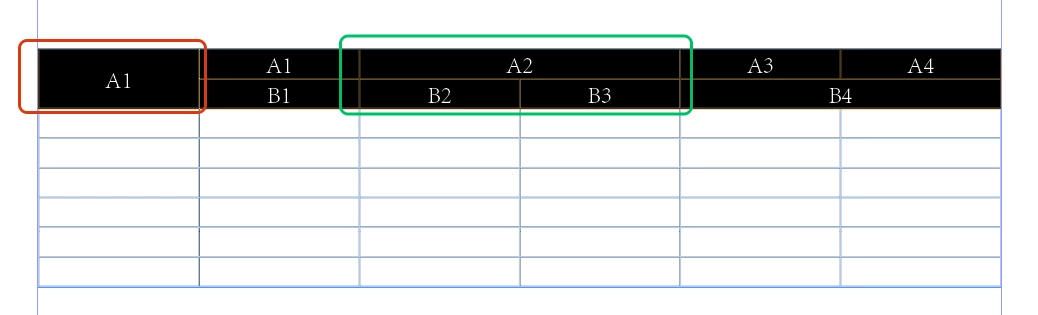
But when there are cross row columns, conversion is not allowed.

Sometimes it needs to be converted to BODY_ROWS, and sometimes it needs to be converted to HEADER_ROWS.


Correct answer Laubender

@Laubender 

Step 1: Undoing all merges is one thing.

Step 3: More importantly, you must also restore the original state before merging.


My true purpose is  add:
Step 2: Convert the selected rows into HEADER_ROW.


Hi @dublove ,

please do comments on my code here in this thread and not in a different one.

You said in this other thread:


"The code doesn't make sense, my goal is to identify the selected row (and then I'll do the table header conversion).
But it seems to return the selected table?"


https://community.adobe.com/t5/indesign-discussions/extendscript-how-to-convert-selected-table-rows-to-header/m-p/15295053#M622593


In this very thread you said:

"My true purpose is add:
Step 2: Convert the selected rows into HEADER_ROW."


That's the most easiest thing to do with a single menu action:

app.menuActions.itemByName( "$ID/To Header" ).invoke();


Regards,
Uwe Laubender
( Adobe Community Expert )


3 replies

dublove
dubloveAuthor
Legend
August 8, 2025

Hi @Manan Joshi 

Maybe you have a good idea about this.

Community Expert
August 26, 2025

Hi @dublove ,

with a selection of cells or rows in mind, you could try to undo the merge with a menu command, in scripting terms, a menuAction. The menu action's name for merging selected table cells is "$ID/kTablesMenuMerge Cells_&", for unmerging selected table cells is "$ID/kTablesMenuUnmerge Cells_&".


So, basically, if the two table rows are already selected, unmerging them in one go would be:

app.menuActions.itemByName( "$ID/kTablesMenuUnmerge Cells_&" ).invoke();


Before running the script code above:

After running the script:

The same result applies if both selected rows are header rows.


If the text frame is selected, not the table's two rows, you could run this script to unmerge all cells in the first two rows:

var textFrameHoldingTheTable = app.selection[0];
var table = textFrameHoldingTheTable.parentStory.tables[0];

var row1 = table.rows[0];
var row2 = table.rows[1];

app.select( row1 );

app.menuActions.itemByName( "$ID/kTablesMenuUnmerge Cells_&" ).invoke();

app.select( row2 );

app.menuActions.itemByName( "$ID/kTablesMenuUnmerge Cells_&" ).invoke();


Note, it's not that easy, maybe impossible, to select the first two rows of this special case in one go by scripting.


Regards,
Uwe Laubender
( Adobe Community Expert )

dublove
dubloveAuthor
Legend
August 26, 2025

@Laubender 

Step 1: Undoing all merges is one thing.

Step 3: More importantly, you must also restore the original state before merging.


My true purpose is  add:
Step 2: Convert the selected rows into HEADER_ROW.

rob day
Community Expert
Community Expert
August 7, 2025

Hi @dublove , It sounds like you are expecting row 1 to have 9 cells, but it only has 5:


//selected frame’s first table’s first row
var c = app.activeDocument.selection[0].tables[0].rows[0].cells
$.writeln(c.length)
//returns 5
for (var i = 0; i < c.length; i++){
    c[i].fillColor = "Black"
    c[i].fillTint = 20
};


dublove
dubloveAuthor
Legend
August 8, 2025

@rob day 

Note that I selected two rows at the same time.
At this point, cross-rows(spead rows) merging is involved. You need to cancel the merge first, then convert to HEADER_ROWS (or BODY_ROWS), and then restore the merge.

Anantha Prabu G
Legend
August 7, 2025

You're working with InDesign scripting and appear to be trying to convert selected rows in a table to header rows.

Design smarter, faster, and bolder with InDesign scripting.
dublove
dubloveAuthor
Legend
August 7, 2025

HI Anantha Prabu G  

Yes, do you have any good ideas?

Anantha Prabu G
Legend
August 7, 2025

@dublove 
Credits: @Peter Kahrel (CE)
https://community.adobe.com/t5/indesign-discussions/script-to-convert-first-row-of-table-to-header-row/td-p/13706458

var myTables = app.activeDocument.stories.everyItem().tables.everyItem().getElements();

for (var i = 0; i < myTables.length; i++) {
  var firstRow = myTables[i].rows[0];
  try {
    firstRow.rowType = RowTypes.HEADER_ROW;
  } catch (e) {
    alert ('Problem in table ' + firstRow.contents);
    alert (e);
  }
}


Design smarter, faster, and bolder with InDesign scripting.