shaunna-gracem60908023
Participant
January 14, 2019
Answered

Brochure help

  • January 14, 2019
  • 4 replies
  • 1081 views

I need to design a landscape brochure. Front cover, back cover etc. So like a quare half fold.  No seperate pages, we need it to be like one document. Everything I try to search for the recommended measurements adobe wants me to buy a template. Has anyone got measurements to hand for me?

Any creative cloud app - InDesign, Illustrator and Photoshop preferred.

TIA.
This topic has been closed for replies.
Correct answer Abambo

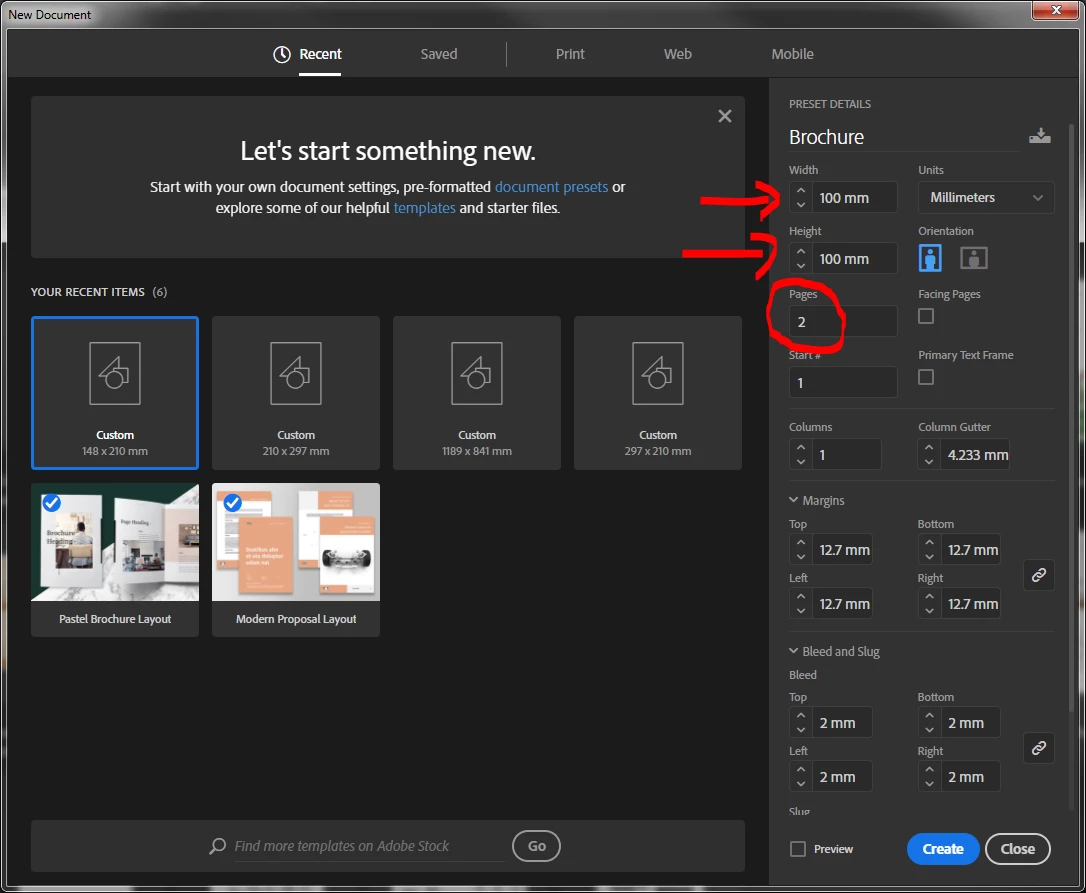
The measures are for you to determine:

Open the pages panel:

Tick off the two shuffle entries and move page 2 adjacent to page 1.

Page 1 and page 2 are now adjacent and can be exported as spread to PDF if you want. If you need a 2 fold (3 sheets) add a new page and attach to the left or right. If you need different page size, you can individualize each page as you want.

As you prefer Indesign I moved your thread from Adobe Creative Cloud​ to InDesign​.

4 replies

Srishti_Bali
Legend
January 17, 2019

Hi Shaunna,

I would like to know if the steps suggested above worked for you, or the issue still persists.

Kindly update the discussion if you need further assistance with it.

Thanks,

Srishti

Community Expert
January 16, 2019

As per the above on setting up your pages.

But it's best to start with a blank piece of paper - cut it to the size you want.

Then fold it down the way you want.

Open back up the page and take the measurements from that - and input them to InDesign.

Derek Cross
Community Expert
Community Expert
January 16, 2019

And having done as Eugene has suggested, you could the. discuss it with your printer, as Bob has suggested to ensure it‘s an economical size sheet. Sometimes by changing the size by a few mm, you can get a cheaper job, that‘s especially important on long runs.

You can lay this out as single pages, but I’d lay it out as two single pages: for each side — pages 4 and 1 on one sheet and pages 3 and 4 for the second, reverse, sheet.

Having established the trimmed page size (TPS), you enter these figures for the flat unfolded sheet, into the InDesign new document page size (untick Facing Pages) with Print as the Intent, and then add 1/8 or 3mm to each edge for Bleed. And away you go!

By the way, are you sure this job is landscape — if you get  say an A4 sheet and fold it in half you have a 4 page A5 leaflet. Add the design one way and its upright, add it parallel to the fold and it‘s landscape (like a tent card). You can have a true landscape, where (in my example) the A5 pages would be joined on the shortest edge to make an A5 landscape leaflet. If so, proceed as I’ve described earlier, but with different dimentions.

Abambo
Community Expert
Community Expert
January 16, 2019

https://forums.adobe.com/people/Derek+Cross  wrote

And having done as Eugene has suggested, you could the. discuss it with your printer, as Bob has suggested to ensure it‘s an economical size sheet. Sometimes by changing the size by a few mm, you can get a cheaper job, that‘s especially important on long runs.

That’s very true. Printers print on big sheets of paper and when they can optimize imposition, it will be cheape as they can use the full sheet in a better way.

Other consideration (also cost related): How do you get your brochure to the people? By postal service? Size matters there too.

ABAMBO | Hard- and Software Engineer | Photographer
BobLevine
Community Expert
Community Expert
January 16, 2019

Ask the printer.

John Waller
Community Expert
Community Expert
January 14, 2019

InDesign.

If you've never used InDesign before there can be a steep learning curve.

shaunna-gracem60908023
Participant
January 14, 2019

Yes, used InDesign before - just need measurements for the brochure.

Abambo
Community Expert
AbamboCommunity ExpertCorrect answer
Community Expert
January 16, 2019

The measures are for you to determine:

Open the pages panel:

Tick off the two shuffle entries and move page 2 adjacent to page 1.

Page 1 and page 2 are now adjacent and can be exported as spread to PDF if you want. If you need a 2 fold (3 sheets) add a new page and attach to the left or right. If you need different page size, you can individualize each page as you want.

As you prefer Indesign I moved your thread from Adobe Creative Cloud​ to InDesign​.

ABAMBO | Hard- and Software Engineer | Photographer