
Participant
June 14, 2022
Answered

BUG: Adobe Fonts not displaying correctly in InDesign

  • June 14, 2022
  • 2 replies
  • 487 views

What the heck happens here? InDesign displays fonts inaccurate, while Illustrator shows the right one. Please fix this, have to work.

This topic has been closed for replies.
Correct answer Willi Adelberger

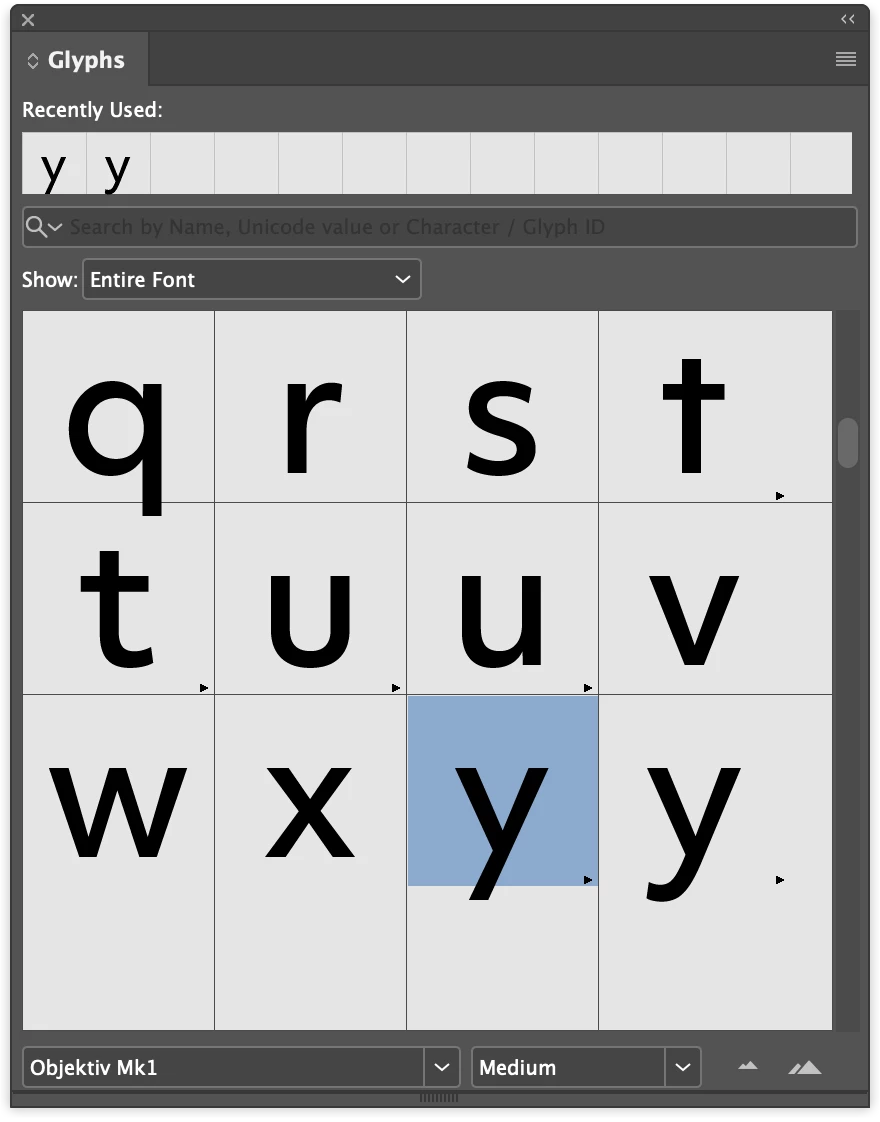
Look here in the Glyph Panel, both versions are available: 
2 replies

Community Expert
June 14, 2022

Hallo,

sieht so aus, als würde InDesign die korrekte Ansicht der Schrift Objektiv Mk1 haben.

Jedenfalls dann, wenn die Schriftschnitte über Adobe Fonts aktiviert werden.


Die Vorschau auf Adobe Fonts stimmt mit dem Ergebnis in InDesign überein:


Gruß,
Uwe Laubender
( Adobe Community Professional )

Willi Adelberger
Community Expert
Community Expert
June 14, 2022

Both are correct. This font has variations, different glyphs for the very same letter. You can change it by selecting the other one from the Glyph Panel. You can save that version you want into your paragraph or character style in the Opentype Sets.


Btw: Your command … fix this … is very unpolite for 2 reasons:

  1. It is not a bug, only a missing understanding on your side.
  2. We are not from Adobe, we are users like you.
Community Expert
June 14, 2022

Danke Willi, für die Klarstellung!

Müsste mal die Schrift aktivieren, um das nachzuvollziehen.


Gruß,
Uwe Laubender
( Adobe Community Professional )