LeCharly46
Participant
November 9, 2021
Answered

BUG AFFICHAGE INDESIGN

  • November 9, 2021
  • 2 replies
  • 1775 views

Bonjour à tous,

Depuis l'installation de la version 2022, l'ensemble de mes blocs (images et textes) sont légèrement décalés, j'ai aussi des effet d'escaliers. J'ai entouré les bugs pour illustrer mon problème. QQn peut-il m'aider ? 


This topic has been closed for replies.
Correct answer Anshul_Saini

Hi there,


Sorry to hear about your experience. As @Laubender suggested, if you are on macOS, try to disable GPU from
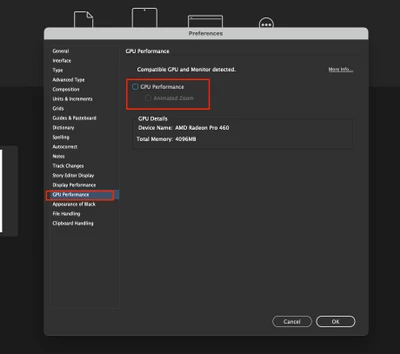
InDesign Preferences (cmd+k) > GPU Performance > uncheck GPU Performance and see if that helps.


If it doesn't, I will request you to share a few more details like:

  • OS & exact version of InDesign
  • Share a screenshot or a small video demonstrating the issue. It would be really helpful.
  • Does it happen while working on a specific document? If yes, could you please share the document with us? You can upload it to the Creative Cloud (https://helpx.adobe.com/in/creative-cloud/help/share.html) and share the download link.
  • Where are you saving the files & links (Network Drive/ System HDD/ Shared Folder on System/ External HDD)?
  • Are there any recent changes made to your system? For example, any antivirus, system updates, plugins, or web extensions installed recently.
  • Does resetting InDesign Preferences (https://helpx.adobe.com/indesign/kb/indesign-preferences-support-file-locations.html) help to resolve the issue?
    Disclaimer: Please note that resetting preferences will remove all the custom settings, and InDesign will launch with default settings. You can also take a backup of the folders in case you want to. Location is mentioned in the article.


We'll be looking forward to your response.


Thanks & Regards,

Anshul Saini

2 replies

Anshul_Saini
Community Manager
Anshul_SainiCommunity ManagerCorrect answer
Community Manager
November 15, 2021

Hi there,


Sorry to hear about your experience. As @Laubender suggested, if you are on macOS, try to disable GPU from
InDesign Preferences (cmd+k) > GPU Performance > uncheck GPU Performance and see if that helps.


If it doesn't, I will request you to share a few more details like:

  • OS & exact version of InDesign
  • Share a screenshot or a small video demonstrating the issue. It would be really helpful.
  • Does it happen while working on a specific document? If yes, could you please share the document with us? You can upload it to the Creative Cloud (https://helpx.adobe.com/in/creative-cloud/help/share.html) and share the download link.
  • Where are you saving the files & links (Network Drive/ System HDD/ Shared Folder on System/ External HDD)?
  • Are there any recent changes made to your system? For example, any antivirus, system updates, plugins, or web extensions installed recently.
  • Does resetting InDesign Preferences (https://helpx.adobe.com/indesign/kb/indesign-preferences-support-file-locations.html) help to resolve the issue?
    Disclaimer: Please note that resetting preferences will remove all the custom settings, and InDesign will launch with default settings. You can also take a backup of the folders in case you want to. Location is mentioned in the article.


We'll be looking forward to your response.


Thanks & Regards,

Anshul Saini

LeCharly46
Participant
January 14, 2022

Hi There,

Thanks for the initial feedback.
I did disabled my GPU and it worked well after that.

But now I have an other display issue.
When scrolling down a creative, I will get some weird display of it on screen (please see screenshot attached).
Any idea what it can be due to of how to solve it ?
Has anyone experienced this as well and fixed it ?

Thanks

Anshul_Saini
Community Manager
Community Manager
January 20, 2022

Glad to hear that turning off GPU helped you. Sorry about the other trouble you are facing, @LeCharly46. You may try changing the UI scaling to small from InDesign Preferences, then restart InDesign, and let us know how it goes. Also, could you please confirm the screen resolution of your Display?


Regards,

Anshul Saini

Community Expert
November 10, 2021

Hi LeCharly46,

does it help if you disable GPU support in the preferences of InDesign ( Mac OS only )?


Regards,
Uwe Laubender

( ACP )

LeCharly46
Participant
November 17, 2021

Hi Laubeder,


Thanks, it works !

Regards

Lecharly46