Answered
Bug affichage indesign
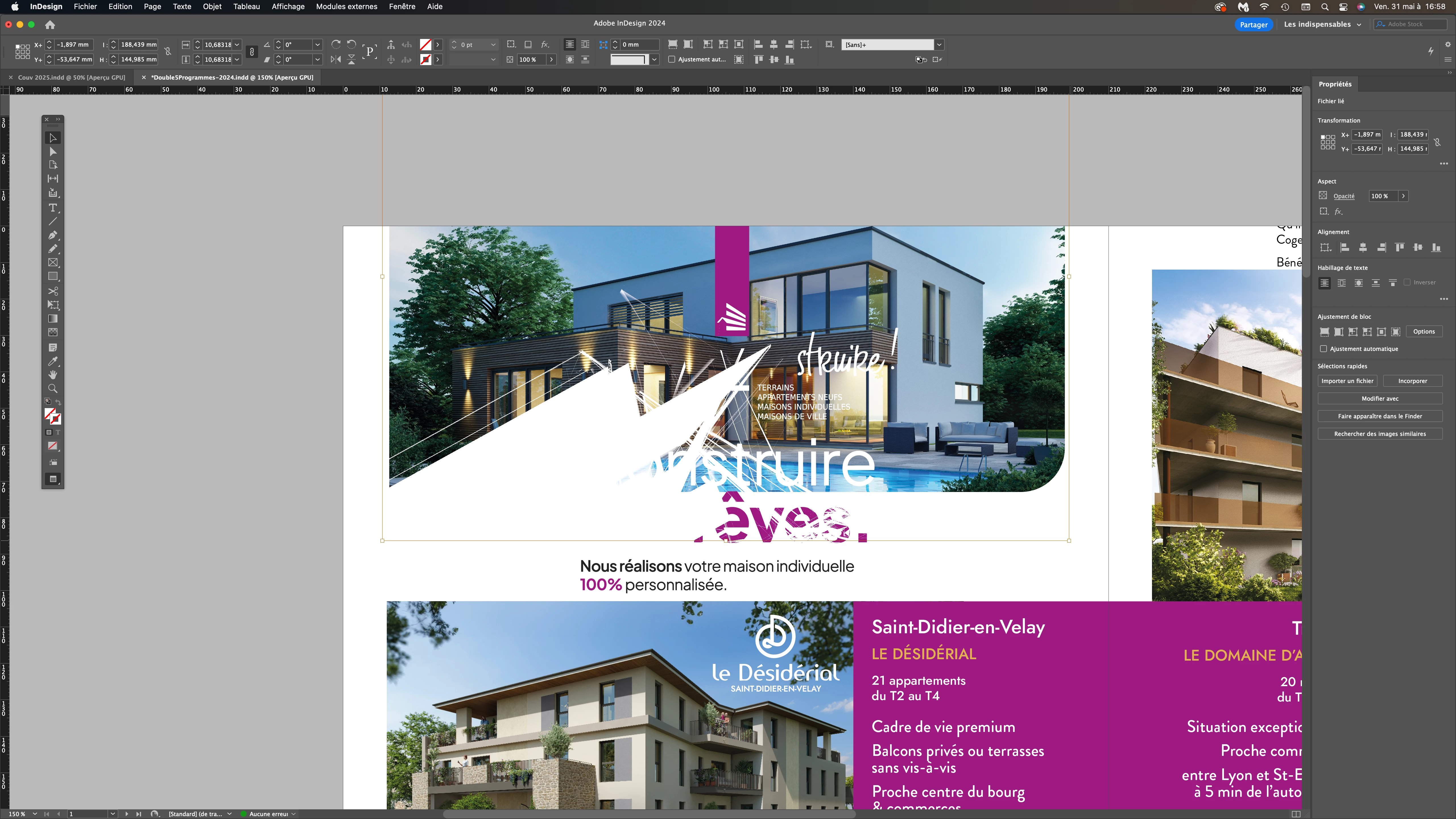
Bonjour à tous ! Bug affichage indesign : Mac Studio Sonoma 14.5 dernière version indesign.... Une idée ?

Bonjour à tous ! Bug affichage indesign : Mac Studio Sonoma 14.5 dernière version indesign.... Une idée ?
It looks like you're experiencing a display bug in InDesign on your Mac Studio running Sonoma 14.5. One solution you can try is to disable GPU Performance in the preferences as suggested by jmlevy. This should help resolve the display bug. However, keep in mind that while GPU performance provides better performance, it can be less accurate compared to CPU preview. Using CPU preview should prevent these glitches, but you might notice a decrease in performance.
Additionally, this issue can sometimes occur due to the combination of external monitors and cables used, such as HDMI. In some cases, using a DisplayPort via Type-C connection works better because Mac hardware and GPU handle video signal compatibility with DisplayPort Type-C connections more efficiently.
Please let us know if these suggestions help or if you need further assistance.
Best regards,
Anshul Saini
Already have an account? Login
No account yet? Create an account
Enter your E-mail address. We'll send you an e-mail with instructions to reset your password.


 AdChoices