Known Participant
September 29, 2021
Question

BUG: First line does not wrap around object when "Custom" Anchered

  • September 29, 2021
  • 6 replies
  • 908 views

Hi

I got another wierd bug:

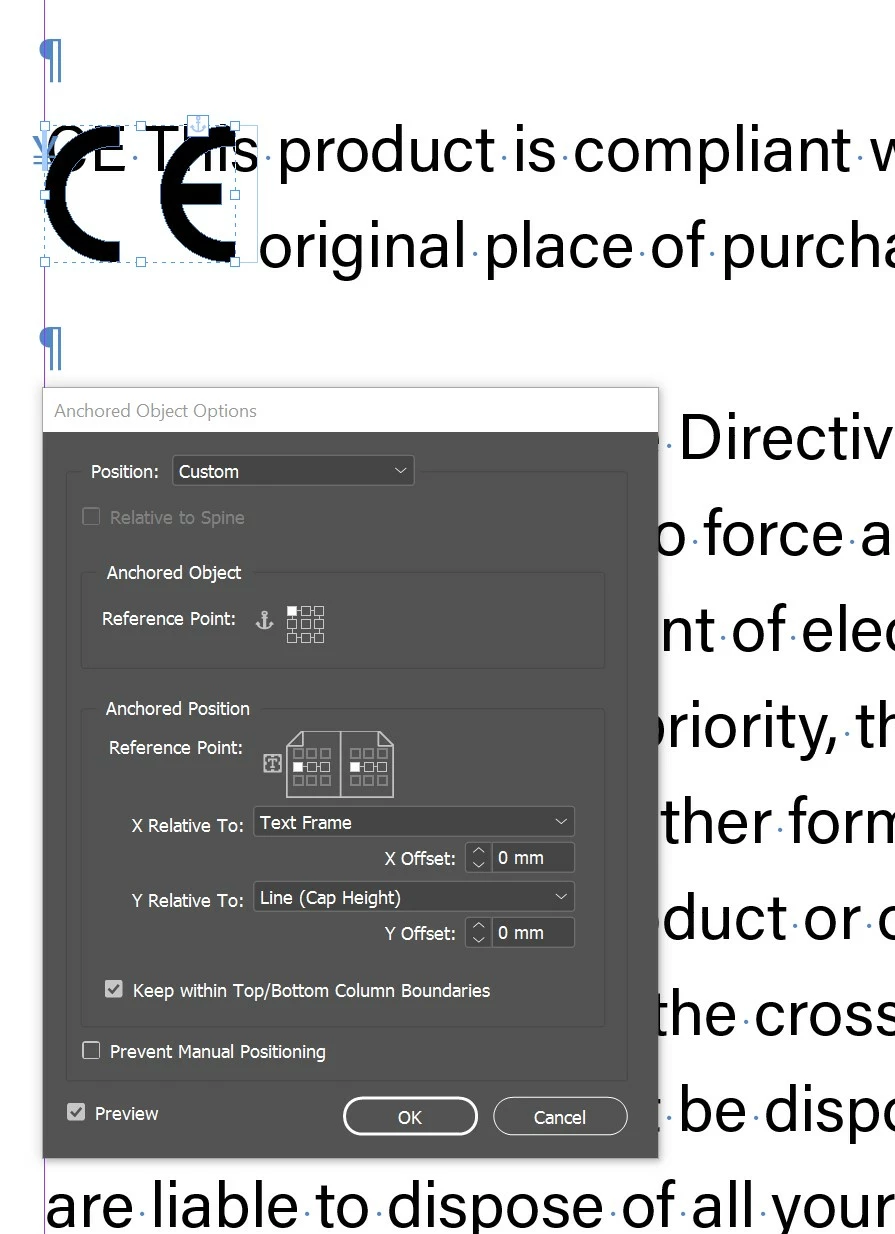
I want to ancher the CE object to the first line of text. For some reason, this line of text ignores the object wrapping.

It works fine though, if I choose "Inline or Above" anchoring.
 

6 replies

Ashutosh_Mishra
Inspiring
October 3, 2021

Hi Dimitri,


Sorry to hear about your experience. As mentioned in earlier responses, app is working as expected.
I have shared the feedback on this discussion with the product team and will update once I get a response from them about it. Please upvote on the UserVoice link shared. We appreciate your patience in the meantime.


Regards,

Ashutosh

Known Participant
September 29, 2021

My mind boggles how much working around rather than working forward a 2021 professional layout suite requires.

I guess it's still better than Word.

Community Expert
September 29, 2021

It's not really a workaround though is it - it's just changing your work habits to the way the programme works. 

If you want to you can make a feature request here

https://www.adobe.com/products/wishform.html


Known Participant
September 30, 2021

That's a very poetic way to describe a workaround.

Community Expert
September 29, 2021

This has always worked this way

You can put a feature request here

https://www.adobe.com/products/wishform.html


I find for images anchored to the front of a paragraph that adding a paragraph indent works best for me - the offset the anchored image.


Bevi Chagnon - PubCom.com
Legend
September 29, 2021

When creating EPUB and accessible PDFs, it's not always possible to anchor the graphic in the preceding paragraph.


This has been one of the top most requested bug fixes since the beginning of InDesign 20+ years ago.


VOTE to get it fixed at https://indesign.uservoice.com/forums/601021-adobe-indesign-feature-requests/suggestions/34501540-anchored-objects-need-be-able-to-apply-a-text-wrap


If you don't vote, there's no chance in he!! that Adobe will fix it. The Adobe gods work based on this stupid voting system at User Voice.


|    Bevi Chagnon   |  Designer, Trainer, & Technologist for Accessible Documents ||    PubCom |    Classes & Books for Accessible InDesign, PDFs & MS Office |
BobLevine
Community Expert
Community Expert
September 29, 2021
Just a note to anyone reading this. IT'S NOT A BUG!

If you report it as a bug, it will be written off as "as designed." It must be a feature request. But at this point it may not be so easy to "fix."

Let's say, Adobe does change the behavior in a future version of InDesign and you open an old file. What happens if someone anchored it in the prior paragraph?
Frans v.d. Geest
Community Expert
Community Expert
September 29, 2021

No bug, user error. Anchor it in the paragraph above the line. This is asked and answered 100 times over here 😉

Known Participant
September 29, 2021

How is this an user error? I want the object alinged with the caps of the first line and not above the line.

Also the text wrap option should wrap text, and not "ok i do wrap the text but not the first line if you use "custom" alignment, if you want that you'd have to find out a work around yoursef".

Derek Cross
Community Expert
Community Expert
September 29, 2021

Try ticking "Ignore Text Wrap" in Text Frame Options under the Object menu.

Frans v.d. Geest
Community Expert
Community Expert
September 29, 2021

Derek, that makes no sense at all. Not yet had your coffee today? 😉

Derek Cross
Community Expert
Community Expert
September 29, 2021

I missread – text wrap threw me Frans.