licral83685769
Inspiring
March 8, 2019
Answered

BUG ? Weird issue with master text frames

  • March 8, 2019
  • 1 reply
  • 564 views

Hello,

I'm having a really weird issue with some master pages.

Normally, any text frame inside a master page will be showing with dotted lines in thumbnails preview, right ? Well I thought so.

I have a master page with one text frame (Master page F), that is based on master page A, which doesn't have any text frame, only footnotes.

When applying Master page F to any page, it gives me editable text frames, which should not be happening, since it is a text frame related to master frame ! And to confirm : those text frames appear with continued blue edges in thumbnail previews.

However, when I use a normal master page, composed of one text frame (master page B), not linked to any other master page, it gives dotter blue edges when applied to a page, which is normal.

See this screenshot :
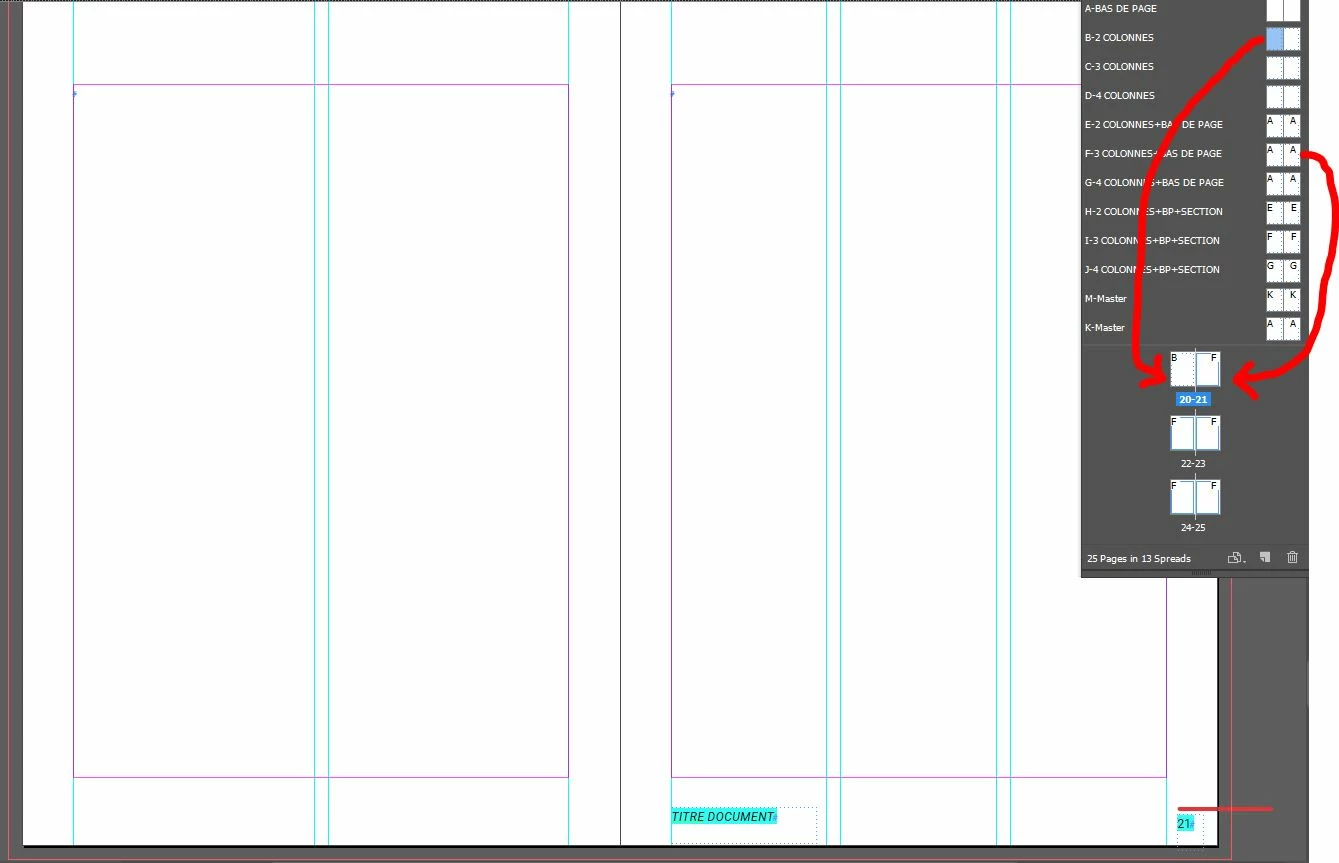
What is going on ? Am I missing something ? This seems like a weird behavior to me

Thank you

This topic has been closed for replies.
Correct answer Laubender

Hi licral83685769 ,

I guess you are using a document that was created with Primary Text Frame enabled.

And you duplicated Master A with the Primary Text Frame feature to create Master F.

So, nothing unusual happened, I think.

https://indesignsecrets.com/indesign-basics-primary-text-frames.php

Can someone help demystify how primary text frames actually work?

Regards,
Uwe

1 reply

Barb Binder
Community Expert
Community Expert
March 8, 2019

Hi Licral:

You have master page overrides on pages 21-25. Just reapply master page F to those pages.

~Barb

~Barb at Rocky Mountain Training
licral83685769
Inspiring
March 8, 2019

This does nothing sadly. After applying master page F on those pages, I still get editable text frames...

Even tried removing any master page on this pages, and applying back master page F, still get those editable text frames.

Restarted indesign, no fix.

LaubenderCommunity ExpertCorrect answer
Community Expert
March 8, 2019

Hi licral83685769 ,

I guess you are using a document that was created with Primary Text Frame enabled.

And you duplicated Master A with the Primary Text Frame feature to create Master F.

So, nothing unusual happened, I think.

https://indesignsecrets.com/indesign-basics-primary-text-frames.php

Can someone help demystify how primary text frames actually work?

Regards,
Uwe