

Mark.y.Mark
Known Participant
January 14, 2025
Question

bullet list creates extra tab after moving pages across documents

  • January 14, 2025
  • 2 replies
  • 317 views

Hello


After making a standard document with warning text and some images and a paragraph style with bullet list, I moved all the pages to another document. But the bullet list jumps with what looks like one tab. 


See images below;
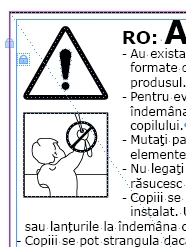
 

original image
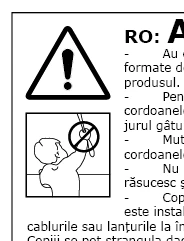
 

Copied to document


What am I doing wrong?


2 replies

Peter Spier
Community Expert
Community Expert
January 14, 2025

This kind of problem frequently arises when defining styles based on [Basic Paragraph]. Since that's a (really bad) default style that is automatically created with each new file may users redefine it to suit a aprticualr docement instead of ignoring it and creating ne styles based on [No Style].

The problem arises when moving content into a new doc wtih a differnt defintion of [Basic Paragraph] since that document's definition is now the base for your style rather than the edited version from the original doc.

Mark.y.Mark
Known Participant
January 14, 2025

Hi  @Peter Spier ,


That makes sense, even though it's a bad way of programming. Do you know the quickest workaround? 


Thanks in advance!

Mark.y.Mark
Known Participant
January 14, 2025

Extra info; the images have a text wrap of 5mm. If I am turning that down to 0 the 'tab' indent dissapears.. So it looks like the bulletlist doesn't work nicely with the text wrap..?