
Participant
January 28, 2020
Answered

Bullet Point Adjustments

  • January 28, 2020
  • 4 replies
  • 9376 views

I'm editing a file that I've run into an issue with. There's a bullet list by the bullet is slightly higher then I'd like it to be as it is not centered with the text. I tried googling different solutions but I think I may be asking the wrong questions.


I've attached a screen grab and I'd like to just move the bullets down a couple of points so it's centered. Can someone shed some light on this? Thanks so much.
This topic has been closed for replies.
Correct answer John Mensinger

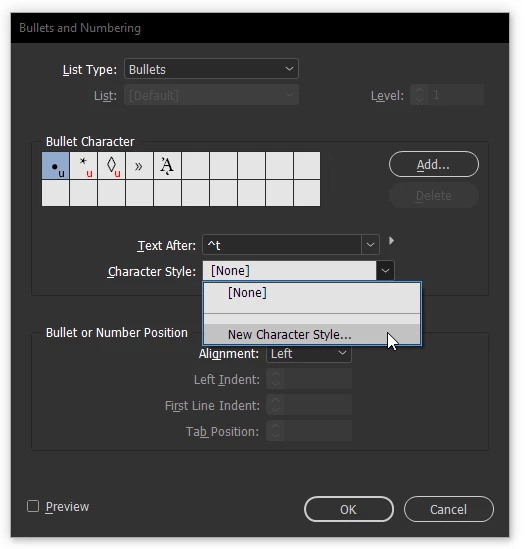
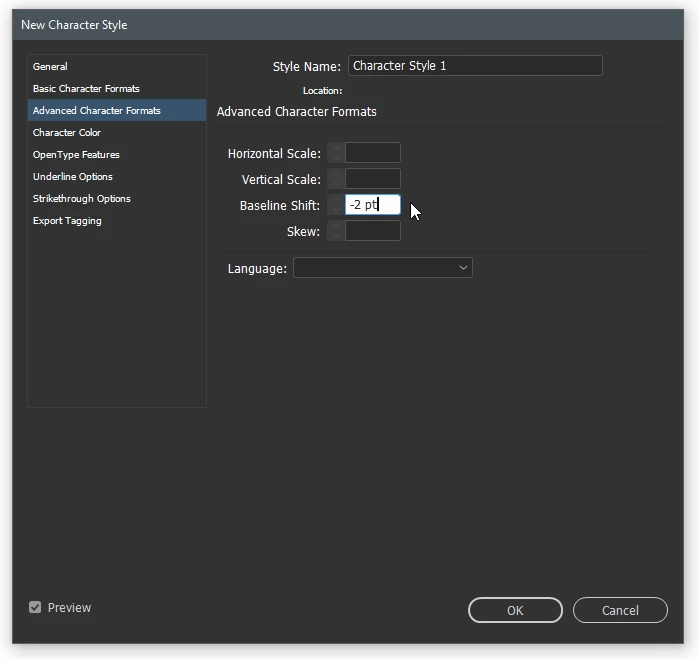
In the Bullets & Numbering dialog, make a new Character Style with a negative Baseline Shift.


4 replies

Community Expert
January 28, 2020

Hi Emmanuel,

my guess is you did a larger point size for the bullet point. You picked up font and font size for the bullet.

And the larger font size is shifting up the bullet point.


You could do it differently:
Instead of using a bigger point size use a percentage value like 150% in the character style for the bullet.


From my German InDesign:


Definition of the character style named "150%":


Regards,
Uwe Laubender

( ACP )


Barb Binder
Community Expert
Community Expert
January 28, 2020

The video will repeat until you close the page.


Try tapping Ctrl++ on Windows (Cmd++ on a Mac) to enlarge the browser magnification so that you can better see it. Tap Ctrl+0 (Cmd+0 on a Mac) to restore the original magnification.


~Barb

~Barb at Rocky Mountain Training
Barb Binder
Community Expert
Community Expert
January 28, 2020

Hi Emmanuel:


John is correct in his first answer, and I agree with his suspicion that you did something different in his second reponse.


Here is a visual for you:


When you create (and assign) the character style through Bullets and Numbering, it will only impact the bullet. And unless you change the type size in Basic Character Formats, the size will not change. Note that once you have created the style, you can edit the character style to fine tune the bullet position.


~Barb


~Barb at Rocky Mountain Training
Participant
January 28, 2020

Having a hard time followng the video clip... no rewind. any way to have that be larger to view?

John Mensinger
Community Expert
John MensingerCommunity ExpertCorrect answer
Community Expert
January 28, 2020

In the Bullets & Numbering dialog, make a new Character Style with a negative Baseline Shift.


Participant
January 28, 2020

Yeah I got that to work but it adjust the entire line, not the bullet point only.  I'd like to just adjust the bullet point without moving the text line. Is that doable?

Participant
January 28, 2020

Oh and now the bullet point is smaller. When I adjust the size the text as well as the bullet point increases.