brendand8449955
Participant
July 5, 2017
Answered

Bullet point effecting the text that follows.

  • July 5, 2017
  • 4 replies
  • 680 views


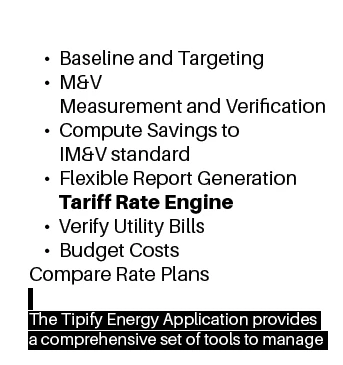
So here is a screenshot of what I am dealing with. Basically when I ad text under the bullet by click shift enter, it indents the text. So I highlight it and turn off the bullet. The issue is that it then effects the last Bullet "Compare Rate Plans."  Why does this occur? How do I fix this issue?

Correct answer BobLevine

Why are you using soft returns? Use a real return in combination with multiple paragraph styles.

What you're seeing is exactly what I'd expect to see given your workflow.

4 replies

Participant
August 1, 2023

Yes, I realize this is an old post however something needs to be pointed out here. When someone comes on here looking for advice, they do not need to be admonished for lacking a skill set they've never been taught. Things like "you should have," "You need basic training then," and "Why didn't you," absolutely do not help. I am shocked by the responses in some of these threads. Everyone is at different levels of learning and speaking to them in such a way inhibits curiosity or the want to learn further. Look at OP's last response, "I'm embarrassed." People should not feel ashamed on here. Learn to be helpful without shaming people.

brendand8449955
Participant
July 5, 2017

I wasn't sure how to start the next line without a bullet other than that way.

Barb Binder
Community Expert
Community Expert
July 5, 2017

Hopefully you are using paragraph styles, and if not, put learning them on your list of important features in InDesign.

Assuming you are not yet using styles, just put your text cursor in a paragraph, switch to the Paragraph view of the Control Panel and click on the Bullets button. It's a toggle to turn bullets off or on the selected paragraph. (Bonus tip: if you hold the Alt/Opt key as you click, you can edit how the bullets look.)

~Barb at Rocky Mountain Training
Frans v.d. Geest
Community Expert
Community Expert
July 5, 2017

Shift-Return? Why??

BobLevine
Community Expert
BobLevineCommunity ExpertCorrect answer
Community Expert
July 5, 2017

Why are you using soft returns? Use a real return in combination with multiple paragraph styles.

What you're seeing is exactly what I'd expect to see given your workflow.