

BEGINNER_X
Legend
April 25, 2015
Answered

Bullet point Size

  • April 25, 2015
  • 1 reply
  • 1426 views

Hi All,

Request:

1. Select two characters (any character and bullet)

2.Bullet size want to be 55% height of first character

3. Still now, I write code for to find the 55% height of character

4. Need help, how to apply to change the bullet size as per calculation.
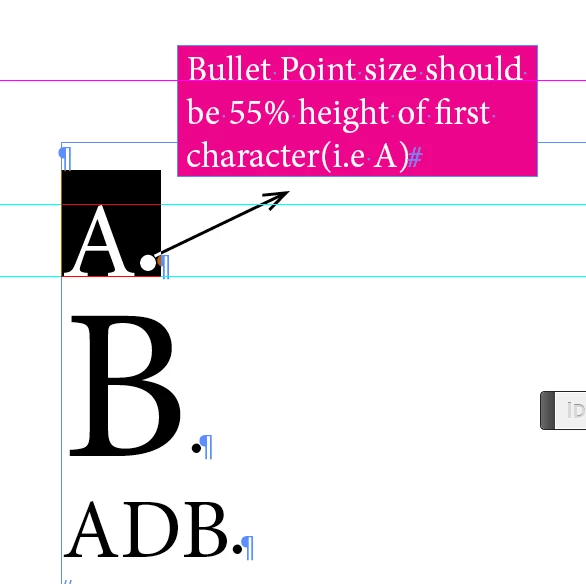
Trying Code:

var mySel = app.selection[0];

var mySel1 = app.selection[0].characters[0];

var mySel1_CreOutlines = mySel1.createOutlines();

var myGB = mySel1_CreOutlines[0].geometricBounds;

app.activeDocument.undo();

var myGB_Height = myGB[2]- myGB[0]

alert("myGB_Height:" + myGB_Height)

var _55_Height = (myGB_Height*55)/100;

alert(_55_Height)

Any help or any other different way much be appreciated.

Regards

Siraj

This topic has been closed for replies.
Correct answer Marc Autret

Hi Siraj,

Well, in pure math terms, the whole stuff is at line #30 of my code. Let's try to clarify. The most important point, I think, is to understand that it's easier to deal with a ratio than an absolute height—because your condition is expressed in terms of a ratio (55%).

1. We compute both the visible height of the first character—say H0—and the visible height of the bullet—say HB—using the outline trick. Note: H0 is equivalent to myGB_Height in your syntax.


2. Now, let k be the factor by which we'll have to change (i.e. rescale) the bullet height, HB, in order to meet the condition. Your goal can be expressed as follows,

   k × HB = ( 55 / 100 ) × H0.

3. Which leads to k = 0.55 × ( H0 / HB ). This is exactly the purpose of line #30 above.

4. Finally you change the scale of the bullet by k, working either on its verticalScale and horizontalScale properties, or on its pointSize. (I think scaling is more relevant here.)

So the transformation scheme is simply: bulletSize → bulletSize × k.

Hope that helps.

@+

Marc

1 reply

Marc Autret
Legend
April 25, 2015

Hi Siraj,

Do you mean that the bullet size must be adjusted so that its visible height is .55 times the visible height of the 1st character?

That's big! Anyway you could try this:

// The required ratio

// ---

const REQ_RATIO = .55;

// Boring constants

// ---

const CS_IN = +CoordinateSpaces.innerCoordinates,

      IN_BOX = [+BoundingBoxLimits.geometricPathBounds,CS_IN],

      TOP_LOC = [[0,0]].concat(IN_BOX),

      BOT_LOC = [[0,1]].concat(IN_BOX);

// Assuming two characters are selected

// ---

var sel = app.selection[0],

    a = sel.characters.everyItem().createOutlines(false),

    h = [], t, k;

// Compute the heights => h[0],h[1]

// ---

while( t=a.pop() )

    {

    t = t[0];

    h.unshift(t.resolve(BOT_LOC,CS_IN)[0][1]-t.resolve(TOP_LOC,CS_IN)[0][1]);

    t.remove();

    }

// Apply the needed factor to the character scale

// (or you could use pointSize, alternately)

// ---

k = REQ_RATIO*(h[0]/h[1]);

sel.characters[1].verticalScale *= k;

sel.characters[1].horizontalScale *= k;

@+

Marc

BEGINNER_X
Legend
April 25, 2015

Hi Marc,

Excellent, Fantastic Stuff you have..

Output is exactly what I want...

But your code is very hard for me.

Because, I need to apply this logic in different areas.

I need this calculation, what I mentioned in the first thread.

var _55_Height = (myGB_Height*55)/100

alert(_55_Height)

through script, again I select the Bullet Size, any ideas... Plz help.

Marc Autret
Marc AutretCorrect answer
Legend
April 25, 2015

Hi Siraj,

Well, in pure math terms, the whole stuff is at line #30 of my code. Let's try to clarify. The most important point, I think, is to understand that it's easier to deal with a ratio than an absolute height—because your condition is expressed in terms of a ratio (55%).

1. We compute both the visible height of the first character—say H0—and the visible height of the bullet—say HB—using the outline trick. Note: H0 is equivalent to myGB_Height in your syntax.


2. Now, let k be the factor by which we'll have to change (i.e. rescale) the bullet height, HB, in order to meet the condition. Your goal can be expressed as follows,

   k × HB = ( 55 / 100 ) × H0.

3. Which leads to k = 0.55 × ( H0 / HB ). This is exactly the purpose of line #30 above.

4. Finally you change the scale of the bullet by k, working either on its verticalScale and horizontalScale properties, or on its pointSize. (I think scaling is more relevant here.)

So the transformation scheme is simply: bulletSize → bulletSize × k.

Hope that helps.

@+

Marc