Inspiring
February 13, 2024
Answered

Bulleted lines: Gap between bullets and left margin

  • February 13, 2024
  • 1 reply
  • 1377 views

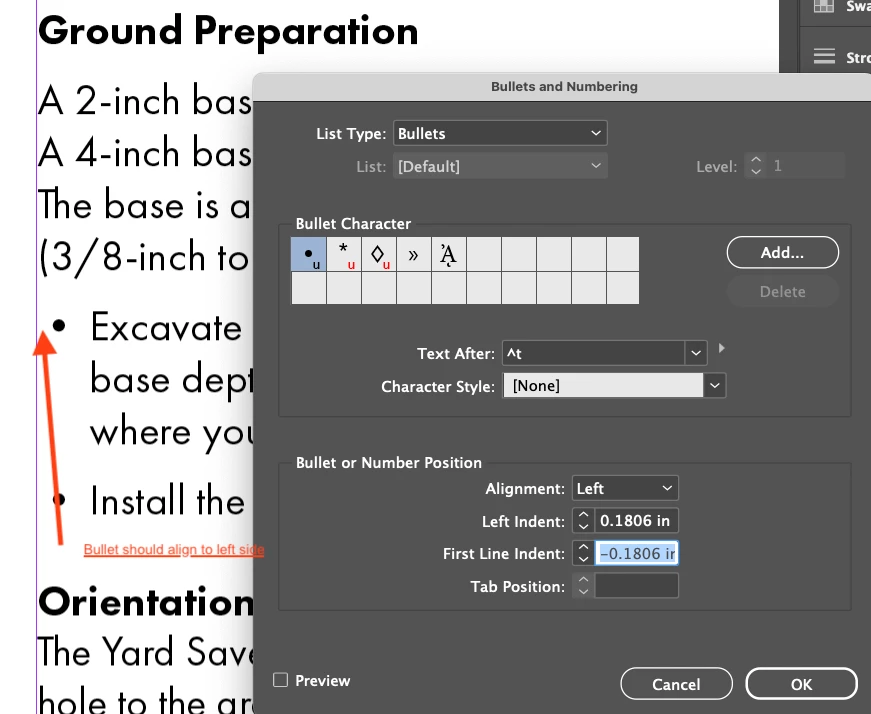
See attached, where the red arrow is pointing at a gap. I simply cannot get these bullets to align with the left side of the text box. Using Adobe Futura PT from the online collection, in Adobe InDesign 2023 on Mac OS. No paragraph style in use as this is a simple one-page document. 


Only some fonts seem to do this, but the end customer wants me to "fix this" and I can't change fonts.  Thanks.
 

This topic has been closed for replies.
Correct answer James Gifford—NitroPress

Futura PT is actually from the Adobe online font library... so I would hope it isn't corrupt for faulty. Poor design, perhaps...

The weight/face chosen does not change the alignment.


It looks as if Futura, as a set, has this odd spacing. I wonder why no one's ever noticed/noted it. On the third hand, though, it's not too common to have bullets right on the left margin, so perhaps no one ever set up the specific combination that reveals it.


Or, getting that small indent, accepted it without thinking as an esthetic grace note.

1 reply

James Gifford—NitroPress
Legend
February 13, 2024

The spacing should be a left indent to the starting point of your text and a negative first line of the same value, as you have.


I can't for the life of me think of anything else that would cause that extra indent, UNLESS you have an inner margin defined on that text box and/or a nonzero margin set on the other text.


Does selecting another bullet (perhaps with a correcting character style applied) change things?

quozAuthor
Inspiring
February 13, 2024

Thanks, James Gifford. It's actually all one text box... If I understand what you mean by "selecting another bullet"... if I choose an Asterisk it does align to the left. So it must be a characteristic of the bullet itself?


James Gifford—NitroPress
Legend
February 13, 2024

Select another bullet character, from that list or from any other font. You can apply a character style to it to "correct" its size, positioning, etc. That bullet glyph may be faulty or bugged somehow.


"All one text box" would be irrelevant if the other text is shifted around. I am assuming the text box has zero inner margins, and the text styles above have no left spacing defined.