
Participant
March 9, 2022
Answered

bulletsCharacterStyle usage in findTextPreferences

  • March 9, 2022
  • 1 reply
  • 285 views

Hi Guys,
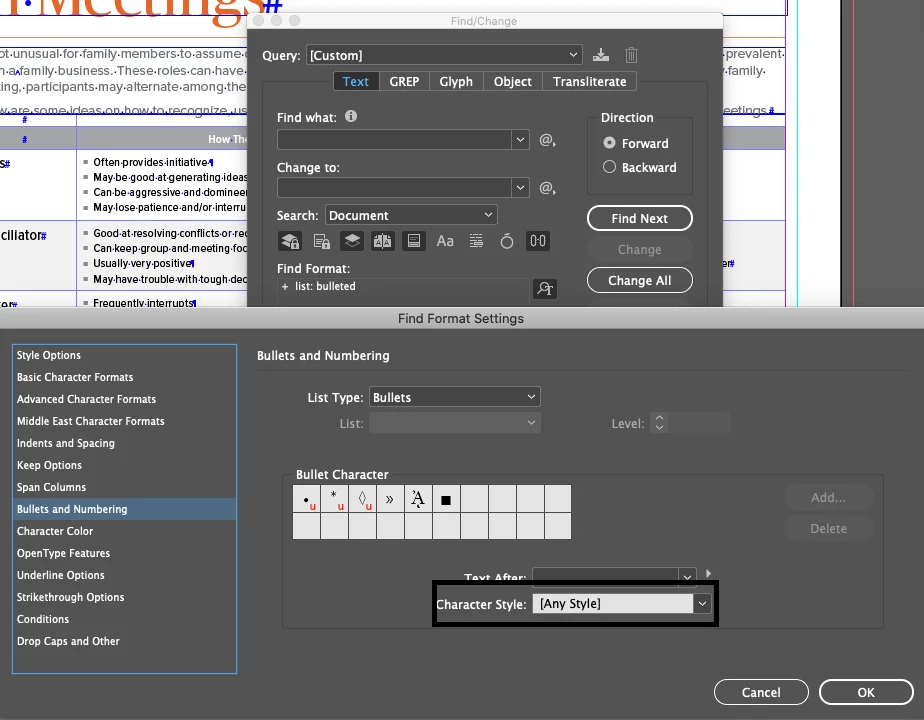
Output Needed:  Have to remove unused character styles from the indesign, in that i have faced a new issue, that the character styles is belongs to bullet and numbering section where i cant able to find over script. then i found a key word to acces the character style used in bullets and numbering "bulletsCharacterStyle". but my code is not working properly. could anyone help on this asap.

function unused_Cstyles_removal_subfunction (myChStyle)
{
setchangeTextPreferences ();
fintext = myChStyle.name;
app.findTextPreferences.bulletsAndNumberingListType = ListType.BULLET_LIST;
app.findTextPreferences.bulletsCharacterStyle = fintext;
myFoundStyles = myDocument.findText();
if (myFoundStyles != 0) {
myChStyle.remove();
}
resetchangeTextPreferences();
}


This topic has been closed for replies.
Correct answer Joel Cherney

I confess, I have no real idea how to make your code work. I learned a very different way to achieve these ends from Jongware:


app.menus.item(“Character Style Panel Menu”).menuItems.item(“Select All Unused”).associatedMenuAction.invoke();

app.menus.item(“Character Style Panel Menu”).menuItems.item(“Delete Styles...”).associatedMenuAction.invoke();


Don't know if it will still work all these years later, but it will respect all charstyles used only in bullet definitions as used. That's what you're trying to do, right? You're using myDocument.findText() to see if a character style is applied to anything in the document (so you can delete it if unused), but that findText won't find a charstyle used only in a paragraph style, correct? So that's why you're looking specifically for charstyles used in this way? 


If I have all that right, then I think you can safely rely on "Select All Unused." If I'm wrong, can you tell me where?


1 reply

Joel Cherney
Community Expert
Joel CherneyCommunity ExpertCorrect answer
Community Expert
March 10, 2022

I confess, I have no real idea how to make your code work. I learned a very different way to achieve these ends from Jongware:


app.menus.item(“Character Style Panel Menu”).menuItems.item(“Select All Unused”).associatedMenuAction.invoke();

app.menus.item(“Character Style Panel Menu”).menuItems.item(“Delete Styles...”).associatedMenuAction.invoke();


Don't know if it will still work all these years later, but it will respect all charstyles used only in bullet definitions as used. That's what you're trying to do, right? You're using myDocument.findText() to see if a character style is applied to anything in the document (so you can delete it if unused), but that findText won't find a charstyle used only in a paragraph style, correct? So that's why you're looking specifically for charstyles used in this way? 


If I have all that right, then I think you can safely rely on "Select All Unused." If I'm wrong, can you tell me where?


Participant
March 10, 2022

Thanks Joel Cherney..
Yes this is the safest way to process on unused styles using invoke options..

I found some other way that reading all the bullet nested styles from all paragraphs and cross check that styles before removing the character styles. its work on.. but its also have some bugs that..incase the bullet nested style created out of paragraph styles(by the manual way) we could not able to catchup..

So i'm also concluded with the invoke option..

And I just wanna share my tested code for the above mentioned way!

//Reading all bullet nested charcter styles from paragraph styles

var allparagraphstyles = myDocument.paragraphStyles;
var charstylestore = [];
for (z = 0; z < allparagraphstyles.length; z++)
{
var bulletsCharacterStyle_ = myDocument.paragraphStyles.itemByName(allparagraphstyles[z].name).bulletsCharacterStyle.name;
if (bulletsCharacterStyle_ != null && bulletsCharacterStyle_ != "[None]")
{
charstylestore.push(bulletsCharacterStyle_);
}
}


//looping charcter style and match with the already stored nested bullet styles

app.findTextPreferences.appliedCharacterStyle = myChStyle;
myFoundStyles = myDocument.findText();
if (myFoundStyles == 0) {
for (check = 0; check < charstylestore.length; check++)
{
if (myChStyle.name == charstylestore[check])
{
Cstyleremove = 1;
break;
}
else
{
Cstyleremove = 0;
}
}
if (Cstyleremove == 0)
{
myChStyle.remove();
}
}
 

Thanks for your help!