
Inspiring
October 28, 2025
Answered

Button Hit Area Expands After Opening Older Files in InDesign 2026 (v21.0)

  • October 28, 2025
  • 3 replies
  • 397 views

I have an issue in exporting PDF. from Indesign

I created a button with buttons and forms, but the area of the button is taller than button, how fix it?
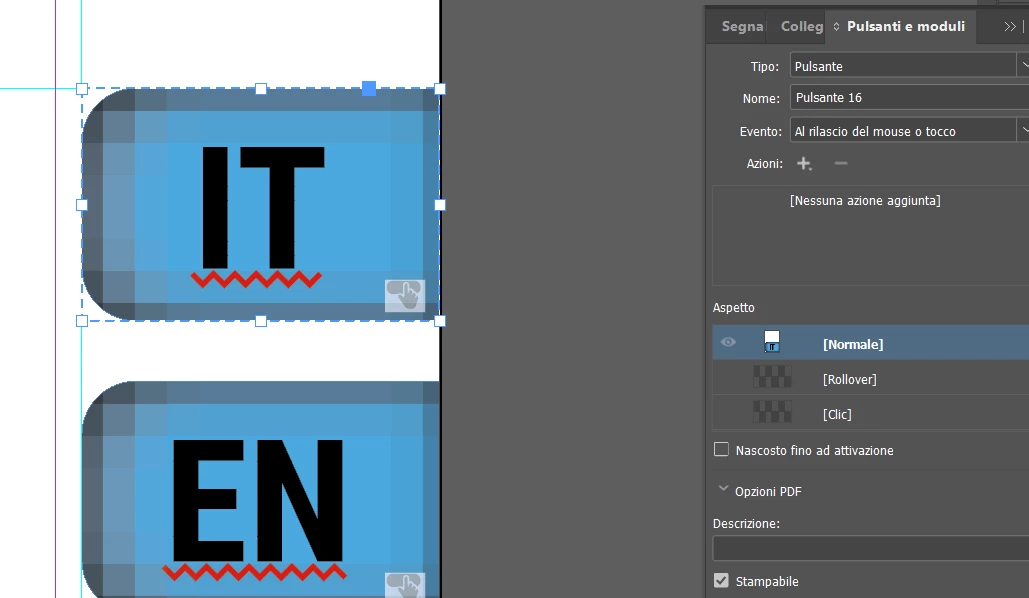


<Title renamed by MOD>

Correct answer BobLevine

The problem seems to come from the file conversion, required by InDesign, when changing version 20.5 > 21.

I just wanted to know if and how it is possible to modify this area.


Try exporting to IDML. Seems to clear it up.

3 replies

Abhishek Rao
Community Manager
Community Manager
November 5, 2025

Hi @Samuel22307458169h,


Thanks for confirming and for sharing all the details. I've logged a bug for this issue, and the product team is actively working on a fix. I'll keep this thread updated once the issue has been resolved.


Appreciate your patience and for helping us identify this.

Abhishek

Abhishek Rao
Community Manager
Community Manager
October 28, 2025

Hi @Samuel22307458169h,


I tested the workflow on my end, and the button exported correctly with the clickable area matching the visible shape. To better understand what might be happening on your side, could you please share a short screen recording showing the complete workflow from creating the button to exporting the PDF? Also, please confirm the version of InDesign and the operating system you're using, so I can check this further.


Looking forward to your update.

Abhishek

Inspiring
October 28, 2025

The problem is that the white space you see on the button in the buttons and forms window makes it impossible for me to click the button in the PDF, and we've been using buttons in PDFs for a long time without any complaints.

The buttons aren't created every time; they're inside files used to build a manual. The buttons were created a long time ago, and up until version 20.5, we had no problems. Now, with version 21, it's created this problem.

Win 11 Indesign 21.0

BobLevine
Community Expert
Community Expert
October 28, 2025

I'm not seeing that behavior here. Try recreating the button.

BobLevine
Community Expert
Community Expert
October 28, 2025

I have no idea what you're referring to from that screenshot but I will tell you that buttons in PDFs are nothing short of a crapshoot. They won't work in many PDF readers.