
Participating Frequently
February 22, 2023
Answered

Buttons and Forms confusion
  • February 22, 2023
  • 4 replies
  • 854 views


I am working on making a multi-page form interactive.
CS InDesign 2023  v18.1
I have spent hours trying to figure this out by trial-and-error. Deadline is looming so I am reaching out for help.
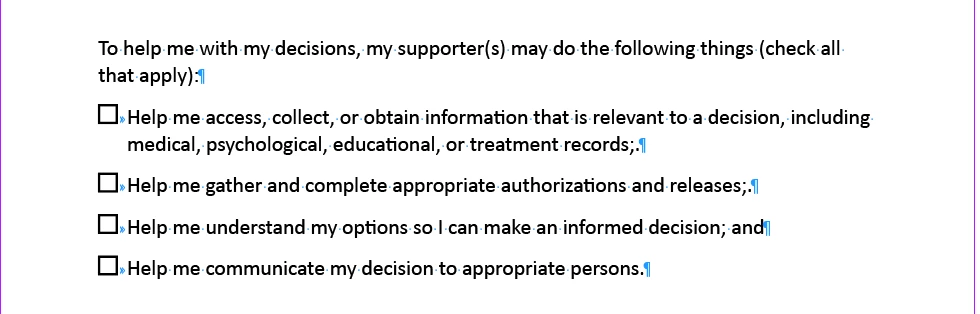
I have set up these as checkboxes, with different names. I need them to be checkable--but also uncheckable as we want people to be able to correct something they might have checked in error.

Also, there are 4 boxes here. Need to set it up so that people can choose only 1, 2, 3 or all four of the statements.
I appreciate any guidance from the community.
Eva

This topic has been closed for replies.
Correct answer Barb Binder

It's me. I hadn't had my coffee yet. It gave you the rule for radio buttons where you can... wait for it... only pick one. 🙄


Let's try this again, for checkboxes, the rule is unique names, same value. For example. The names could be "information", "authorization", "options" and "communication" with all the values set to "yes". 


Sorry!! On the bright side, you now know how to set up radio buttons. 


~Barb


4 replies

Barb Binder
Community Expert
Community Expert
February 22, 2023

Thank you for being so gracious!


~Barb

~Barb at Rocky Mountain Training
Barb Binder
Community Expert
Barb BinderCommunity ExpertCorrect answer
Community Expert
February 22, 2023

It's me. I hadn't had my coffee yet. It gave you the rule for radio buttons where you can... wait for it... only pick one. 🙄


Let's try this again, for checkboxes, the rule is unique names, same value. For example. The names could be "information", "authorization", "options" and "communication" with all the values set to "yes". 


Sorry!! On the bright side, you now know how to set up radio buttons. 


~Barb


~Barb at Rocky Mountain Training
Ruu2Author
Participating Frequently
February 22, 2023
Thank you!! Coffee did the trick! 😄
It's all working perfectly now.
Thank you for the radio button tutorial--I had trial-and-errored my way through that challenge—but your instruction confirmed that I landed on the right process there!

Appreciation overload.
~Eva
Barb Binder
Community Expert
Community Expert
February 22, 2023

The trick to checkboxes working the way you want is to give all the same name, but they are assigned unique values. For example, your list asks the question about how to help. The buttons could all be named "help" and the values could be "information", "authorization", "options" and "communication".


~Barb

~Barb at Rocky Mountain Training
Ruu2Author
Participating Frequently
February 22, 2023

Thank you for your quick reply!
I have made your suggested edits. I am able to check and uncheck now but the lingering problem is only one box can be checked at a time. Would you know how to adjust the settings so that I can have only 1-or 2-or 3 or all to be checked?

John T Smith
Community Expert
Community Expert
February 22, 2023

You need to ask program questions in the forum for the program you are using
To ask in the forum for your program please start at https://community.adobe.com/
Moving from Using the Community (which is about the forums) to the correct forum