
Participant
June 11, 2018
Answered

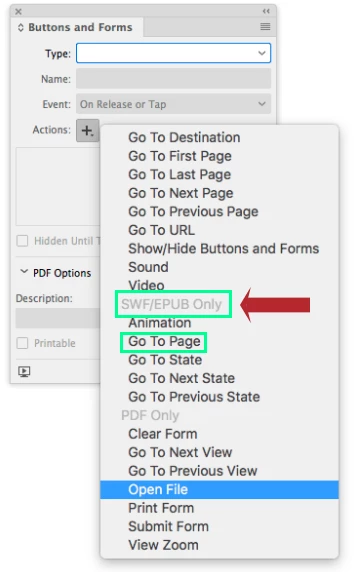
Buttons/go to page not supported when saving as pdf

  • June 11, 2018
  • 4 replies
  • 7661 views

I'm saving a pdf with hyperlinks and buttons on images from a contents page in order to take you to the feature.

When I save the pdf as interactive it says the buttons will not work. Please help!
    Correct answer vinny38

    Did you use "Go to page" action?

    Also, you can read this thread:Hyperlinks not working on export

    It will give you two different approaches of the "issue", Derek's one being the most straightforward.

    4 replies

    fionag30318404
    Participant
    March 17, 2025

    Hi, I am similarly vexed -  why even have a 'Go to Page' option if it doesn't work?

    Participant
    September 6, 2021

    https://www.youtube.com/watch?v=Ygy0-2OrrGY

    Found out that bookmarks work. So book mark the pages in your document, and use "Go to destination" to go around the problem which InDesign does not allow you to use "Go to page" in PDFs. Hope this helps.

    Derek Cross
    Community Expert
    Community Expert
    June 11, 2018

    Stick to hyperlinks.

    vinny38
    vinny38Correct answer
    Legend
    June 11, 2018

    Did you use "Go to page" action?

    Also, you can read this thread:Hyperlinks not working on export

    It will give you two different approaches of the "issue", Derek's one being the most straightforward.